
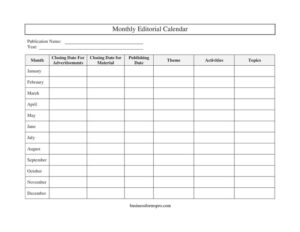
Monthly Editorial Calendar
Plan content deadlines, themes, and topics with our free Monthly Editorial Calendar template — organized, clear, and ready for free download in PDF or DOCX.
PDF
DOCX
0
likes
Download Files
- DOCX
A Monthly Editorial Calendar is a planning document that maps out your publication’s content, themes, topics, and key deadlines across each month of the year. People most often use it to keep articles, advertisements, and production materials on schedule so nothing slips through the cracks. It’s free to download here in both PDF and DOCX formats, with no signup required.
What Is a Monthly Editorial Calendar?
A Monthly Editorial Calendar is a structured log used by editors, publishers, marketing teams, and content managers to plan what gets published and when. It documents the publication name, the year and month being planned, the central theme, the topics to be covered, scheduled activities, and the critical deadlines for both editorial material and advertisements. Rather than tracking these details in scattered emails or memory, the calendar consolidates them into one organized reference. It serves as both a forward-looking roadmap and a historical record of what was published, making it easy to coordinate writers, designers, advertisers, and printers around a shared, predictable timeline.
When Do You Need a Monthly Editorial Calendar?
This form is useful any time content production must align with firm dates. Common scenarios include:
- Planning a magazine, newsletter, or trade journal where each month follows a different editorial theme.
- Coordinating advertising sales, since advertisers need to know the closing date for ads well before the publishing date.
- Managing a blog or digital content team that publishes on a recurring monthly schedule.
- Organizing a company newsletter so departments know when to submit materials and topics.
- Scheduling seasonal or holiday-themed content months in advance to give writers and designers lead time.
- Tracking a full year of issues at a glance, with one row or block dedicated to each month from January through December.
What a Monthly Editorial Calendar Should Have
A complete editorial calendar gives every stakeholder the information they need without follow-up questions. At minimum it should identify the publication and the period covered, then break down each month into its theme, planned topics, and supporting activities. Crucially, it must spell out two separate deadlines: the closing date for editorial material and the closing date for advertisements, each of which falls before the publishing date. Listing all twelve months — January, February, March, April, May, June, July, August, September, October, November, and December — in a single calendar lets you plan the entire year and spot scheduling conflicts early.
How to Fill Out a Monthly Editorial Calendar
- Enter the Publication Name at the top so the calendar is clearly tied to a specific newsletter, magazine, or content channel.
- Fill in the Year the calendar covers, and identify the Month you are currently planning.
- For each month — January through December — assign a Theme that unifies the issue, such as a season, product launch, or campaign.
- List the Topics you plan to cover under that theme, including article ideas and feature subjects.
- Record the planned Activities, such as photo shoots, interviews, or design tasks tied to the issue.
- Set the Closing Date for Material — the deadline by which writers and editors must submit final content.
- Set the Closing Date for Advertisements — the cutoff for advertisers to provide their ad files.
- Enter the Publishing Date, the day the issue goes live or to print, ensuring it falls after both closing dates.
Setting Realistic Deadlines
The single most valuable part of this calendar is the relationship between your three dates. Always work backward from the Publishing Date. Production, proofing, and layout need time, so the Closing Date for Material should leave enough of a buffer for editing and design. The Closing Date for Advertisements often comes even earlier, because ad placement affects page layout. A common practice is to set the ad closing date a week or two ahead of the material closing date, then the material deadline one to two weeks before publishing. Document these intervals consistently across all twelve months so your team learns to anticipate them.
Building a Cohesive Annual Theme Strategy
Filling in a Theme for every month transforms a simple deadline tracker into a strategic plan. Map themes to your audience’s calendar: tax tips in spring, back-to-school content in late summer, year-in-review pieces in December. Once themes are set, brainstorming Topics becomes far easier, and your Activities — like booking a guest contributor or arranging a product photo session — can be scheduled with adequate lead time. Reviewing all twelve months side by side also helps you avoid repeating subjects too closely and ensures balanced coverage across the year.
Common Mistakes to Avoid
- Setting the closing dates after or too close to the publishing date, leaving no time for production.
- Forgetting to distinguish the material deadline from the advertisement deadline, causing layout conflicts.
- Leaving the theme or topics blank for future months, which delays planning and content assignments.
- Failing to update the calendar when dates shift, so the document no longer reflects reality.
- Omitting the publication name or year, which creates confusion when archiving multiple calendars.
- Overloading a single month with too many topics that cannot realistically be produced on schedule.
Frequently Asked Questions
What is a Monthly Editorial Calendar used for? It is used to plan and track the content, themes, topics, and deadlines for a publication across each month of the year. Editors and marketing teams rely on it to coordinate writers, designers, and advertisers around shared publishing dates. It keeps everyone aligned and prevents missed deadlines.
How do I fill out an editorial calendar? Start by entering the publication name, year, and month, then assign a theme and topics for each month. Record planned activities and set the closing dates for material and advertisements, ensuring both fall before the publishing date. Repeat this for every month you want to plan.
What is the difference between the closing date for material and the closing date for advertisements? The closing date for material is the deadline for editors and writers to submit final editorial content, while the closing date for advertisements is the cutoff for advertisers to deliver their ad files. They are tracked separately because ads often need to be placed first to finalize page layout. Both deadlines precede the publishing date.
Can I use this template for a digital blog or only print publications? You can use it for both. Although the fields reference traditional concepts like advertisement closing dates, the same structure works perfectly for blogs, newsletters, and social content where you simply leave ad-related fields blank or repurpose them for sponsorship deadlines.
Is this Monthly Editorial Calendar free to download? Yes, the template is completely free to download in both PDF and DOCX formats, with no signup or payment required. You can edit the DOCX version to add your own columns, branding, or additional months as needed.
How far in advance should I plan my editorial calendar? Many teams plan an entire year at once, filling in firm themes for the next quarter and rough placeholders for later months. This gives writers and advertisers lead time while leaving flexibility to adjust topics as priorities change. Reviewing and updating the calendar monthly keeps it accurate.
This template is provided as a general example for informational purposes only and does not constitute legal, financial, or professional publishing advice. Workflows, deadlines, and requirements vary by organization and publication — consult a qualified professional to ensure your editorial process meets your specific needs.
Related Forms
- Bill Payment Reminder
- Auto Maintenance Log
- Restroom Cleaning Checklist
- Edit Log
- Employee Order Log
- Long Distance Phone Call Log
Browse more in Log and Inventory.