
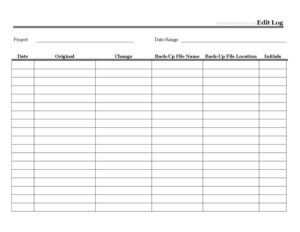
Edit Log
Track every document revision with our free Edit Log template, recording dates, editors, and changes made — free download in PDF and DOCX formats.
PDF
DOCX
4 downloads
0
likes
Download Files
- DOCX
An Edit Log is a simple record that documents every change made to a file, document, or project over time, capturing who edited it, when, and what was changed. People most often use it to maintain a clear revision history and accountability for shared or controlled documents, and you can download it free here in both PDF and DOCX formats — no signup required.
What Is an Edit Log?
An Edit Log is a tracking sheet that chronologically records modifications to a document, dataset, design file, or any other working item. It is typically maintained by the person or team responsible for a document, and it answers three core questions: what was changed, who changed it, and when. Rather than relying on memory or scattered email threads, the log keeps a single, ordered trail of revisions in one place. It is commonly used alongside version numbering so that anyone reviewing the document later can understand how it evolved, why specific edits were made, and which version is current.
When Do You Need an Edit Log?
An Edit Log earns its keep any time more than one person touches a document, or whenever a record of changes matters for accuracy, compliance, or accountability. Common scenarios include:
- Collaborative documents: Several team members editing a shared policy, manual, or proposal and needing to see who contributed what.
- Quality and compliance records: Industries that require an audit trail showing controlled documents were reviewed and updated on schedule.
- Software and content versioning: Tracking edits to code documentation, web copy, or knowledge-base articles over multiple releases.
- Contracts and agreements in negotiation: Logging each redline or clause change before a final version is signed.
- Spreadsheets and databases: Noting corrections to figures, formulas, or records so errors can be traced back to their source.
- Creative and design projects: Recording revisions to artwork, layouts, or specifications as feedback rounds accumulate.
Types of Edit Logs
Edit logs come in a few flavors depending on what they monitor. A document revision log tracks formal versions of a written file. A change log summarizes feature or content updates for end users. A data edit log focuses on individual record corrections, often for audit purposes. This template is flexible enough to serve any of these uses — adapt the columns to fit your situation.
What an Edit Log Should Have
A useful Edit Log captures enough detail that anyone can reconstruct the history of a document without guessing. Core elements include a date and time for each entry, the name of the editor, a clear description of the change made, and ideally a version or reference number tied to that change. Many logs also include the reason for the edit, the section or page affected, and an approval or review note. Keeping entries in chronological order and writing one row per distinct change keeps the log readable and trustworthy over time.
How to Fill Out an Edit Log
The template is built around straightforward, repeatable rows so anyone can record changes consistently. Follow these steps:
- Title the document: At the top, identify the file or project the log belongs to, so the log is never separated from its subject.
- Enter the date: For each new entry, record the date the edit was made — add a time stamp if precise sequencing matters.
- Add the editor’s name: Write the full name or initials of the person who made the change, establishing accountability.
- Note the version or reference: Assign a version number (for example 1.2 or v3) or a reference code so this revision can be located later.
- Describe the change: Summarize exactly what was edited — for instance, “Updated payment terms in Section 4” or “Corrected Q3 totals.”
- Record the reason (optional): Briefly explain why the change was needed, which helps reviewers understand intent.
- Add approval or notes: If the edit requires sign-off, note who approved it and any follow-up needed.
Repeat one row per distinct change, and avoid overwriting earlier entries — the value of the log lies in its complete history.
Tips for Keeping a Reliable Edit Log
An Edit Log is only as good as the discipline behind it. Make a habit of logging each change immediately rather than reconstructing edits days later from memory, which invites gaps and errors. Be specific in descriptions: “fixed typo” is far less useful than “corrected client name spelling on page 2.” Pair the log with consistent version numbering so the document file name and the log entry always agree. If multiple people maintain the log, agree on a shared format up front — same date style, same naming conventions — so the record stays clean. For sensitive or controlled documents, store the log alongside the master file and restrict who can edit past entries to protect the integrity of the trail.
Edit Log vs. Version History
People sometimes assume an automated version history makes an Edit Log redundant, but the two serve different purposes. Automated version histories in software capture snapshots of a file at points in time, but they rarely explain why a change was made or who approved it. An Edit Log adds the human context — intent, reasoning, and accountability — in plain language. For many teams the best approach is to use both: let the software preserve the raw versions while the Edit Log narrates the meaningful story behind them.
Common Mistakes to Avoid
- Vague descriptions: Entries like “various edits” defeat the purpose; describe each change clearly.
- Skipping entries: Logging only major changes leaves gaps that undermine the trail’s reliability.
- Inconsistent dates or formats: Mixing date styles or skipping the editor’s name makes the log hard to follow.
- Overwriting old entries: Editing previous rows erases history — always add a new row instead.
- Forgetting version numbers: Without a version reference, it’s hard to match a log entry to the right file.
- Delaying entries: Recording changes long after the fact leads to forgotten details and inaccuracies.
Frequently Asked Questions
What is an Edit Log used for? An Edit Log is used to keep a chronological record of every change made to a document or project, including who made each change and when. It provides accountability, helps teams track revisions, and creates a clear audit trail that anyone can review later.
How do I fill out an Edit Log? Title the log with the document it tracks, then add one row for each change containing the date, the editor’s name, a version or reference number, and a clear description of what was changed. Add a reason or approval note where helpful, and never overwrite earlier entries.
Is an Edit Log a legal document? An Edit Log itself is generally an internal record rather than a binding legal document, though it can serve as supporting evidence of when and how a document changed. Its value comes from being accurate, consistent, and maintained in good faith.
Do I need special software to use this Edit Log? No. This template works as a printed PDF you can fill in by hand or as a DOCX file you can edit on your computer. You can also adapt the columns into a spreadsheet if you prefer a digital record.
How much does this Edit Log template cost? It is completely free to download from Business Forms Pro in both PDF and DOCX formats, with no signup or payment required. You can use and customize it for personal or business purposes.
How often should I update an Edit Log? Update the log every time a change is made, ideally at the moment of the edit. Logging changes immediately keeps the record accurate and prevents details from being forgotten or lost over time.
This Edit Log template is provided as a general example for informational purposes only and does not constitute legal, compliance, or professional advice. Record-keeping and audit requirements vary by industry and jurisdiction, so consult a qualified professional to ensure your documentation meets any applicable standards.
Related Forms
- Website Password Tracker
- Yearly Project Timetable
- Credit History Record
- Library Loan List
- Hurricane Emergency Checklist
- Vendor Price Analysis
Browse more in Log and Inventory.