
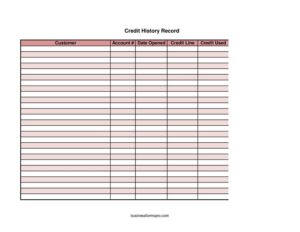
Credit History Record
Track customer accounts, credit lines, and balances with this free Credit History Record template — easy to use and free to download in PDF or DOCX.
PDF
XLSX
0
likes
Download Files
- XLSX
A Credit History Record is a simple tracking log used to monitor a customer’s account details, credit limit, and outstanding balance over time. Businesses most often use it to keep a clear, organized snapshot of how much credit each customer has been extended and how much remains available. It’s free to download here in both PDF and DOCX formats, with no signup required.
What Is a Credit History Record?
A Credit History Record is a log document that captures the essential credit details tied to a customer account. It typically records who the customer is, their account number, when the account was opened, the total credit line approved, how much credit has been used, and the current credit still available. Bookkeepers, accounts receivable staff, and small business owners use it to track customer balances at a glance, make informed decisions about extending further credit, and maintain an audit-friendly paper trail. Unlike a full credit report from a bureau, this internal record reflects only the credit relationship between your business and a specific customer, making it a practical in-house management tool.
When Do You Need a Credit History Record?
This record is useful any time your business sells goods or services on account rather than requiring immediate payment. Common situations include:
- Opening a new account for a customer who will be billed later and needs an approved credit line.
- Reviewing a credit increase request when a long-standing customer asks for a higher limit.
- Monitoring outstanding balances across multiple customers to spot accounts nearing their limits.
- Preparing for collections by documenting how much a customer owes against their approved line.
- Conducting periodic account reviews at month-end or quarter-end to reconcile receivables.
- Onboarding a new accounts team member who needs a clear picture of each customer’s standing.
Types of Credit Relationships This Record Can Track
Although the format is the same, a Credit History Record can be applied to several kinds of accounts. Retailers use it for store charge accounts, wholesalers track net-30 or net-60 trade credit with business buyers, and service providers monitor recurring clients billed on credit. You might keep one record per customer or maintain a master log with a row for each account. In every case, the goal is the same: a clear, current view of credit extended versus credit used so you always know where each customer stands.
What a Credit History Record Should Have
A complete and useful Credit History Record includes the core fields that define the credit relationship. At minimum it should capture the customer’s name or business name, a unique account number, the date the account was opened, the total approved credit line, the amount of credit currently used, and the resulting available credit. Keeping these elements together ensures the figures always reconcile and that anyone reviewing the record can immediately understand the customer’s credit position without digging through invoices.
How to Fill Out a Credit History Record
- Customer: Enter the full name of the individual or the legal business name tied to the account. Use the same name that appears on invoices and agreements to avoid confusion.
- Account #: Record the unique account number you assign to this customer. This identifier links the record to your billing system and keeps duplicate names separate.
- Date opened: Write the date the credit account was first established. This helps track account age and supports periodic reviews.
- Credit line: Enter the total approved credit limit you have extended to this customer, such as the maximum dollar amount they may carry at one time.
- Credit used: List the amount of the credit line currently outstanding — the balance the customer owes against their limit.
- Current credit available: Subtract credit used from the credit line and record the remaining amount the customer may still draw on. Update this figure whenever a payment or new charge posts.
Keeping the Record Accurate Over Time
A Credit History Record is only valuable if it stays current. Update the credit used and current credit available fields each time the customer makes a purchase on account or submits a payment. Many businesses reconcile these figures against their accounting software on a set schedule — weekly or at month-end — to catch discrepancies early. If you maintain printed copies, store them securely, since they contain sensitive customer financial information. For digital versions, restrict access to authorized staff and keep dated backups so you can trace how a balance changed over time.
How It Differs From a Credit Application
It’s easy to confuse this record with a credit application, but they serve different purposes. A credit application is the form a customer completes when first requesting credit, gathering background, references, and authorization. The Credit History Record, by contrast, is your ongoing internal log that tracks the relationship after credit is granted. Think of the application as the starting point and the history record as the running ledger that reflects current status.
Common Mistakes to Avoid
- Letting figures go stale — failing to update credit used after new charges or payments makes the available credit field unreliable.
- Math errors — always confirm that credit line minus credit used equals current credit available.
- Reusing account numbers — assigning the same number to two customers creates billing chaos.
- Omitting the date opened — without it, you lose the ability to assess account age and history.
- Storing records carelessly — leaving financial details accessible to unauthorized people risks privacy issues.
- Not reconciling regularly — discrepancies between the record and your accounting system can hide overdue balances.
Frequently Asked Questions
What is a Credit History Record used for? It is an internal log that tracks a customer’s account number, approved credit line, credit used, and remaining available credit. Businesses use it to monitor balances, make credit decisions, and keep an organized record of each customer’s standing.
How do I calculate current credit available? Subtract the credit used from the total credit line. For example, a $5,000 credit line with $1,800 used leaves $3,200 in current credit available. Update this figure whenever charges or payments change the balance.
Is a Credit History Record a legal document? It is primarily an internal business management tool rather than a contract or legal filing. While it can support recordkeeping and collections, it is not a substitute for a signed credit agreement or a credit bureau report.
How often should I update this record? Update it whenever the customer’s balance changes through a new purchase or payment, and reconcile it against your accounting records on a regular schedule such as weekly or monthly to keep the figures accurate.
Does this record need to be notarized or witnessed? No. A Credit History Record is an internal tracking log and does not require notarization or witnesses. You simply need to keep it accurate and secure.
How much does this template cost? Nothing — this Credit History Record template is free to download in PDF and DOCX formats with no signup required, so you can start tracking customer accounts right away.
This template is provided as a general example for informational purposes only and does not constitute legal, financial, or accounting advice. Credit practices and recordkeeping requirements vary by jurisdiction and industry — consult a qualified professional to ensure your records meet applicable rules.
Related Forms
- Circuit Breakers
- Visitor Log
- Weekly Status Report
- Submission Tracker Received
- Sterilization Log
- Donations Tracker Thermometer
Browse more in Log and Inventory.