
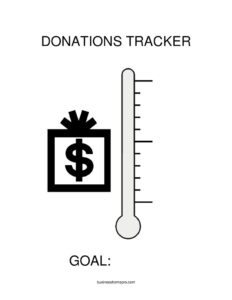
Donations Tracker Thermometer
Download a free Donations Tracker Thermometer template to visually track fundraising progress toward your goal in PDF or DOCX, no signup required.
PDF
DOCX
2 downloads
0
likes
Download Files
- DOCX
A Donations Tracker Thermometer is a visual fundraising tool shaped like a thermometer that fills in as your campaign collects money, making it easy to see how close you are to your goal at a glance. People most often use it to motivate donors and volunteers during a single fundraising drive. You can download it free here in PDF or DOCX, with no signup required.
What Is a Donations Tracker Thermometer?
A Donations Tracker Thermometer is a simple chart used by nonprofits, schools, clubs, churches, sports teams, and community groups to display progress toward a fundraising target. The thermometer image is divided into segments, and as donations arrive, the “mercury” is shaded upward to reflect the running total. It documents your goal amount, the current amount raised, and the milestones in between. Unlike a spreadsheet that lives in a back office, a thermometer is meant to be seen — posted on a wall, shared online, or printed for an event — so everyone watching the campaign can instantly understand momentum and feel encouraged to help push the total higher.
When Do You Need a Donations Tracker Thermometer?
- School fundraisers: Tracking progress for a new playground, library books, or a class trip and posting it in the hallway so students and parents can watch it rise.
- Church or charity capital campaigns: Displaying how much has been pledged toward a building fund, mission trip, or relief effort during weekly gatherings.
- Nonprofit donation drives: Giving board members and donors a clear monthly or annual giving snapshot at a gala or open house.
- Sports teams and clubs: Raising money for uniforms, equipment, or tournament travel and motivating members to chase the finish line.
- Online and social media campaigns: Updating a shareable graphic so followers see real-time momentum and are nudged to donate before the total stalls.
- Workplace giving and matching drives: Showing employees how close a department is to triggering a company match or hitting a charitable goal.
What a Donations Tracker Thermometer Should Have
An effective thermometer is clear, accurate, and easy to update. The most important elements are a clearly stated fundraising goal, a visible amount raised to date, and a scale with evenly spaced increments so progress is easy to read. A strong tracker also includes a campaign name or purpose, a start and end date, and intermediate milestone markers (for example, 25%, 50%, and 75%) that give donors smaller wins to celebrate. Color contrast between the filled and unfilled portions matters — bold shading for the amount raised makes the progress obvious from across a room. A short call to action, such as how and where to donate, turns the display from a status report into a fundraising prompt.
How to Fill Out a Donations Tracker Thermometer
- Name the campaign: Write a clear title at the top, such as “New Roof Fund” or “Spring Food Drive,” so anyone glancing at it knows the purpose.
- Set the goal amount: Enter your total target at the top of the thermometer — the number the full bulb represents when reached.
- Label the scale: Mark the increments along the side, dividing the goal into equal steps (for example, every $500 or every $1,000) so each segment is easy to fill.
- Add milestone markers: Note key checkpoints like halfway or three-quarters to give the campaign celebration points.
- Record the amount raised: Write the current running total in the space provided, then shade the thermometer up to that level.
- Date the update: Note the date of the most recent figure so viewers know how fresh the total is.
- Include donation instructions: Add a line explaining how to give and any deadline.
- Update regularly: Refresh the shading and total as new gifts arrive to keep momentum visible.
Tips for Keeping Your Thermometer Accurate
Decide upfront whether the displayed total reflects cash received, pledges, or both, and stay consistent so the number is trustworthy. Keep a separate, detailed donation log or spreadsheet behind the scenes that records each gift, the donor, and the date; the thermometer is the public summary, not your official record. Reconcile the thermometer figure against that log every time you update it so the two never drift apart. If you display the tracker in multiple places — a printed poster, a website graphic, and a social post — assign one person to update all versions on the same schedule so no location shows an outdated number.
Printed vs. Digital Thermometers
A printed thermometer works beautifully at in-person events, lobbies, and bulletin boards where foot traffic creates excitement, and it can be filled in by hand with a marker as gifts come in. A digital version of the same template is better for email updates, donation pages, and social media, where you can re-share the image each time it climbs. Many campaigns use both: print one for the venue and post the same design online so supporters who can’t attend still feel connected. The DOCX format makes it easy to edit the goal, scale, and totals, while the PDF is ready to print as-is.
Common Mistakes to Avoid
- Setting an unclear or moving goal: Changing the target mid-campaign without explanation confuses donors and undercuts trust.
- Forgetting to update it: A thermometer stuck at the same level for weeks signals a dead campaign and discourages giving.
- Uneven scale increments: Spacing the marks inconsistently makes the visual misleading and hard to read.
- Mixing pledges with cash silently: Counting promised gifts as received can overstate progress and create shortfalls later.
- No call to action: Showing progress without telling people how to donate wastes the display’s motivational power.
- Letting versions disagree: A poster, website, and social post that show different totals make supporters question your accuracy.
Frequently Asked Questions
What is a donations tracker thermometer used for? It is a visual fundraising aid that shows progress toward a money goal by filling in a thermometer image as donations arrive. Groups use it to motivate donors, build excitement, and give everyone a clear, instant sense of how the campaign is going. It works equally well on a wall, a website, or a social media feed.
How do I fill out the thermometer? Start by writing your campaign name and total goal at the top, then label the scale in equal increments. As money comes in, record the current total and shade the thermometer up to that level, noting the date of each update. Refresh it regularly so the displayed progress stays accurate.
Is this an official accounting record? No. The thermometer is a public summary, not a substitute for proper bookkeeping. You should keep a separate, detailed log of every individual donation, donor, and date for your records, and reconcile the thermometer total against that log each time you update it.
Should I count pledges or only money received? Either approach can work, but you must choose one and stay consistent so the displayed figure is honest. If you include pledges, consider labeling them separately or noting it on the chart so donors understand the number. Quietly mixing the two can overstate progress and lead to a shortfall.
Can I customize the goal and design? Yes. The DOCX version lets you edit the campaign name, goal amount, scale increments, milestones, and colors to match your organization, while the PDF is ready to print as-is. You can resize it for a poster or shrink it for a social media post.
How much does this template cost? It is completely free to download here in both PDF and DOCX formats, with no signup or account required. You can print, edit, and reuse it for as many campaigns as you like.
This template is provided as a general example for informational purposes only and does not constitute financial, accounting, tax, or legal advice. Fundraising and charitable reporting requirements vary by jurisdiction and organization type — consult a qualified professional to ensure your records and disclosures meet applicable rules.
Related Forms
- Inventory Cards Spreadsheet — Black And White
- Document Tracker
- Inspection Tags
- Weekly Status Report
- Weekly Bathroom Cleaning Checklist
- Nanny Daily Log
Browse more in Log and Inventory.