
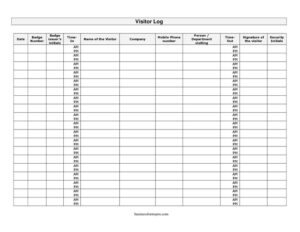
Visitor Log
Track guests at your facility with this free Visitor Log template, recording sign-in times, badges, and signatures — free download in PDF and DOCX.
PDF
DOCX
2 downloads
0
likes
Download Files
- DOCX
A Visitor Log is a sign-in record that documents everyone who enters your building, recording who they are, when they arrived and left, who they came to see, and the badge they were issued. Most organizations use it to maintain a clear security trail of guests on the premises. This template is free to download in PDF and DOCX, with no signup required.
What Is a Visitor Log?
A Visitor Log is a simple register kept at a reception desk or security checkpoint where guests sign in upon arrival and sign out when they leave. It is typically maintained by front-desk staff or a security officer and captures identifying details for each visitor along with timestamps and badge information. The purpose is to know exactly who is inside a facility at any given moment — essential for emergency evacuations, security audits, and accountability. Unlike an employee timesheet, the Visitor Log focuses on external guests, contractors, and other non-staff individuals. It creates a chronological paper trail that can be referenced later if a question arises about who accessed the building on a particular date.
When Do You Need a Visitor Log?
A Visitor Log is useful any time non-employees enter a controlled space. Common scenarios include:
- Corporate offices greeting clients, job candidates, and delivery personnel at a staffed reception desk.
- Manufacturing plants and warehouses where contractors and vendors need badges and escort tracking for safety reasons.
- Schools and childcare centers that must record every adult on campus during the day.
- Healthcare and laboratory facilities requiring controlled access and an audit trail for compliance.
- Construction sites logging subcontractors and inspectors for safety and insurance purposes.
- Data centers, government buildings, and secure offices where identity verification and badge issuance are mandatory.
What a Visitor Log Should Have
A complete Visitor Log captures enough detail to identify each guest and reconstruct their visit. The essential elements are the date of the visit, the visitor’s full name and the company they represent, a contact mobile phone number, and the person or department they are visiting. Equally important are the time in and time out, the badge number issued, the initials of the staff member who issued the badge, the visitor’s own signature confirming the entry, and the initials of the security or reception personnel who processed them. Together these fields provide a verifiable, time-stamped record of presence and accountability.
How to Fill Out a Visitor Log
Walk through the form one column at a time as each guest arrives:
- Date: Record the calendar date of the visit at the start of the row.
- Badge number: Enter the number printed on the temporary visitor badge you hand out.
- Badge issuer’s initials: The staff member who issued the badge adds their initials to confirm responsibility.
- Time in: Note the exact time the visitor arrives and checks in.
- Name of the visitor: Write the guest’s full name, asking them to confirm spelling.
- Company: Record the organization the visitor represents, or note “personal” if none.
- Mobile phone number: Capture a direct contact number for the visitor.
- Person/department visiting: Identify the host employee or department being visited.
- Time out: Fill this in when the visitor returns the badge and departs.
- Signature of the visitor: Have the guest sign to acknowledge the entry.
- Security initials: The officer or receptionist initials the completed row.
Paper Logs vs. Digital Sign-In Systems
This printable Visitor Log works well for small offices, occasional visitors, or as a reliable backup when power or network access is unavailable. It requires no software, runs on a clipboard, and is easy for any staff member to operate. Larger or higher-security facilities sometimes pair the paper log with a digital visitor-management kiosk that prints badges and timestamps automatically. Even when a digital system is in place, many organizations keep a printed log as a fallback during outages and for fire-drill roll calls. Whichever approach you choose, the underlying fields remain the same, so this template doubles as a clear specification for what your system should capture.
Retention, Privacy, and Best Practices
Because a Visitor Log contains personal details such as names and phone numbers, store completed sheets securely and limit who can view them. Decide on a retention period that fits your needs and any applicable rules — some facilities keep logs for a set number of months, then shred them. Keep a fresh page available at the front desk each day, collect badges promptly on departure so numbers can be reissued, and review entries periodically to confirm everyone has signed out. Consistent, legible entries make the log genuinely useful during an audit or emergency.
Common Mistakes to Avoid
- Leaving “time out” blank: Failing to log departures means you cannot tell who is still inside during an evacuation.
- Illegible handwriting: A name or number you cannot read defeats the purpose of the record.
- Skipping the signature: Without the visitor’s signature, the entry lacks acknowledgment from the guest.
- Reusing badge numbers without logging the return: This breaks the chain of accountability for badges.
- Not capturing the host: Omitting the person or department visiting makes follow-up and escort tracking difficult.
- Storing logs in the open: Leaving completed pages visible exposes personal contact details to other visitors.
Frequently Asked Questions
What is a Visitor Log used for? A Visitor Log is used to record everyone who enters a building, including their arrival and departure times, the badge they were issued, and who they came to see. It supports security, emergency accountability, and audit needs. Many organizations consider it a basic component of facility safety.
How do I fill out a Visitor Log? When a guest arrives, record the date, issue a badge and note its number with the issuer’s initials, log the time in, and capture the visitor’s name, company, mobile number, and the host they are visiting. Have the visitor sign, and add security initials. Fill in the time out when they leave and return the badge.
Does a Visitor Log need to be signed? Yes, this template includes a signature line so each visitor can acknowledge their entry, and a security initials field for the staff member who processed them. Signatures strengthen the record by confirming the visitor was present and aware of the sign-in. They are especially valuable for facilities with strict access controls.
How long should I keep visitor logs? Retention varies by organization and industry, so set a period that fits your security and compliance needs. Some facilities keep logs for several months and then dispose of them securely. Check any rules that apply to your sector before deciding.
Is a paper Visitor Log still useful with a digital system? Yes, a paper log is a dependable backup when networks or power fail and is handy for fire-drill roll calls. Even fully digital sites often keep a printed sheet at reception for redundancy. The fields are identical, so the two methods complement each other.
How much does this Visitor Log template cost? It is completely free to download from Business Forms Pro in both PDF and DOCX formats, with no signup required. You can print it as-is or edit the DOCX to match your facility’s branding and fields. Use it for as many days and locations as you need.
This Visitor Log template is a general example provided for informational purposes only and does not constitute legal, security, or compliance advice. Recordkeeping and privacy requirements vary by jurisdiction and industry. Consult a qualified professional to ensure your visitor management practices meet applicable rules.
Related Forms
- Pledge Log
- Donation Record
- Employee Covid Attestation Log
- College Application Comparison Checklist
- Store Opening Procedure Checklist
- Loaned Items Tracker
Browse more in Log and Inventory.