
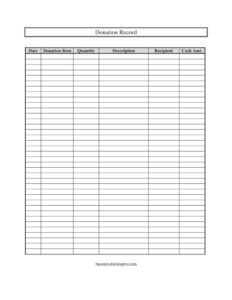
Donation Record
Track every gift with a free Donation Record template — log cash and in-kind donations by date, item, and recipient. Free download in PDF and DOCX.
PDF
DOCX
0
likes
Download Files
- DOCX
A Donation Record is a simple log used to document the cash and in-kind gifts you give or receive, capturing the date, the recipient, what was donated, and how much. The most common reason people use one is to keep an organized, year-round paper trail for tax deductions, bookkeeping, or grant reporting. You can download this Donation Record template free in PDF and DOCX, with no signup required.
What Is a Donation Record?
A Donation Record is a tracking document that lists each donation along with its key details so nothing is forgotten or lost at tax time. It is used by individuals who give to charity, by nonprofits and churches receiving gifts, and by small businesses that contribute goods or money to community causes. The record documents both cash contributions and donated items — such as clothing, food, equipment, or supplies — in a single, consistent format. Rather than digging through receipts and bank statements months later, a Donation Record gives you one running ledger. It captures the cash amount, date, description, donation item, quantity, and recipient for every gift, making the information easy to total, verify, and reference when needed.
When Do You Need a Donation Record?
This log is useful any time you need a reliable history of giving. Common situations include:
- Preparing for tax season — you want a clean summary of charitable contributions to support deductions you plan to claim.
- Donating goods to a thrift store or shelter — you drop off clothing, furniture, or household items and need to note the item, quantity, and estimated value.
- Running a nonprofit or church — you track incoming donations from members and supporters across the year.
- Managing a fundraiser or drive — you record contributions from multiple donors during a food drive, toy drive, or capital campaign.
- Operating a small business with a giving program — you log corporate gifts of cash or inventory to local organizations.
- Distributing estate or surplus items — you document where donated belongings went and to whom.
What a Donation Record Should Have
A complete Donation Record balances simplicity with enough detail to stand up to review. At minimum it should identify when each gift occurred, what was given, how much or how many, and who received it. Cash gifts need a clear dollar amount, while donated goods need a description specific enough to support a fair value estimate. A separate row for each donation keeps the log readable and easy to total. Leaving room for both cash and in-kind entries means a single sheet can handle your entire year of giving. Consistency matters most: filling in every column the same way each time makes the record trustworthy and far easier to reconcile against receipts later.
How to Fill Out a Donation Record
Work through the template one row per donation, completing each field:
- Date — Enter the exact date the donation was made or received. Use a consistent format throughout so entries sort and total cleanly.
- Recipient — Write the name of the organization or person receiving the gift, such as a charity, church, food bank, or shelter. Spell it out fully in case you need to look it up later.
- Donation Item — Name the specific thing donated, like “winter coats,” “canned goods,” or “office chairs.” For cash gifts, you can note “cash” or leave it blank and rely on the cash amount column.
- Description — Add detail that supports the entry, such as condition, size, brand, or purpose. A precise description helps justify the value of in-kind donations.
- Quantity — Record how many units you gave (for example, 5 boxes or 12 books). This is essential for in-kind gifts.
- Cash Amt. — For monetary gifts, enter the dollar amount. For donated goods, you may enter the estimated fair market value here so your totals reflect everything.
Cash vs. In-Kind Donations
This record handles two kinds of giving, and it helps to treat them slightly differently. Cash donations are straightforward: enter the amount, the date, and the recipient. In-kind donations — physical items rather than money — require more care because you are documenting goods that must be assigned a value. For these, lean on the Donation Item, Description, and Quantity fields to capture exactly what changed hands. When estimating value for donated goods, use a reasonable fair market figure rather than the original purchase price, since used items are typically worth less. Keeping cash and in-kind entries on the same log gives you a complete giving picture at a glance.
Keeping Receipts and Backup Documentation
A Donation Record is most powerful when paired with supporting documents. For larger gifts, many charities provide a written acknowledgment or receipt; staple or file these alongside your log and note on the record that a receipt exists. Bank or credit card statements back up cash contributions, while photos of donated goods can support in-kind entries. Store everything together by year so reconciliation is painless. Treat the record as your master index and the receipts as the evidence behind each line — together they form a defensible, audit-ready file.
Common Mistakes to Avoid
- Recording donations from memory — log each gift the day it happens, not weeks later when details blur.
- Skipping the description — vague entries like “misc.” make it hard to justify value or recall what was given.
- Overestimating the value of used goods — assign a realistic fair market value rather than the original cost.
- Leaving the recipient blank — without a named organization, the entry has little supporting weight.
- Mixing units in the quantity field — be clear whether you mean pieces, boxes, or pounds.
- Not keeping the matching receipt — a log without backup documentation is weaker if anyone questions it.
Frequently Asked Questions
What is a Donation Record used for? It is used to track cash and in-kind donations in one organized list, capturing the date, recipient, item, quantity, description, and amount. People use it to prepare for tax season, manage nonprofit bookkeeping, and keep a clear history of their charitable giving throughout the year.
How do I fill out a Donation Record? Use one row per donation and complete every column: enter the date, name the recipient, describe the item, note the quantity, add a detailed description, and record the cash amount or estimated value. Filling in each entry consistently makes the log easy to total and reconcile later.
Can I use this record for both cash and item donations? Yes. The template includes a cash amount field for monetary gifts and item, quantity, and description fields for in-kind donations. You can log both types on the same sheet and estimate a fair value for donated goods in the amount column.
Does a Donation Record need to be notarized? No, a Donation Record is an internal tracking document and does not require notarization or witnesses. For tax purposes, however, official receipts or written acknowledgments from the recipient organization are what provide formal support, so keep those alongside your log.
How much does this Donation Record template cost? It is completely free to download from Business Forms Pro in both PDF and DOCX formats, with no signup or payment required. You can print it as-is or open the editable version to customize the columns for your needs.
How long should I keep my donation records? Retention rules vary, but many people keep donation records and supporting receipts for several years in case they are needed for tax verification. Storing each year’s log and receipts together makes them easy to retrieve if questions ever arise.
This Donation Record template is provided as a general example for informational purposes only and does not constitute legal, financial, or tax advice. Rules for documenting and deducting charitable contributions vary by jurisdiction and circumstance — consult a qualified tax professional or accountant for guidance specific to your situation.
Related Forms
- Depreciable Assets Log
- Computer Fault List
- Pest Sighting Log
- Beauty Salon Supplies Inventory Card
- Project Timeline
- Visitor Log
Browse more in Log and Inventory.