
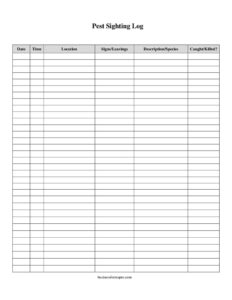
Pest Sighting Log
Track infestations with a free Pest Sighting Log template that records date, location, species, and removal status — free download in PDF and DOCX.
PDF
DOCX
19 downloads
0
likes
Download Files
- DOCX
A Pest Sighting Log is a simple record-keeping sheet used to document every encounter with pests — when and where they were spotted, what evidence they left behind, and whether they were caught or killed. People most often use it to track an ongoing infestation, build a clear history for a pest control professional, or satisfy hygiene and audit requirements. It is free to download here in both PDF and DOCX formats, with no signup required.
What Is a Pest Sighting Log?
A Pest Sighting Log is a structured document that captures individual pest observations over time. Each entry records a single sighting or piece of evidence, so the log gradually paints a picture of where pests are active, how often they appear, and whether control measures are working. Homeowners, facility managers, restaurant operators, warehouse staff, and property landlords all use these logs. In food-handling and regulated environments, a sighting log is often a required part of an integrated pest management (IPM) program, demonstrating that activity is being monitored and addressed. At home, it simply helps you stay organized and give your exterminator accurate information instead of vague guesses.
When Do You Need a Pest Sighting Log?
This log is valuable any time you need to monitor pest activity systematically rather than relying on memory. Common situations include:
- Active infestation tracking: Recording mouse, cockroach, ant, or rodent sightings room by room to find the source and hotspots.
- Food service compliance: Restaurants, cafes, and commercial kitchens keeping documentation for health inspectors and IPM audits.
- Warehouse and storage facilities: Logging droppings, gnaw marks, or insects near inventory to protect goods and meet safety standards.
- Rental property management: Landlords and tenants documenting recurring problems for repair records or dispute resolution.
- Working with an exterminator: Giving a pest control technician dated evidence so treatment can be targeted and progress measured.
- Seasonal monitoring: Tracking whether activity spikes in warmer months or after weather events, so prevention can be timed.
What a Pest Sighting Log Should Have
A useful pest log balances simplicity with enough detail to be actionable. The core columns in this template cover the essentials: the date and time of the observation, the location within the building or property, any signs or leavings (droppings, nests, gnaw marks), a description or species identification, and a caught/killed status. Together these fields answer the questions any inspector or technician will ask: what was seen, where, when, and what was done about it. Consistency matters more than elaborate detail — the same person or team filling out every field the same way produces a log you can actually analyze for patterns and trends over weeks or months.
How to Fill Out a Pest Sighting Log
- Date: Enter the calendar date of the sighting or when you discovered the evidence. Use a consistent format throughout the log.
- Time: Record the approximate time of day. This helps identify whether pests are active at night, around opening hours, or after deliveries.
- Location: Be specific — note the exact room, zone, or fixture, such as “kitchen, under sink” or “warehouse bay 3, north wall.” Precise locations reveal hotspots.
- Signs/Leavings: Describe physical evidence: droppings, urine stains, shed skins, gnaw marks, nesting material, grease trails, or webbing. Note quantity if you can.
- Description/Species: Identify the pest as best you can — mouse, rat, German cockroach, ant, fly. If unsure, describe size, color, and behavior so it can be identified later.
- Caught/Killed?: Mark whether the pest was trapped, killed, or escaped, and note the method (snap trap, bait, swatted) if relevant. This tracks control effectiveness.
Reading the Log to Spot Patterns
The real power of a sighting log comes from reviewing entries together rather than one at a time. After a couple of weeks, scan the location column to see if a single area dominates — that usually points to a harborage, food source, or entry point nearby. Compare time-of-day entries to identify nocturnal versus daytime activity, which differs by species. Watch the caught/killed column over time: a steady decline suggests treatment is working, while fresh sightings after a quiet period may mean a new generation has hatched or a previously sealed gap has reopened. These patterns help you and any professional decide where to place traps, seal cracks, or remove attractants.
Pest Log vs. Treatment Record
A sighting log and a treatment record serve different purposes and ideally work side by side. The sighting log documents observations — what you or staff actually saw and any evidence found. A treatment record documents actions taken by pest control, such as chemical applications, bait station servicing, and follow-up visits. Inspectors and IPM auditors often want both: the log proves you are monitoring, and the treatment record proves you are responding. If you only keep one, the sighting log is the more important starting point because it captures the raw data that justifies and guides every treatment decision.
Common Mistakes to Avoid
- Vague locations: Writing only “kitchen” instead of a specific spot makes it impossible to target the problem.
- Delayed entries: Logging from memory days later leads to wrong dates and forgotten details — record sightings promptly.
- Skipping the evidence column: Droppings and gnaw marks matter even when no live pest is seen; omitting them hides active infestations.
- Guessing species without noting uncertainty: A confident wrong ID can misdirect treatment; describe what you saw if unsure.
- Leaving the caught/killed field blank: Without it, you cannot tell whether control measures are reducing the population.
- Letting only one person know about the log: In a workplace, make sure all staff know where the log is and how to add to it.
Frequently Asked Questions
What is a Pest Sighting Log used for? It is used to systematically record every pest observation — including the date, location, evidence, species, and removal status. This creates a documented history that helps identify hotspots, measure whether treatment is working, and satisfy hygiene or audit requirements in regulated settings.
How do I fill out a Pest Sighting Log? Add one row each time you spot a pest or find evidence, entering the date, time, and specific location, then describe the signs or leavings, identify the species as best you can, and mark whether it was caught or killed. Filling in every field consistently makes the log far more useful for spotting trends.
Is a Pest Sighting Log legally required? Requirements vary by industry and jurisdiction. Many food-handling, healthcare, and storage businesses are expected to maintain pest monitoring records as part of health and safety or IPM standards, while home use is entirely voluntary. Check your local health authority or auditing body for specific rules.
Who should keep the log in a business? Typically a designated staff member, manager, or sanitation lead owns the log, but everyone should be able to add entries. The key is that observations are recorded promptly and that the log is kept somewhere accessible and reviewed regularly.
How long should I keep pest sighting records? For home use, keep them as long as the problem is ongoing plus a few months to confirm it is resolved. Businesses often retain records for one to several years depending on regulatory or audit expectations — confirm the required retention period for your sector.
Is this Pest Sighting Log template free to download? Yes. You can download this Pest Sighting Log free of charge in both PDF and DOCX formats, with no signup required. Use the PDF for quick printing or the editable DOCX to add your own columns, logo, or facility zones.
This Pest Sighting Log template is provided as a general example for informational purposes only and does not constitute legal, health, or regulatory advice. Pest control requirements and record-keeping obligations vary by jurisdiction and industry — consult a qualified pest management professional or your local health authority for guidance specific to your situation.
Related Forms
- Birthday Calendar One Page
- Inventory Tracking Spreadsheet
- Firearm Inventory
- Wilderness Emergency Checklist
- Incoming Mail Log
- Asset List
Browse more in Log and Inventory.