
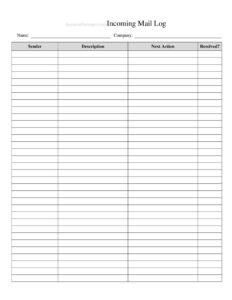
Incoming Mail Log
Track every letter and package received with this free Incoming Mail Log template, available as a free download in PDF and DOCX for offices.
PDF
DOCX
16 downloads
0
likes
Download Files
- DOCX
An Incoming Mail Log is a simple tracking sheet used to record every piece of mail, parcel, and delivery that arrives at an office, mailroom, or front desk. The most common reason people use one is to create a reliable paper trail so nothing gets lost between the delivery driver and the intended recipient. It is free to download here in both PDF and DOCX formats, with no signup required.
What Is an Incoming Mail Log?
An Incoming Mail Log is a record-keeping document that captures the details of each item delivered to a business or organization. It is typically maintained by a receptionist, mailroom clerk, office manager, or administrative assistant who is responsible for receiving and distributing mail. The log documents what arrived, when it arrived, who sent it, who it is for, and when it was handed off. By keeping these details in one place, an organization can prove receipt of important documents, locate misplaced packages, and hold staff accountable for items they have signed for. It serves as both an operational tool and an internal audit record.
When Do You Need an Incoming Mail Log?
A mail log becomes valuable any time multiple people share a single delivery point and accountability matters. Common situations include:
- Busy office reception desks where dozens of letters and parcels arrive each day and must reach the right departments.
- Law firms, accounting practices, and medical offices that receive time-sensitive or confidential documents requiring proof of receipt.
- Property management offices and apartment buildings that accept packages on behalf of tenants and need to track pickups.
- Schools, universities, and government offices with centralized mailrooms serving many staff members.
- Companies expecting checks, contracts, or legal notices where the date received can carry financial or legal weight.
- Shared coworking spaces and virtual office providers that handle mail for many separate clients under one address.
What an Incoming Mail Log Should Have
A complete and useful mail log balances detail with speed, since whoever fills it out is usually doing so while sorting a stack of deliveries. The essential elements include the date and time of receipt, the sender or return address, the type of mail (letter, package, certified, registered, or courier), the intended recipient, the carrier or delivery service, a tracking or reference number where applicable, and a signature or initials confirming who received the item. Many logs also add a column for the date and time the item was delivered to the recipient, plus the recipient’s signature. Together these fields close the loop from arrival to handoff, leaving no gap in the chain of custody.
How to Fill Out an Incoming Mail Log
Record each delivery as it arrives so details stay accurate. Work across one row per item:
- Date received: Enter the calendar date the item physically arrived at your location.
- Time received: Note the time of day; this matters for time-sensitive legal or financial mail.
- Sender / from: Write the company or person named on the return address.
- Recipient / addressed to: Record the employee, department, or tenant the item is intended for.
- Type of mail: Indicate whether it is a standard letter, package, certified, registered, or courier delivery.
- Carrier: List the delivery service, such as USPS, FedEx, UPS, DHL, or a private courier.
- Tracking number: Copy any tracking or reference number from the label so the item can be traced later.
- Received by: Have the person accepting the mail sign or initial here.
- Delivered to recipient / date and signature: When the item is handed off, record the date and capture the recipient’s signature or initials.
Tips for Running an Efficient Mailroom
A log is only as good as the routine around it. Keep the sheet at the exact spot where deliveries are dropped off so it gets filled out in the moment rather than from memory. Use a clipboard or a bound notebook so pages cannot be quietly removed, which protects the integrity of the record. For high-volume operations, pre-print the recipient names or department codes to speed up entry. Flag anything marked confidential, certified, or urgent with a highlighter so it is prioritized for delivery. Finally, file completed log sheets by month in a labeled binder; you will be grateful for the archive the next time someone insists a check or contract never arrived.
Paper Log vs. Digital Tracking
Many organizations eventually move to barcode scanners or mailroom software, but a printable log remains the most accessible and reliable starting point. A paper or spreadsheet log requires no special equipment, never crashes, and works during power or network outages. The DOCX version lets you customize columns to match your workflow, while the PDF prints cleanly for use on a clipboard. If you later adopt a digital system, a paper log makes an excellent backup and a familiar fallback for temporary staff who have not been trained on the software yet.
Common Mistakes to Avoid
- Recording mail in batches at the end of the day instead of as each item arrives, which causes missed or guessed details.
- Skipping the tracking number, then being unable to trace a package the carrier insists was delivered.
- Leaving the “received by” field blank, which destroys accountability if an item later goes missing.
- Failing to log the handoff to the final recipient, so the chain of custody ends at the mailroom door.
- Using vague sender names like “bank” instead of the actual company on the return label.
- Letting completed sheets pile up loose instead of filing them, making past records impossible to find.
Frequently Asked Questions
What is an Incoming Mail Log used for? It is used to document every letter, package, and delivery received at a business so the organization has proof of receipt and a clear chain of custody. It helps locate misplaced items, confirm when time-sensitive documents arrived, and hold staff accountable for what they sign for.
How do I fill out an Incoming Mail Log? Complete one row per item as it arrives, entering the date and time received, the sender, the intended recipient, the type of mail, the carrier, and any tracking number. The person accepting the mail signs the “received by” column, and the handoff to the recipient is recorded when the item is delivered.
Is an Incoming Mail Log a legal document? It is primarily an internal business record rather than a formal legal instrument, but a consistently maintained log can serve as supporting evidence of when something was received. Its value in any dispute depends on how reliably and contemporaneously it was completed.
Who should keep the mail log? Typically a receptionist, mailroom clerk, office manager, or administrative assistant who is the designated point of contact for incoming deliveries. Limiting the number of people who write in the log keeps entries consistent and accountable.
How long should I keep completed mail logs? Many businesses retain them for at least a year, though retention depends on your industry and internal recordkeeping policies. Offices handling legal, financial, or medical mail often keep them longer to support audits or disputes.
Is this Incoming Mail Log template free? Yes. You can download it here for free in both PDF and DOCX formats with no signup required, print it for a clipboard, or edit the columns to match your office’s workflow.
This template is provided as a general example for informational purposes only and does not constitute legal, financial, or professional advice. Recordkeeping and document-retention requirements vary by jurisdiction and industry, so consult a qualified professional to confirm what applies to your organization.
Related Forms
- Auction Sell List
- Short Term Disability Claims Tracker
- Casino Earnings Log
- Phone Message Log
- Cleaning Log By Room
- Bill Reminder Tracker
Browse more in Log and Inventory.