
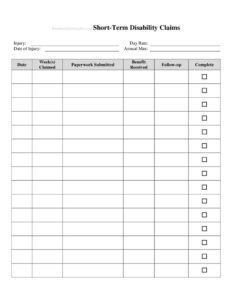
Short Term Disability Claims Tracker
Track every short term disability claim, deadline, and payment with this free Short Term Disability Claims Tracker template — free download in PDF and DOCX.
PDF
DOCX
5 downloads
0
likes
Download Files
- DOCX
A Short Term Disability Claims Tracker is a simple log used to monitor the status, deadlines, and payments tied to short term disability (STD) claims from start to finish. People most often use it to stay on top of paperwork and benefit dates so nothing slips through the cracks during a stressful leave. It’s free to download here in both PDF and DOCX formats with no signup required.
What Is a Short Term Disability Claims Tracker?
A Short Term Disability Claims Tracker is an organizational document that records the key details of one or more STD claims in a single place. It can be used by an individual employee managing their own leave, an HR or benefits administrator overseeing multiple cases, or a small-business owner coordinating with an insurance carrier. The tracker typically captures who filed the claim, when it was submitted, the disability period, the carrier or plan handling it, the current status, and the payments received. Rather than digging through emails and letters, you get an at-a-glance view of where each claim stands. It does not replace official claim forms — it supplements them by giving you a running, dated history of every action taken.
When Do You Need a Short Term Disability Claims Tracker?
This tracker is useful any time a disability leave involves moving parts, multiple parties, or strict deadlines. Common scenarios include:
- An employee recovering from surgery who wants to confirm each benefit payment arrives on schedule.
- A new parent on a medically certified pregnancy or recovery leave coordinating STD with employer policy.
- An HR coordinator managing several active claims across different carriers and reporting status to leadership.
- A claimant who needs to track appeal deadlines after a partial or denied claim.
- A worker juggling STD benefits alongside accrued sick time or paid time off and needing to see the full timeline.
- A benefits administrator preparing documentation for an audit or for a transition to long-term disability.
What a Short Term Disability Claims Tracker Should Have
A complete tracker turns scattered details into a usable record. The most valuable elements include the claimant’s name and employee ID, the claim or reference number, the date the disability began and the expected return-to-work date, the insurance carrier or plan administrator, the date the claim was filed, and the current claim status (submitted, pending, approved, denied, or closed). It should also track the benefit amount, the payment frequency, dates payments were received, and any outstanding documents or follow-up actions. A notes column is essential for recording phone calls, names of representatives, and dates of correspondence. Together these fields create a chronological audit trail that protects everyone involved.
How to Fill Out a Short Term Disability Claims Tracker
Work through the tracker one entry at a time so each claim has its own complete row or section:
- Claimant details: Enter the employee’s full name, employee or member ID, and department or job title if you manage multiple people.
- Claim reference: Record the claim number assigned by the carrier and the date the claim was filed.
- Disability dates: Note the first day of disability, the expected duration, and the anticipated return-to-work date.
- Carrier and plan: List the insurance company or plan administrator and a contact phone number or portal.
- Status: Mark the current stage — submitted, pending, approved, denied, or closed — and update it whenever it changes.
- Benefit details: Enter the weekly or biweekly benefit amount, the elimination (waiting) period, and the payment schedule.
- Payments received: Log each payment date and amount as funds arrive to confirm accuracy.
- Outstanding items: List any forms, physician statements, or signatures still needed, with due dates.
- Notes: Record dates of calls, representative names, and next steps after each interaction.
Tips for Keeping the Tracker Accurate
The tracker only helps if it stays current. Update it the same day you take any action — file a form, receive a letter, or finish a phone call — while the details are fresh. Always write the date next to every entry and the name of the person you spoke with at the carrier. Keep a column for follow-up deadlines, such as appeal windows or recertification dates, and review the tracker weekly so nothing expires unnoticed. If you manage claims for several employees, sort or color-code by status so pending and at-risk claims rise to the top. Save copies of supporting letters and reference them in your notes so the tracker links cleanly to your underlying paperwork.
How It Differs From the Claim Form Itself
It’s important to understand that this tracker is a management tool, not the official disability claim. The actual STD claim is filed using forms provided by your employer or insurance carrier and usually requires a physician’s statement certifying the disability. The tracker sits on top of that process, giving you a personal or administrative record of dates, payments, and statuses. Think of the claim form as the formal request and the tracker as your dashboard for watching that request move through approval, payment, and closure. Keeping the two separate helps you avoid confusion and gives you a clear summary you can reference without re-reading every document.
Common Mistakes to Avoid
- Letting deadlines lapse — failing to log appeal or recertification dates can forfeit benefits.
- Skipping the date column — entries without dates undermine the tracker’s value as a timeline.
- Not recording who you spoke with — without a representative’s name, disputes are harder to resolve.
- Forgetting to reconcile payments — assuming a benefit arrived rather than confirming the amount and date.
- Mixing multiple claims in one row — give each claim its own entry to keep details clean.
- Treating the tracker as the official claim — always file through your carrier’s required forms.
Frequently Asked Questions
What is a Short Term Disability Claims Tracker used for? It is used to monitor the status, deadlines, and payments associated with one or more short term disability claims. Individuals use it to confirm benefits arrive correctly, while HR teams use it to oversee multiple cases. It provides a single, dated overview so you never lose track of where a claim stands.
How do I fill out the tracker? Create one entry per claim and fill in the claimant details, claim number, disability dates, carrier, status, benefit amount, payments received, and outstanding items. Update the status and payment columns each time something changes. Add dated notes after every call or letter so the record stays complete.
Is this tracker the same as filing a disability claim? No. The tracker is a personal or administrative record, not the official claim. You still file your claim using the forms your employer or insurance carrier provides, which typically require a physician’s certification. The tracker simply helps you follow that claim through approval and payment.
Does the tracker need to be notarized or signed? No notarization or signature is required because it is an internal organizational tool rather than a legal filing. Anyone managing the claim can maintain it. However, keep it accurate and consistent, especially if it may be referenced during an audit or appeal.
How much does this template cost? It is completely free to download from Business Forms Pro in both PDF and DOCX formats, with no signup required. The DOCX version is editable so you can add columns or adjust the layout to match your carrier’s terminology. Use it as often as you need at no charge.
Can I track more than one claim in the same document? Yes. The tracker is designed to hold multiple entries, so HR administrators can log several employees’ claims side by side. Give each claim its own row or section, and consider sorting by status so pending or at-risk claims stay visible at the top.
This template is a general example provided for informational purposes only and does not constitute legal, financial, tax, or insurance advice. Short term disability rules, benefit amounts, and deadlines vary by employer, insurance carrier, and jurisdiction. Consult your plan administrator or a qualified professional for guidance specific to your situation.
Related Forms
- Weekly Music Practice Log
- Visitor Log
- Employee Password Tracker
- Observation Log
- Maintenance Log Form
- Casino Earnings Log
Browse more in Log and Inventory.