
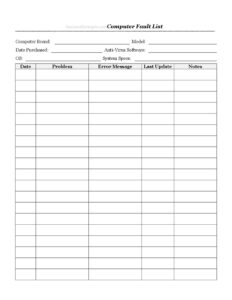
Computer Fault List
Track computer faults, errors, and repairs with this free Computer Fault List template available as a PDF and DOCX download to keep machines running.
PDF
DOCX
2 downloads
0
likes
Download Files
- DOCX
A Computer Fault List is a simple log used to record hardware and software problems on a computer so you can track recurring issues, communicate clearly with technicians, and decide when a machine needs repair or replacement. Most people reach for it the moment a computer starts crashing, throwing error messages, or slowing down. It’s free to download here in both PDF and DOCX formats — no signup required.
What Is a Computer Fault List?
A Computer Fault List is a record-keeping document that captures the identity of a computer alongside a running history of the faults it experiences. It pairs static details — brand, model, operating system, and system specifications — with date-stamped entries describing each problem, the exact error message, and any notes about what was happening when the fault occurred. IT support staff, repair shops, office managers, and home users all use it. Rather than relying on memory or scattered sticky notes, the list keeps everything in one place so patterns become obvious. When the same error keeps reappearing, the log shows you, helping you diagnose whether the cause is a failing drive, an outdated driver, or a software conflict.
When Do You Need a Computer Fault List?
This log is useful any time a computer’s behaviour stops being reliable. Common situations include:
- Recurring crashes or freezes — you want to record exactly when and how often a machine locks up.
- Sending a device for repair — handing a technician a clear fault history speeds up diagnosis and avoids repeated visits.
- Managing multiple office computers — IT teams keep one list per machine to track reliability across the fleet.
- Tracking a warranty claim — documented faults with dates strengthen a return or repair request to the manufacturer.
- Diagnosing software conflicts — noting the last update before a fault helps pinpoint the culprit.
- Deciding whether to replace a machine — a long history of faults makes the cost-benefit case clear.
What a Computer Fault List Should Have
A complete fault list combines identifying details with a structured fault history. The identification block should name the computer brand, model, and date purchased so you can reference warranty windows. It should capture the technical environment — the operating system, system specs, and the anti-virus software installed — because these often relate directly to the cause of a fault. The heart of the document is the fault entries themselves: each needs a date, a clear description of the problem, the precise error message, the date of the last update, and a notes field for anything else relevant. Together these elements turn a vague complaint into actionable troubleshooting data.
How to Fill Out a Computer Fault List
- Computer Brand and Model: Enter the manufacturer (for example Dell, HP, Lenovo, or Apple) and the exact model name or number, usually found on a label on the case.
- Date Purchased: Record when the machine was bought; this helps you check whether it’s still under warranty.
- Anti-Virus Software: Note the security program installed and its version, since some faults trace back to security scans or conflicts.
- OS: Write the operating system and version, such as Windows 11, macOS Sonoma, or a Linux distribution.
- System Specs: List key hardware — processor, RAM, and storage type and size — so a technician understands the machine’s capabilities.
- Date: Stamp each fault entry with the date it occurred so you can spot frequency and timing.
- Problem: Describe what went wrong in plain language — for example “blue screen during startup” or “freezes when opening email.”
- Error Message: Copy the exact wording or code shown on screen; these details are vital for diagnosis.
- Last Update: Record the most recent software or driver update before the fault appeared.
- Notes: Add any extra context — overheating, recent installs, or steps you already tried.
How a Detailed Fault Log Speeds Up Repairs
Technicians work faster when they aren’t guessing. An error message copied word for word can be searched against known issues in minutes, while a vague “it doesn’t work” forces the technician to reproduce the problem from scratch. The last update field is especially powerful: many faults appear immediately after an operating system patch or driver change, and noting that timing can point straight to the cause. Likewise, recording the anti-virus software helps rule out scans that lock the system or quarantine legitimate files. For office environments, keeping a separate list for each computer turns individual complaints into fleet-wide intelligence — if three machines from the same purchase batch show identical faults, you may have a hardware defect worth raising with the supplier.
Tips for Keeping an Effective Log
Update the list at the moment a fault happens, not days later when details have faded. Photograph error screens with your phone and transcribe the exact text into the error message field. Be consistent with date formats so entries sort correctly. If you resolve a fault, add a follow-up note describing the fix — over time this becomes a personal troubleshooting knowledge base. Store a digital copy alongside backups so the log survives even if the machine itself fails.
Common Mistakes to Avoid
- Paraphrasing error messages — “some error popped up” is useless; copy the exact code and wording.
- Leaving out dates — without timing you can’t see patterns or correlate faults with updates.
- Skipping system specs — a technician needs to know the hardware before suggesting fixes.
- Recording faults from memory — log them in real time to keep details accurate.
- Forgetting the last update field — this is often the single biggest clue to the cause.
- Mixing several computers on one list — keep one log per machine for clarity.
Frequently Asked Questions
What is a Computer Fault List used for? It is used to record and track the faults a computer experiences over time, including problems, error messages, and the conditions surrounding each issue. This helps with diagnosis, repairs, warranty claims, and deciding whether a machine should be replaced.
How do I fill out a Computer Fault List? Start by entering the computer’s brand, model, purchase date, operating system, system specs, and anti-virus software. Then, for each fault, log the date, a description of the problem, the exact error message, the last update before it occurred, and any helpful notes.
Why should I record the error message exactly? Error messages often contain specific codes that map directly to known issues. Copying them word for word lets you or a technician search for the cause quickly instead of trying to reproduce the fault from scratch.
Can I use this log for multiple computers? It’s best to keep a separate fault list for each machine so the history stays clear and patterns are easy to spot. In an office setting, one log per computer also makes it easier to compare reliability across devices.
Is the Computer Fault List free to download? Yes. You can download this template for free in both PDF and DOCX formats with no signup required. Use the PDF for quick printing or the DOCX if you want to customise the fields.
Will this log help with a warranty claim? A documented history of faults with dates and error messages provides clear evidence to support a repair or replacement request. Combined with the recorded purchase date, it helps you confirm whether the machine is still within its warranty period.
This Computer Fault List template is a general example provided for informational purposes only and does not constitute technical, legal, or warranty advice. Hardware policies, warranty terms, and support procedures vary by manufacturer and region — consult the relevant documentation or a qualified professional for guidance on your specific situation.
Related Forms
- Drivers Daily Log
- Sleepover Checklist
- Computer Time Tracker
- Pest Sighting Log
- Beneficiaries List
- IT Inventory
Browse more in Log and Inventory.