
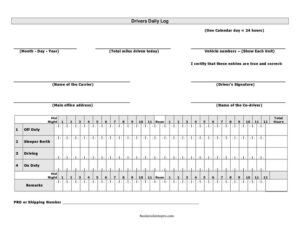
Drivers Daily Log
Download a free Drivers Daily Log template to track hours of service, duty status, and mileage—free download in PDF and DOCX, no signup required.
PDF
DOCX
10 downloads
0
likes
Download Files
- DOCX
A Drivers Daily Log is a record commercial vehicle drivers use to document their hours of service, duty status changes, mileage, and route details for each 24-hour period. Most drivers complete one to stay compliant with hours-of-service rules and to keep an accurate account of their working day. You can download this Drivers Daily Log free in both PDF and DOCX formats, with no signup required.
What Is a Drivers Daily Log?
A Drivers Daily Log is a standardized form that records how a driver spends each portion of a working day, broken into duty categories such as off duty, sleeper berth, driving, and on duty (not driving). It is typically completed by the driver and retained by the driver and their carrier or employer. The log documents the date, starting and ending locations, total miles driven, the vehicle and trailer numbers, and a time-by-time accounting of activity. Fleet managers, dispatchers, and safety officers rely on these logs to confirm that drivers stay within legal limits, to verify trip details, and to maintain an audit-ready paper trail of daily operations.
When Do You Need a Drivers Daily Log?
A daily log is part of the routine for many commercial and fleet drivers, but it is useful in a range of situations:
- Long-haul trucking trips where a driver must track cumulative driving and on-duty hours across multiple days.
- Local delivery routes that still require documentation of start time, stops, and miles for payroll or compliance.
- Fleet operations where a company needs consistent records from every driver to monitor safety and scheduling.
- Backup or supplemental records alongside an electronic logging device in case of a malfunction or short-term exemption.
- Owner-operators who want a clear personal record of their hours, mileage, and routes for tax and maintenance tracking.
- Audits or roadside inspections where a driver may need to present a written account of recent duty status.
What a Drivers Daily Log Should Have
A complete and useful daily log captures both the timeline of activity and the identifying details that tie it to a specific driver, vehicle, and trip. The core elements include the date and 24-hour period covered, the driver’s name and signature, the carrier or company name, and the home terminal address. It should identify the vehicle and trailer numbers and the starting and ending points of the day. The heart of the form is the duty-status grid, which maps each block of time to one of the standard categories, plus a running total of hours in each. A good log also includes total miles driven, a remarks or notes line for stops and delays, and a place to record any shipping or manifest numbers.
How to Fill Out a Drivers Daily Log
- Enter the date for the 24-hour period the log covers, and note the time zone you are using.
- Add your name and the carrier name exactly as they appear on your driving and company records.
- Record the home terminal address and the main office address if it differs.
- List the vehicle and trailer numbers, along with any shipping document or manifest numbers for the load.
- Fill in the duty-status grid by drawing a line through each category—off duty, sleeper berth, driving, and on duty (not driving)—to match how your day actually progressed.
- Note the start and end locations for the day, plus key intermediate stops in the remarks section.
- Total each duty category so the hours add up to 24, and record total miles driven.
- Use the remarks line for fuel stops, inspections, delays, or anything that explains a gap.
- Sign and date the log to certify that the entries are true and accurate.
Understanding Duty Status Categories
The grid on a daily log divides the day into four standard duty statuses, and using them correctly is essential. Off duty covers time when you are relieved of all responsibility and free to pursue personal activities. Sleeper berth applies when you are resting in the vehicle’s sleeper compartment. Driving means you are at the controls of a moving commercial vehicle. On duty (not driving) includes time spent loading, unloading, inspecting, fueling, or completing paperwork. The lines you draw across the grid should connect cleanly between status changes so the timeline reads continuously across the full 24 hours, leaving no unaccounted gaps.
Tips for Keeping Accurate Logs
Accurate logs protect both the driver and the carrier. Fill in entries as the day unfolds rather than reconstructing them from memory at the end of a shift, which reduces errors and missed stops. Keep your pen strokes clear and legible on the grid, and use the remarks area liberally to explain anything unusual—a long wait at a dock, a detour, or a roadside inspection. Match your odometer readings to your mileage entries, and double-check that your status totals add up to a full day before signing. Store completed logs in a consistent place so they are easy to retrieve for payroll, maintenance scheduling, or an inspection.
Common Mistakes to Avoid
- Leaving gaps in the grid so the timeline does not account for the full 24 hours.
- Forgetting to sign and date the log, which is what certifies the entries as accurate.
- Mismatched mileage between the odometer, the route, and the recorded total miles.
- Vague or empty remarks that fail to explain stops, delays, or status changes.
- Completing the log from memory at the end of the day instead of recording activity in real time.
- Omitting vehicle, trailer, or shipping numbers that connect the log to a specific trip and load.
Frequently Asked Questions
What is a Drivers Daily Log used for? It is used to document a driver’s hours of service, duty status, mileage, and route details over a single 24-hour period. Drivers, carriers, and safety officers use it to verify compliance, support payroll, and keep an organized record of each working day.
How do I fill out the duty-status grid? Draw a continuous line through the appropriate category—off duty, sleeper berth, driving, or on duty (not driving)—for each block of time, connecting the lines at every status change. The totals for each category should add up to 24 hours, with no unexplained gaps in the timeline.
Does a Drivers Daily Log need to be signed? Yes, the driver should sign and date the log to certify that the recorded entries are true and accurate. The signature is what gives the document its credibility during reviews, audits, or inspections.
Is a paper log still acceptable? Rules vary by jurisdiction and may require electronic logging devices for many commercial drivers, but a paper log like this one is commonly used as a backup, for short-term exemptions, or for operations not subject to those requirements. Check the regulations that apply to your operation before relying on a paper log alone.
How long should I keep completed logs? Retention periods vary depending on your jurisdiction and company policy, so confirm the requirements that apply to you. Many drivers keep recent logs on hand for inspections and store older logs with their carrier’s records for the required retention window.
How much does this Drivers Daily Log template cost? Nothing—it is completely free to download from Business Forms Pro in both PDF and DOCX formats. There is no signup required, so you can fill it out by hand or edit the DOCX version on your computer.
This Drivers Daily Log template is a general example provided for informational purposes only and is not legal, regulatory, or compliance advice. Hours-of-service and recordkeeping requirements vary by jurisdiction and operation type—consult the applicable regulations or a qualified professional to ensure you meet your obligations.
Related Forms
- Moving Inventory Organizer
- Evidence Inventory
- Inventory Count Sheet
- Publication Submission Tracker
- Trip Itinerary
- Short Term Disability Claims Tracker
Browse more in Log and Inventory.