
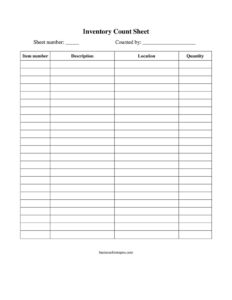
Inventory Count Sheet
Track stock accurately with our free Inventory Count Sheet template — record items, quantities, and locations during counts. Free download in PDF and DOCX.
PDF
DOCX
4 downloads
0
likes
Download Files
- DOCX
An Inventory Count Sheet is a simple worksheet used to physically record the quantity of items on hand during a stock count. Businesses reach for it most often during scheduled or surprise inventory counts to compare actual stock against system or ledger figures. You can download it free in PDF and DOCX with no signup required.
What Is an Inventory Count Sheet?
An Inventory Count Sheet is a structured form that staff use to manually tally physical inventory in a warehouse, stockroom, retail floor, or storage location. It is typically issued by an inventory manager or accountant and completed by the person performing the count. The sheet documents each item by number and description, where it is stored, and how many units were found. Once completed, the recorded quantities are reconciled against the inventory management system to identify discrepancies, shrinkage, or counting errors. It serves as a clear paper trail that proves a count was performed, who performed it, and what was found on a specific occasion.
When Do You Need an Inventory Count Sheet?
Almost any operation that holds physical stock benefits from a standardized counting form. Common situations include:
- Year-end or period-end physical counts required for accurate financial statements and tax reporting.
- Cycle counting where a portion of inventory is counted on a rotating schedule rather than all at once.
- Reconciling discrepancies when the system quantity does not match what staff believe is on the shelf.
- Receiving or returns verification to confirm incoming or returned goods before they are logged.
- Opening or closing a location, such as setting up a new stockroom or shutting down a warehouse.
- Auditor or owner spot checks to verify accuracy and deter theft or recordkeeping mistakes.
Types of Inventory Counts
The same count sheet supports several counting methods. A full physical count covers every item in a location, usually done after hours when stock is not moving. A cycle count samples a defined group of items regularly, spreading the workload across the year. A spot count targets specific high-value or fast-moving items as needed. Whichever method you use, recording the sheet number, location, and counter keeps the data organized and traceable so you can reconstruct exactly what was counted, where, and by whom.
What an Inventory Count Sheet Should Have
A complete and usable count sheet captures enough detail to make reconciliation straightforward. Key elements include a unique sheet number for tracking, the name of the person who counted, and a row for each item showing its item number, a clear description, the storage location, and the counted quantity. Together these fields let a supervisor match physical totals against system records, assign accountability for each sheet, and quickly locate any item that needs recounting.
How to Fill Out an Inventory Count Sheet
- Sheet number: Assign a unique number to the sheet (for example 001, 002) so it can be tracked, filed, and referenced during reconciliation.
- Counted by: Enter the full name of the person performing the count to establish accountability for the figures recorded.
- Item number: Write the SKU, part number, or internal code for each product so it matches your inventory system exactly.
- Description: Note a short, clear name or description of the item to avoid confusion between similar products.
- Location: Record the precise storage spot — aisle, shelf, bin, or zone — so the same item in different places is counted separately.
- Quantity: Enter the actual physical count of units found at that location. Count carefully and double-check high-value items.
Work down the sheet one item at a time, finishing each row completely before moving on. When the sheet is full, sign or initial it, note the date, and hand it to the supervisor for entry and reconciliation.
Tips for an Accurate Count
Accuracy depends as much on process as on the form itself. Count when stock is not moving, or freeze receiving and shipping during the count window so totals do not shift mid-task. Organize the area first — group like items together and clearly label locations — so counters are not hunting for products. Use a second person to verify high-value or fast-moving items, and have a third party recount any line where the physical figure differs sharply from the system quantity. Keep blank count sheets handy so a counter never has to stop and improvise on scrap paper, which is where errors creep in.
After the Count: Reconciliation
The count sheet is only the first step. Once submitted, each line’s quantity is compared to the system or ledger figure. Matches are signed off, and variances are flagged for investigation: a shortfall may point to theft, damage, or misplaced stock, while an overage often signals a receiving or data-entry error. Adjusting entries are then posted so the system reflects reality. Keep completed sheets on file — they are valuable evidence for auditors and useful for spotting recurring problem areas over time.
Common Mistakes to Avoid
- Skipping the sheet number or counter name, which makes it impossible to trace who counted what when a discrepancy appears.
- Vague descriptions that blur similar items and lead to misallocated quantities.
- Counting while stock is still moving, so items get counted twice or missed entirely.
- Recording the same item in one row when it sits in multiple locations instead of listing each location separately.
- Estimating instead of physically counting, especially for small or bulk items.
- Failing to reconcile promptly, allowing the gap between physical and system figures to widen.
Frequently Asked Questions
What is an Inventory Count Sheet used for? It is used to manually record the physical quantity of items on hand during an inventory count. The recorded figures are then compared against system or ledger records to confirm accuracy, identify shrinkage, and post adjusting entries so your books match reality.
How do I fill out an Inventory Count Sheet? Assign a sheet number, write the name of the person counting, then complete one row per item with its item number, description, storage location, and counted quantity. Work methodically through each location and have the sheet signed and dated before submitting it for reconciliation.
Who should complete the count sheet? Any trained staff member assigned to the count can complete it, but their name should appear in the “counted by” field for accountability. For high-value items, many businesses require a second person to verify the count.
Is an Inventory Count Sheet a legal document? It is primarily an internal operational record rather than a legal contract, though it can support financial statements, tax filings, and audits. Keeping accurate, signed count sheets on file helps demonstrate that proper inventory controls were followed.
What is the difference between a count sheet and an inventory log? A count sheet captures a single physical count at a point in time, while an inventory log tracks ongoing movements such as receipts, issues, and adjustments over a period. Count sheets feed the log by verifying actual quantities against running balances.
How much does this template cost? Nothing — this Inventory Count Sheet is completely free to download in both PDF and DOCX formats with no signup required. You can print it as-is or edit the DOCX version to match your own item codes and locations.
This Inventory Count Sheet template is a general example provided for informational purposes only and does not constitute legal, financial, or tax advice. Inventory and accounting requirements vary by jurisdiction and industry — consult a qualified professional to ensure your records meet applicable standards.
Related Forms
- Software Inventory
- Semi Annual Safety And Maintenance Update
- Amateur Radio Station Log
- Interview Preparation Worksheet
- Loaned Items Tracker
- Work Seeking Log
Browse more in Log and Inventory.