
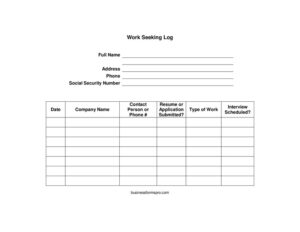
Work Seeking Log
Track every job application and interview with a free Work Seeking Log template—organize your search and meet work-search requirements with a free download.
PDF
DOCX
0
likes
Download Files
- DOCX
A Work Seeking Log is a simple record that documents the jobs you apply for, who you contacted, and what came of each effort. People most often use one to track their job search in an organized way or to prove ongoing work-search activity for unemployment benefits. You can download this template free in PDF and DOCX formats, with no signup required.
What Is a Work Seeking Log?
A Work Seeking Log is a structured worksheet for recording each step of a job hunt. The person seeking work fills it out, listing the companies they contacted, the type of position, whether they submitted a resume or application, and any interviews scheduled. It serves two main purposes: keeping an individual organized during a busy search, and providing documented evidence of job-search activity. Many state unemployment programs require recipients to record a minimum number of work-search contacts per week, and a log like this captures exactly the details they ask for. The form also helps you follow up consistently, since every contact name and phone number is in one place.
When Do You Need a Work Seeking Log?
A Work Seeking Log is useful any time you need to organize or document your search for employment. Common situations include:
- Collecting unemployment benefits — most programs require proof of a set number of job contacts each week, and this log gives you a ready format.
- Running an active job search — when applying to many openings, the log keeps every company, contact, and submission date straight.
- Following up on applications — having the contact person and phone number recorded makes timely follow-up calls easy.
- Preparing for interviews — the log shows which roles led to scheduled interviews so you can prepare for each one.
- Working with a career counselor or case manager — many agencies ask clients to bring a completed log to review progress.
- Documenting effort for a workforce program — some reemployment or training programs require participants to show ongoing search activity.
What a Work Seeking Log Should Have
A complete Work Seeking Log captures both who you are and what you did for each job contact. At the top, it identifies the job seeker with full name, address, phone number, and—where a program requires it—a Social Security number for verification. The body of the form is a repeating set of entries, each holding the date of contact, the company name, the contact person or phone number, whether a resume or application was submitted, the type of work sought, and whether an interview was scheduled. Together these elements show a clear, dated trail of effort. A good log leaves room for several entries so you can record an entire week (or more) of activity on a single page and present it whenever it is requested.
How to Fill Out a Work Seeking Log
- Full name: Print your legal name as it appears on official documents.
- Address: Enter your current mailing address, including city, state, and ZIP code.
- Phone: Add the best number for reaching you about applications and interviews.
- Social Security number: Provide this only if the program or agency requires it for identity verification; otherwise you may leave it blank.
- Date: For each entry, record the date you made the contact or submitted the application.
- Company name: Write the full name of the employer you contacted.
- Contact person or phone #: Note the name of the recruiter or hiring manager, or a company phone number if no name was given.
- Resume or application submitted: Mark whether you sent a resume, completed an application, or both.
- Type of work: State the position or kind of job you applied for, such as “warehouse associate” or “administrative assistant.”
- Interview scheduled: Indicate yes or no, and add the interview date if one was set.
Tips for Keeping an Accurate Log
Fill in each entry the same day you make a contact, while the details are fresh. Use the official company name rather than an abbreviation so the record is easy to verify. When you reach a real person, write their name—it makes follow-up far more effective than a generic phone number. Save copies of the confirmation emails or application receipts that correspond to your entries; if an agency later asks for proof, those documents back up your log. Keep your logs in order by date so you can quickly count how many contacts you made in a given week.
Meeting Work-Search Requirements
If you are filing for unemployment, requirements vary by state. Many programs set a minimum number of job contacts per week and define what counts as a valid contact—applying online, submitting a resume, attending an interview, or registering with a staffing agency. Some require you to report your log details when you file your weekly claim, and some may audit your entries. Check your state workforce agency’s rules so you know how many contacts to record and which fields they expect. This template is designed to capture the information most programs request, but always confirm the specifics with your local office.
Common Mistakes to Avoid
- Leaving entries blank or vague — “applied online” without a company name or date may not count as proof.
- Filling it out from memory weeks later — record contacts promptly to keep dates and details accurate.
- Skipping the contact person — without a name or number, follow-up and verification are harder.
- Recording too few contacts — falling short of your program’s weekly minimum can affect eligibility.
- Sharing your Social Security number unnecessarily — only include it when an agency genuinely requires it, and store the log securely.
- Losing supporting documents — keep confirmation emails and receipts that match each entry.
Frequently Asked Questions
What is a Work Seeking Log used for? It is used to record the jobs you apply for and the employers you contact during a job search. People use it to stay organized and, very often, to document work-search activity required to receive unemployment benefits. The log keeps dates, company names, and outcomes in one place.
How do I fill out a Work Seeking Log? Start by entering your personal details at the top, then add one row for each job contact. For every contact, record the date, company name, contact person or phone number, whether you submitted a resume or application, the type of work, and whether an interview was scheduled. Update it the same day you make each contact.
Do I have to include my Social Security number? Only if the program or agency reviewing your log requires it for identity verification. If it is for your own organization or the requesting party does not need it, you can leave that field blank. Always keep any log containing your SSN in a secure place.
How many job contacts should I record each week? That depends on your state’s unemployment or workforce program, since minimums vary. Check your local agency’s published work-search rules to learn the required number and what kinds of activities count. The log gives you room to record as many entries as you need.
Is a Work Seeking Log legally binding? It is a record, not a contract, so it does not create legal obligations by itself. However, if you submit it to a government program, you are generally certifying that the information is true, so accuracy matters. Providing false work-search information can affect your benefits.
Is this Work Seeking Log template free? Yes. You can download it free in both PDF and DOCX formats with no signup required. Use the editable DOCX to type entries on your computer, or print the PDF to fill it in by hand.
This Work Seeking Log template is a general example provided for informational purposes only and is not legal, financial, or tax advice. Unemployment and work-search requirements vary by jurisdiction and program. Consult your state workforce agency or a qualified professional to confirm what applies to your situation.
Related Forms
- Inventory Card Template
- Short Term Disability Claims Tracker
- Office Supplies Inventory
- Telephone Time Tracker
- Cigar Tasting Log
- Gas Mileage Log
Browse more in Log and Inventory.