
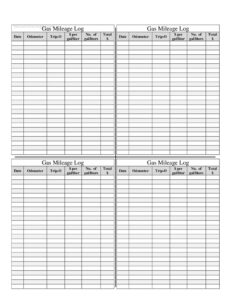
Gas Mileage Log
Track fuel costs and vehicle efficiency with this free Gas Mileage Log template, a simple printable PDF and DOCX you can download free with no signup.
PDF
DOCX
0
likes
Download Files
- DOCX
A Gas Mileage Log is a simple record sheet used to track every fuel purchase along with the distance driven, so you can calculate your vehicle’s real fuel economy and total fuel spending over time. People most often use one to monitor MPG (or liters per 100 km), budget for fuel, and keep accurate records for tax deductions or expense reimbursements. This template is completely free to download in both PDF and DOCX formats, with no signup required.
What Is a Gas Mileage Log?
A Gas Mileage Log is a structured table that documents each time you put fuel in your vehicle. Each row captures the date, the odometer reading, the trip distance, the price per gallon or liter, the volume purchased, and the total cost. Drivers, small business owners, rideshare contractors, and fleet managers use it to translate scattered gas receipts into meaningful data. Over weeks and months, the log reveals your average fuel efficiency, how much you spend on fuel, and whether a vehicle’s performance is changing. It serves as both a personal budgeting tool and a paper trail for reimbursement or deduction purposes.
When Do You Need a Gas Mileage Log?
This log is useful any time fuel costs matter or need to be documented. Common situations include:
- Claiming a vehicle expense deduction — self-employed people and contractors who use the actual-expense method need detailed fuel records to support deductions.
- Employer reimbursement — workers who drive their personal car for work can document fuel purchases tied to business trips.
- Tracking a new or used vehicle’s efficiency — monitoring MPG after a purchase, a repair, or a tune-up to confirm it runs as expected.
- Household or personal budgeting — knowing exactly how much you spend on fuel each month helps with planning and cutting costs.
- Managing a small fleet — comparing fuel economy across multiple vehicles or drivers to spot maintenance issues or inefficient routes.
- Diagnosing problems — a sudden drop in MPG can be an early warning sign of low tire pressure, a dirty air filter, or a failing component.
What a Gas Mileage Log Should Have
A complete fuel log makes the numbers add up and stay easy to interpret. The essential elements are a clear date for each fill-up, the odometer reading at the time, the trip distance since the last fill, the price per gallon or liter, the number of gallons or liters purchased, and the total dollar amount spent. Together these let you calculate fuel economy (distance divided by volume) and cost per mile. Consistency is what makes a log trustworthy: filling in every row at each stop and using the same units throughout prevents gaps that distort your averages. A title line identifying the vehicle is also helpful when you keep separate logs.
How to Fill Out a Gas Mileage Log
- Date: Write the date of the fill-up. Record it every time so you can group entries by week or month later.
- Odometer: Note the vehicle’s total mileage shown on the dashboard when you fuel up. This anchors each entry to a fixed point.
- Trip-O: Enter the trip odometer reading — the distance driven since your last fill-up. Reset the trip meter after each fill so this number stays accurate, or subtract the previous odometer reading from the current one.
- $ per gal/liter: Record the posted price per gallon (or per liter) you paid at the pump.
- No. of gal/liters: Write the exact volume dispensed, shown on the pump display.
- Total $: Enter the full amount charged. You can confirm it by multiplying price per unit by volume; it should match your receipt.
To find fuel economy, divide the Trip-O distance by the gallons (or liters) added at that fill. Keep your receipts with the log if you need supporting documentation.
Getting Accurate Numbers From Your Log
The reliability of a Gas Mileage Log depends on how you collect each reading. For the truest MPG calculation, fill the tank completely each time so the volume you record corresponds to the distance you actually drove. Partial fills make the math inconsistent because you cannot know how much fuel was already in the tank. Record the entries at the pump rather than from memory later, when prices and amounts blur. If you drive in mixed conditions, jotting a brief note in the margin — highway trip, towing, cold weather — helps explain swings in efficiency when you review the data. Over time, a column of consistent MPG values gives you a baseline, and any meaningful deviation becomes easy to spot.
Using the Log for Taxes and Reimbursement
If you plan to use the log for business purposes, keep it as part of your broader vehicle records. Fuel costs are one component of the actual-expense method, which may also include maintenance, insurance, and depreciation; the standard mileage method instead uses total miles driven. Either way, a dated, itemized fuel log strengthens your documentation. Pair it with a separate mileage or trip log noting business versus personal miles, since tax authorities generally want to see the business purpose of each trip. Rules and rates differ by country and change over time, so confirm current requirements before filing.
Common Mistakes to Avoid
- Skipping fill-ups: A missing entry breaks the distance-to-fuel relationship and throws off your average.
- Mixing units: Switching between gallons and liters, or between miles and kilometers, produces meaningless economy figures.
- Forgetting to reset the trip meter: If Trip-O isn’t reset (or calculated by subtraction), the distance per fill is wrong.
- Estimating instead of reading the pump: Rounding volume or price introduces errors that compound over many entries.
- Partial fills with full-tank math: Topping off the tank inconsistently makes MPG calculations unreliable.
- Losing receipts: If you need the log for reimbursement or taxes, an entry without backup documentation is weaker support.
Frequently Asked Questions
What is a Gas Mileage Log used for? It is used to track fuel purchases and distance driven so you can calculate your vehicle’s fuel economy and total fuel spending. Drivers use it for budgeting, monitoring vehicle health, and documenting expenses for taxes or reimbursement. The log turns individual gas receipts into a clear, ongoing record.
How do I calculate MPG from the log? Divide the Trip-O distance (miles driven since the last fill) by the number of gallons added at that fill-up. For metric users, divide liters used by kilometers driven and multiply by 100 to get liters per 100 km. Doing this at every fill-up gives you a running picture of efficiency.
Should I fill the tank completely each time? For the most accurate fuel economy, yes. A full fill means the volume you record matches the distance you actually traveled since the last full tank. Partial fills make it impossible to know how much fuel was already in the tank, which skews your numbers.
Can I use this log for tax purposes? Yes, a dated and itemized fuel log can support a vehicle expense deduction or reimbursement claim. Keep your receipts and a separate record of business versus personal trips. Because tax rules and rates vary and change, confirm current requirements with a qualified tax professional.
Is the Gas Mileage Log free to download? Yes. You can download this template free in both PDF and DOCX formats with no signup or account required. Print the PDF to keep in your glove box, or edit the DOCX version on your computer.
How often should I make an entry? Add a new row every single time you buy fuel. Consistency is what makes the log useful — even one skipped fill-up creates a gap that distorts your average MPG and total-cost calculations over the period.
This Gas Mileage Log template is provided as a general example for informational purposes only and is not legal, financial, or tax advice. Fuel-expense and deduction requirements vary by jurisdiction and change over time. Consult a qualified tax or financial professional before relying on this log for any official purpose.
Related Forms
- Cash Register Log
- Donation Record
- Janitorial Checklist
- Wilderness Emergency Checklist
- Outgoing Mail Log
- List of Home Services
Browse more in Log and Inventory.