
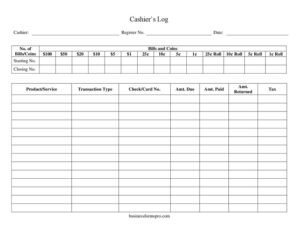
Cash Register Log
Track till counts, transactions, and cash drawer balances with this free Cash Register Log template, available as a free download in PDF and DOCX.
PDF
DOC
0
likes
Download Files
- DOC
A Cash Register Log is a record used to track the money in a cash drawer and the transactions processed during a shift. Retailers, cafés, and small businesses use it most often to count opening and closing cash, document sales, and reconcile the till against expected totals. It’s free to download here in both PDF and DOCX formats, with no signup required.
What Is a Cash Register Log?
A Cash Register Log is a structured worksheet that a cashier completes at the start and end of a shift, plus throughout the day as transactions occur. It captures who operated the register, which physical drawer was used, and a denomination-by-denomination breakdown of bills, coins, and coin rolls on hand. Alongside the cash count, it records individual transactions — the product or service sold, the payment type, amounts due and paid, change returned, and tax. The completed log gives a manager a clear, auditable snapshot of every drawer, making it easy to spot shortages, overages, or data-entry errors at the close of business.
When Do You Need a Cash Register Log?
This log is useful any time cash changes hands and accountability matters. Common situations include:
- Opening a register for the day — counting the starting float and recording each denomination before sales begin.
- Closing out a shift — counting the drawer down, comparing it to the starting count, and verifying totals against the register tape.
- Handing off a drawer between cashiers — documenting the balance so each person is accountable only for their own shift.
- Investigating a discrepancy — when the till is short or over, a detailed log helps trace which transactions or denominations are off.
- Tracking mixed payment types — when customers pay by cash, check, or card, the log records the check or card number and amounts for later reconciliation.
- Preparing bank deposits — the denomination count and roll totals make it simple to prepare and verify a deposit slip.
What a Cash Register Log Should Have
A complete and reliable log includes a clear header identifying the cashier, register number, and date so every drawer can be matched to a person and a day. It needs a full denomination grid covering bills ($100, $50, $20, $10, $5, $1), loose coins (25¢, 10¢, 5¢, 1¢), and coin rolls (25¢, 10¢, 5¢, 1¢), with space for the quantity of each. It should record starting and closing register numbers or counts, a transaction area listing each product or service, the transaction type, any check or card number, and the amount due, amount paid, amount returned, and tax. Together these fields produce a self-checking record that ties physical cash to documented sales.
How to Fill Out a Cash Register Log
- Enter the Cashier name, the Register No., and the Date at the top so the drawer is tied to a specific operator and shift.
- Count the drawer and fill the No. of Bills/Coins column for each denomination: $100, $50, $20, $10, $5, $1, then loose coins 25¢, 10¢, 5¢, 1¢, and finally the 25¢, 10¢, 5¢, and 1¢ Rolls.
- Record the Starting No. — the opening count or register reading — before any sales are rung.
- As transactions occur, log each one: write the Product/Service sold and the Transaction Type (cash, check, or card).
- For non-cash payments, note the Check/Card No. for reference.
- Enter the Amt. Due, the Amt. Paid by the customer, the Amt. Returned as change, and the applicable Tax.
- At shift end, recount the drawer and record the Closing No., then compare it against the starting count plus net sales.
Reconciling and Catching Discrepancies
The real power of the log is reconciliation. Add the starting float to the cash sales recorded, subtract any cash paid out, and the result should equal the cash you physically count at closing. If the closing count does not match, work backward through the denomination grid and the transaction list. A common cause is a single mis-keyed amount paid or returned, so checking the Amt. Paid and Amt. Returned columns against receipts usually surfaces the error quickly. Small recurring shortages can point to change-making mistakes, while large gaps warrant a manager review. Keeping the coin-roll counts accurate is equally important, since a missing or extra roll can throw off a count by several dollars at once.
Tips for Accurate Cash Handling
Count the drawer in a quiet moment, not while customers wait. Use the denomination grid in order from highest to lowest so nothing is skipped. Have a second person verify large counts when possible, and store completed logs together with the matching register tapes and deposit slips. Consistency matters more than speed: filling out the same fields the same way every shift makes month-end review far easier and protects honest cashiers from blame.
Common Mistakes to Avoid
- Skipping the starting count — without a recorded Starting No., you have nothing to reconcile the closing drawer against.
- Confusing quantity and value — the denomination columns ask for the number of bills or coins, not the dollar total; multiply afterward.
- Leaving payment type blank — omitting the Transaction Type makes it impossible to separate cash from card and check totals.
- Forgetting tax — leaving the Tax field empty distorts the amount due and complicates reporting.
- Not recording change — skipping Amt. Returned hides the most frequent source of till errors.
- Sharing a single log between cashiers — each operator should have their own drawer and log to keep accountability clear.
Frequently Asked Questions
What is a Cash Register Log used for? It is used to count the cash in a register and document the transactions processed during a shift. It lets a business reconcile the physical drawer against recorded sales, identify shortages or overages, and prepare bank deposits with confidence.
How do I fill out the denomination section? Enter the quantity of each bill, coin, and coin roll you physically count — for example, the number of $20 bills or 25¢ rolls. You then multiply each quantity by its value and total them to find the cash in the drawer.
What is the difference between Starting No. and Closing No.? The Starting No. is the count or register reading taken before any sales are rung at the beginning of a shift. The Closing No. is the count taken at the end, and the difference between them, adjusted for sales and payouts, should match your transaction records.
Do I need to log card and check payments here too? Yes — recording the Transaction Type and the Check/Card No. for non-cash payments keeps your records complete. This helps you separate cash totals from card and check totals when reconciling and preparing deposits.
Is a Cash Register Log legally required? There is no universal law mandating this exact form, but accurate cash records support tax reporting, audits, and internal controls. Requirements and retention periods vary by jurisdiction and industry, so check your local rules and your own company policy.
Is this template really free? Yes. You can download the Cash Register Log as a free PDF or DOCX with no signup required, print it for daily use, or edit the DOCX version to match your store’s denominations and transaction fields.
This template is a general example provided for informational purposes only and is not legal, financial, or tax advice. Record-keeping and tax requirements vary by jurisdiction — consult a qualified professional for guidance specific to your business.
Related Forms
- Pre-Trip Vehicle Inspection Checklist
- Inventory Tracking Spreadsheet
- Pledge Log
- College Packing Checklist
- Weekly Blog Planner
- Club Tracking Payments
Browse more in Log and Inventory.