
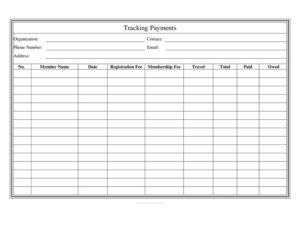
Club Tracking Payments
Use our free Club Tracking Payments log to record member dues, fees, and balances owed, then download it instantly as a PDF or DOCX template.
PDF
DOC
3 downloads
0
likes
Download Files
- DOC
A Club Tracking Payments form is a simple ledger that lets an organization record what each member owes and has paid across registration, membership, and travel costs. Clubs most often use it to keep dues collection organized and to know at a glance who still has an outstanding balance. It is free to download here in both PDF and DOCX formats, with no signup required.
What Is a Club Tracking Payments Form?
A Club Tracking Payments form is a financial log used by clubs, teams, associations, and community groups to track money collected from members. It documents each member by name, the fees they were charged, the amount they have paid, and the balance still owed. Typically the club treasurer, secretary, or membership coordinator maintains it throughout a season or membership year. Rather than juggling scattered receipts or memory, the form gives one central record that ties a contact organization to a clear list of individual payments. It is a working tool for transparency and reconciliation, making it easy to answer questions like “Who still owes for travel?” or “How much has the club collected so far?”
When Do You Need a Club Tracking Payments Form?
This log is useful any time money flows from members into a club. Common situations include:
- Collecting annual dues — recording who has paid the yearly membership fee and who is overdue.
- Sports team seasons — tracking registration fees, uniform costs, and travel charges for tournaments or away games.
- New member onboarding — logging one-time registration fees as people join throughout the year.
- Group trips and events — recording travel contributions for a retreat, competition, or conference.
- Treasurer handoffs — giving an incoming officer a clean record of balances at the time of transition.
- Budget reporting — summarizing total collected versus total owed for a board meeting or members’ assembly.
What a Club Tracking Payments Form Should Have
A complete payment tracker keeps both the club’s identity and each member’s financial detail in one place. At the top, it should carry the organization’s name and a point of contact so anyone reading the log knows who maintains it. The body should list members individually with numbered rows, the date of each transaction, and a breakdown of the fees that apply. Crucially, it should separate the categories of money — registration, membership, and travel — then total them and compare against what was paid to reveal the balance owed. Clear column headings, consistent entries, and a running set of totals make the document easy to audit and hard to misread.
How to Fill Out a Club Tracking Payments Form
- Organization: Enter the full name of the club, team, or association the log belongs to.
- Contact: Write the name of the person responsible for the log, usually the treasurer or membership coordinator.
- Phone Number and Email: Add the contact’s phone and email so members can ask about their balances.
- Address: Record the club’s mailing address or the address where payments should be sent.
- No.: Number each row sequentially so entries are easy to reference.
- Member Name: Enter the member the payment applies to.
- Date: Note the date the payment was received or recorded.
- Registration Fee: List any one-time sign-up fee charged to that member.
- Membership Fee: Enter the recurring or annual membership dues amount.
- Travel: Record travel-related charges, such as transportation or trip costs.
- Total: Add the fee columns to show the full amount the member is responsible for.
- Paid: Enter how much the member has actually paid.
- Owed: Subtract Paid from Total to show the outstanding balance.
Tips for Keeping Accurate Payment Records
Consistency is what makes this log trustworthy. Update entries as soon as payments come in rather than batching them later, when memory fades and receipts get lost. Use the same currency format throughout, and keep a zero in any fee column that does not apply instead of leaving it blank, so the totals are never ambiguous. If a member pays in installments, you can add a new dated row each time and adjust the Owed figure accordingly. At the end of a meeting or month, total each column to produce a snapshot of how much the club has collected and how much is still outstanding. Keeping the DOCX version lets you sort, recalculate, and reuse the sheet each season.
Keeping the Log Versus Issuing Receipts
A Club Tracking Payments form is an internal record, not a receipt. The log shows the club’s full picture of all members at once, while a receipt confirms a single payment to one person. Many clubs use both: the tracker for their own reconciliation and a short receipt or email confirmation for the paying member. Pair the log with bank deposit records so the cash and the spreadsheet always agree, and retain it for your club’s records in case members or auditors ask questions later.
Common Mistakes to Avoid
- Leaving fee cells blank instead of entering 0, which makes totals unclear and invites disputes.
- Forgetting to update the Owed column after a partial payment, so balances drift out of date.
- Mixing categories — lumping travel charges into membership fees, which hides where money came from.
- Skipping the date, making it impossible to reconcile against bank deposits later.
- Not numbering rows, which makes a long member list hard to reference in meetings.
- Storing only one copy — keep a backup so a lost file does not erase your records.
Frequently Asked Questions
What is a Club Tracking Payments form used for? It is used to record each member’s fees, payments, and outstanding balances in one organized log. Clubs rely on it to track dues, registration, and travel costs so the treasurer always knows who has paid and who still owes money.
How do I fill out the Total and Owed columns? Add the Registration Fee, Membership Fee, and Travel amounts together to get the Total a member is responsible for. Then subtract the Paid amount from that Total, and the result is the figure you enter in the Owed column.
Is this form legally binding? The form itself is an internal record rather than a binding contract. It documents amounts owed and paid, but the obligation to pay dues generally comes from your club’s bylaws or membership agreement, not from the log alone.
Can I customize the fee categories? Yes. Because the template is available in editable DOCX format, you can rename or add columns to match your club’s actual charges, such as equipment, event tickets, or fundraising contributions.
How much does this template cost? It is completely free to download from Business Forms Pro in both PDF and DOCX formats, with no signup or account required. You can use it for as many members and seasons as you need.
Do members need to sign this form? A signature is not required for the log to serve its purpose as an internal tracking record. Some clubs add a signature column to confirm receipt of payment, but it is optional and depends on your group’s preferences.
This template is a general example provided for informational purposes only and does not constitute legal, financial, or tax advice. Record-keeping and financial reporting requirements vary by jurisdiction and by organization type — consult a qualified professional or your club’s governing documents to ensure your practices are appropriate.
Related Forms
- IT Inventory
- Home Inventory List of Possessions
- Payment Method Tracker
- Incoming Mail Log
- Retirement Income Sources
- Laundry Dry Cleaning Form
Browse more in Log and Inventory.