
IT Inventory
Track every device with this free IT Inventory template, listing computers, servers, printers and more by department, with free download in PDF and DOCX.
PDF
DOCX
3 downloads
0
likes
Download Files
- DOCX
An IT Inventory is a structured record of all the technology hardware your organization owns, listing each item by type, quantity, and department. Most teams reach for one when they need a single reliable source of truth for what equipment exists, where it lives, and who uses it. You can download this IT Inventory template free in both PDF and DOCX formats, with no signup required.
What Is an IT Inventory?
An IT Inventory is a working document used by IT managers, office administrators, and asset coordinators to catalog the computers, servers, telephones, networking gear, and peripherals a company relies on every day. It documents what hardware is in service, how many units there are, and which department holds them, along with space for notes about condition, model, or assigned user. Unlike a financial asset register that focuses on depreciation, an IT Inventory is operational: it helps you support, replace, audit, and secure physical technology. Maintaining one keeps purchasing decisions grounded in real data and makes audits, insurance claims, and troubleshooting far faster.
When Do You Need an IT Inventory?
Almost any organization that owns more than a handful of devices benefits from keeping a current inventory. Common situations include:
- Annual asset audits — verifying that physical equipment matches accounting and procurement records before the books close.
- Onboarding and offboarding employees — tracking which computer, phone, and peripherals a new hire receives and reclaiming them when someone leaves.
- Office moves or expansions — counting servers, routers, printers, and copiers so nothing is lost or duplicated during relocation.
- Insurance and loss claims — providing documented proof of owned hardware and quantities after theft, fire, or water damage.
- Refresh and budget planning — identifying aging keyboards, mice, modems, and computers due for replacement in the next cycle.
- Security and compliance reviews — confirming that every networked device, from modems to scanners, is accounted for and patched.
What an IT Inventory Should Have
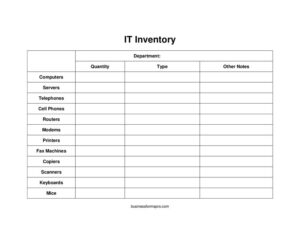
A useful IT Inventory captures enough detail to identify and locate each asset without becoming so complex that nobody updates it. At minimum, it should record the department that holds the equipment, the type of device, the quantity on hand, and an other notes field for serial numbers, models, condition, or the assigned user. The categories themselves matter: this template breaks hardware into computers, servers, telephones, cell phones, routers, modems, printers, fax machines, copiers, scanners, keyboards, and mice. Grouping items this way makes totals easy to tally and gaps easy to spot. A complete inventory also benefits from a date of last review so readers know how current the information is.
How to Fill Out an IT Inventory
Work through the form one row or section at a time so nothing is double-counted:
- Enter the department the equipment belongs to, such as Accounting, Sales, or IT Support, so items can be traced to a location and owner.
- Identify the device type using the listed categories — choose computer, servers, telephones, cell phones, routers, modems, printers, fax machines, copiers, scanners, keyboards, or mice.
- Record the quantity of that device type held by the department; count carefully and avoid estimating.
- For computers and servers, note make, model, and operating system in the notes so support staff can match drivers and warranties.
- Log telephones and cell phones with their numbers or extensions where useful.
- List networking hardware — routers and modems — with location and any static IP details.
- Capture output and imaging devices: printers, fax machines, copiers, and scanners.
- Count input peripherals such as keyboards and mice, including spares.
- Use other notes for serial numbers, purchase dates, condition, or the assigned user.
Tips for Keeping the Inventory Accurate
An inventory is only valuable if it stays current. Set a recurring review — quarterly works for most teams — and update the document whenever equipment is purchased, retired, or moved between departments. Assign one owner responsible for the master file so changes flow through a single channel rather than several conflicting copies. Where possible, label physical devices with an asset tag and write that tag in the notes column, which makes physical-to-record reconciliation fast during audits. For larger fleets, consider exporting the DOCX into a spreadsheet so you can sort and filter by department or device type.
IT Inventory vs. an Asset Register
People sometimes confuse an IT Inventory with a financial asset register, but they serve different goals. A financial asset register tracks purchase cost, depreciation schedules, and book value for accounting purposes. An IT Inventory, by contrast, is operational — it answers practical questions like “how many working printers does Marketing have?” or “which department is missing a router?” Many organizations keep both and reconcile them periodically, using the IT Inventory as the ground-truth count of physical hardware and the asset register for valuation.
Common Mistakes to Avoid
- Letting it go stale — an inventory that hasn’t been touched in a year quickly becomes useless; schedule regular reviews.
- Vague device descriptions — listing “computer” without a model or serial number makes warranty and support work harder than it needs to be.
- Skipping small peripherals — keyboards, mice, and modems add up and are often the first items to disappear unaccounted for.
- No clear owner — when everyone can edit and no one is responsible, versions drift apart.
- Forgetting decommissioned gear — failing to remove retired or wiped devices inflates counts and clouds security reviews.
- Mixing departments in one block — keep each department’s items grouped so totals and gaps are easy to see.
Frequently Asked Questions
What is an IT Inventory used for? It is a centralized record of an organization’s technology hardware, including computers, servers, networking equipment, and peripherals. Teams use it for audits, employee onboarding, budget planning, insurance documentation, and day-to-day support. Having one in place means you always know what equipment exists and where it is assigned.
How do I fill out the IT Inventory template? Start by listing the department, then the device type from the categories provided, followed by the quantity on hand. Use the notes column to capture serial numbers, models, condition, or assigned users. Work through one department at a time so items are not double-counted.
Is this IT Inventory template free to download? Yes. You can download it free in both PDF and DOCX formats with no signup or payment required. The DOCX version is fully editable, so you can add columns, rename categories, or convert it into a spreadsheet to suit your environment.
How often should I update an IT Inventory? A quarterly review works well for most organizations, but you should also update it any time equipment is purchased, retired, reassigned, or relocated. Keeping the document current ensures it remains reliable for audits and budget decisions. Assigning a single owner helps maintain consistency.
What details should I record for each device? Beyond department, type, and quantity, capture the make and model, serial or asset tag number, condition, purchase date, and assigned user where relevant. For phones and networking gear, include extensions, phone numbers, or IP details. The more identifying information you record, the easier support and audits become.
Can I use this for both office and remote equipment? Yes. The department and notes fields let you flag whether a laptop, cell phone, or router is deployed in the office or with a remote worker. Tracking remote assets in the same inventory helps you recover equipment when employees leave and supports security reviews.
This IT Inventory template is provided as a general example for informational purposes only and does not constitute legal, financial, or IT security advice. Requirements for asset tracking, data security, and recordkeeping vary by industry and jurisdiction — consult a qualified professional to ensure your practices meet applicable standards.
Related Forms
- Bill Reminder Tracker
- Library Loan List
- New Car Inventory Card
- Inventory Cards Spreadsheet — Black And White
- Vendor Price Analysis
- Cash Envelope Tracker
Browse more in Log and Inventory.