
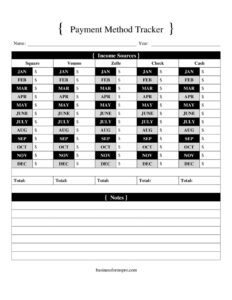
Payment Method Tracker
Use this free Payment Method Tracker template to record and organize every payment method, balance, and transaction in one place — free download in PDF/DOCX.
PDF
DOCX
0
likes
Download Files
- DOCX
A Payment Method Tracker is a simple log used to record and organize the various ways money moves in and out of a household or business — cash, debit and credit cards, bank transfers, digital wallets, and more. The most common reason people use one is to keep a clear, at-a-glance picture of which payment methods are active, what they cost, and how often each is used. This template is free to download in both PDF and DOCX, with no signup required.
What Is a Payment Method Tracker?
A Payment Method Tracker is an organizational document that lists each payment method you or your organization uses and the key details tied to it. Individuals use it to manage personal finances, while small businesses, bookkeepers, and freelancers use it to monitor accounts payable and receivable across different channels. Rather than tracking individual purchases, it focuses on the methods themselves — the card numbers (last four digits), provider names, account nicknames, due dates, fees, and current status of each. The result is a single reference sheet that answers questions like “Which card has the lowest balance?” or “Is this subscription charged to the right account?” without digging through statements.
When Do You Need a Payment Method Tracker?
This log is useful any time you manage more than one way of paying or getting paid. Common situations include:
- Juggling multiple cards. You carry several credit and debit cards and want one place to see balances, limits, and due dates side by side.
- Managing recurring subscriptions. You need to know exactly which card or account each streaming, software, or membership charge hits.
- Running a small business. You accept cash, card, bank transfer, and digital wallet payments and want to track which channels customers actually use.
- Budgeting and debt payoff. You’re prioritizing which balances to clear first and want fees and interest visible at a glance.
- Sharing finances. A couple, family, or business partners need a shared record of which accounts are active and who manages them.
- Auditing for fraud or waste. You’re reviewing all active payment methods to cancel unused ones and confirm nothing unfamiliar is on file.
Types of Payment Methods to Track
A thorough tracker covers every channel money flows through. Typical categories include physical cash, checks, debit cards linked to checking accounts, credit cards, prepaid or gift cards, ACH and wire bank transfers, and digital wallets such as mobile pay apps. For businesses, you might also log point-of-sale terminals, online payment gateways, and invoicing platforms. Grouping methods by type makes it easier to compare fees and spot duplicates.
What a Payment Method Tracker Should Have
To be genuinely useful, the tracker should capture enough detail to identify each method without exposing sensitive full account numbers. Key elements include a method name or nickname, the type (card, bank, wallet, cash), the provider or issuer, the last four digits or a partial identifier, the account it’s linked to, the current balance or available credit, any fees or interest, the billing or due date, the status (active, paused, closed), and notes for context. A date column lets you record when each entry was last reviewed or updated.
How to Fill Out a Payment Method Tracker
Work down one row per payment method and complete each column:
- Method name / nickname: Give each entry a label you’ll recognize, such as “Travel Card” or “Business Checking.”
- Type: Note whether it’s cash, debit, credit, bank transfer, or digital wallet.
- Provider / issuer: Record the bank, card network, or app that operates the method.
- Last four digits: Enter only the final four digits or a partial identifier — never the full number — so the entry is recognizable but secure.
- Linked account: Specify the checking or funding account behind the method, if any.
- Balance / available credit: Log the current balance, limit, or available funds.
- Fees / interest: Note monthly fees, annual fees, or interest rates that apply.
- Due / billing date: Record the payment due date or statement close date.
- Status: Mark the method active, paused, or closed.
- Notes & date reviewed: Add reminders and the date you last verified the details.
Tips for Keeping Your Tracker Accurate and Secure
A tracker is only as good as its upkeep. Set a recurring reminder — monthly or each pay cycle — to update balances and due dates, since these change constantly. Because the document references financial accounts, store it securely: use a password-protected file or a locked location, and avoid emailing it as an unencrypted attachment. Never write down full card numbers, PINs, CVV codes, or online banking passwords; the last four digits and a nickname are enough to identify a method while limiting damage if the sheet is lost. If you maintain a DOCX version, color-coding or sorting by due date can turn the log into a quick action list each week.
Tracker vs. a Full Budget or Ledger
A Payment Method Tracker is not the same as a budget or a transaction ledger. A budget plans how much you intend to spend by category, and a ledger records every individual transaction. This tracker sits between them, summarizing the channels themselves so you can see at a glance which methods exist, what they cost to hold, and whether any should be closed. Many people use all three together — the tracker as the master index, the budget for planning, and the ledger for detail.
Common Mistakes to Avoid
- Writing full card or account numbers. Always limit entries to the last four digits to protect sensitive data.
- Letting balances go stale. Outdated figures defeat the purpose; update on a fixed schedule.
- Forgetting inactive methods. Closed or paused accounts still belong on the sheet so you don’t reactivate them by mistake.
- Skipping the fees column. Small monthly charges add up; logging them reveals methods worth cancelling.
- Storing the file insecurely. An unprotected document is a fraud risk — keep it encrypted or locked.
- Using vague nicknames. Labels like “Card 1” cause confusion; be descriptive enough to tell methods apart.
Frequently Asked Questions
What is a Payment Method Tracker used for? It’s used to keep an organized list of every payment method you use — cards, bank accounts, cash, and digital wallets — along with their balances, fees, and due dates. The goal is to give you one reference sheet instead of scattered statements. Both individuals and small businesses use it to stay on top of their finances.
How do I fill out a Payment Method Tracker? Enter one payment method per row and complete each column: the nickname, type, provider, last four digits, linked account, balance, fees, due date, status, and notes. Update the balances and dates regularly so the information stays accurate. Avoid recording any full account numbers or security codes.
Is it safe to write down my payment details? It’s safe as long as you record only partial identifiers like the last four digits and never full card numbers, PINs, or passwords. Store the completed file in a password-protected document or a locked location. Treating it like any sensitive financial record keeps your information protected.
How often should I update the tracker? Most people update it monthly or each pay cycle, since balances and due dates change frequently. Reviewing it on a fixed schedule helps you catch unused subscriptions, rising fees, or unfamiliar charges early. Add a “date reviewed” note each time so you know how current the figures are.
Can a business use this template? Yes. Small businesses, freelancers, and bookkeepers can track the channels they accept payments through and the accounts they pay vendors from. It works alongside accounting software as a quick master index of active payment methods.
How much does this template cost? Nothing — it’s completely free to download from Business Forms Pro in both PDF and DOCX formats, with no signup required. You can print the PDF or edit the DOCX to match your own accounts and categories. Reuse and customize it as often as you like.
This Payment Method Tracker template is a general example provided for informational purposes only and is not financial, tax, or legal advice. Practices and requirements vary by individual circumstances and jurisdiction. Consult a qualified financial professional for guidance specific to your situation.
Related Forms
- Trip Itinerary
- Price List
- Birthday Calendar One Page
- Monthly Outdoor Maintenance Log
- Weekly Cleaning Log
- Weekly Bathroom Cleaning Checklist
Browse more in Log and Inventory.