
Trip Itinerary
Organize flights, car rentals, and hotels in one place with this free Trip Itinerary template — download as PDF or DOCX, no signup required.
PDF
DOCX
1 downloads
0
likes
Download Files
- DOCX
A Trip Itinerary is a single document that gathers every detail of a journey — flights or rail, car rental, and accommodations — into one easy-to-scan plan. People most often use it to keep travel logistics organized so they (and anyone meeting them) know exactly where they need to be and when. This template is free to download in PDF or DOCX, with no signup required.
What Is a Trip Itinerary?
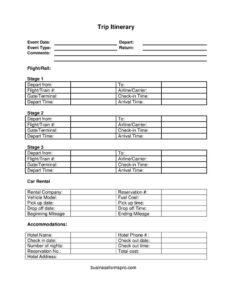
A Trip Itinerary is a structured travel summary that documents the schedule and logistics of a trip from departure to return. It is typically created by a traveler, an administrative assistant, a travel coordinator, or anyone planning a business or personal journey. The form captures the event date and type, transportation details such as flight or train numbers and gate information, car rental reservations and mileage, and hotel check-in and check-out dates. Its purpose is to consolidate scattered confirmation emails and booking references into one reliable reference sheet, so the traveler always has critical times, addresses, and reservation numbers in one place. It also doubles as a record for expense tracking and reimbursement after the trip ends.
When Do You Need a Trip Itinerary?
An itinerary is useful any time a trip involves more than one moving part. Common situations include:
- Business travel: documenting flights, rental cars, and hotel stays for a conference, client visit, or multi-city tour.
- Coordinating with others: sharing arrival and departure times with colleagues, family, or a driver picking you up.
- Expense reporting: recording fuel cost, rental totals, and hotel charges so you can submit accurate reimbursement claims.
- Multi-leg trips: tracking several flights, train segments, or vehicle changes that are easy to confuse without a written plan.
- Group or family vacations: keeping everyone informed of check-in times, hotel addresses, and phone numbers.
- Emergency reference: giving a contact at home a copy with carrier, gate, and accommodation details in case they need to reach you.
What a Trip Itinerary Should Have
A complete itinerary leaves no gap between one leg of the trip and the next. It should clearly state the event date, the type of trip or event, and the depart and return dates so the overall window is obvious at a glance. For transportation, it needs the flight or train number, airline or carrier, departure point and destination, gate or terminal, and the relevant check-in, depart, and arrival times. The car rental section should list the rental company, reservation number, vehicle model, pickup and drop-off dates and times, beginning and ending mileage, and fuel cost. The accommodations section should include the hotel name, address, phone number, reservation number, check-in and check-out dates and times, number of nights, and total cost. A comments line ties up any extra notes.
How to Fill Out a Trip Itinerary
- Enter the event date and the event type (for example, conference, client meeting, or vacation), then record the depart and return dates that frame the whole trip.
- In the flight/rail section, fill in depart from and to locations, the flight/train #, and the airline/carrier.
- Add the gate/terminal, then the check-in time, depart time, and arrival time exactly as shown on your confirmation.
- For car rental, write the rental company, reservation #, and vehicle model.
- Note the pickup date, pickup time, drop off date, and drop off time, plus beginning mileage and ending mileage and the fuel cost.
- Under accommodations, record the hotel name, hotel address, and hotel phone #.
- Add the check in date, check out date, check out time, number of nights, reservation no., and total cost.
- Use the comments field for parking, contacts, or any reminder, then review every time and number for accuracy.
Tips for a Reliable, Reimbursable Itinerary
Always copy details directly from your official confirmations rather than from memory — a single wrong digit in a flight number or reservation code can cause confusion at the worst moment. Record times in a consistent format and note the time zone for each leg, especially when crossing zones, since a 9:00 departure means little without knowing whether it is local or home time. The mileage and fuel cost fields are particularly valuable for rental returns and expense claims: snap a photo of the odometer at pickup and drop-off to back up your beginning and ending mileage. Keep the total cost lines current so the itinerary doubles as a quick spending summary you can hand to accounting.
Itinerary vs. Travel Confirmation
A booking confirmation covers only one purchase — one flight, one car, or one hotel. A Trip Itinerary stitches all of those confirmations together into a chronological, at-a-glance overview. Where a confirmation tells you the airline rules and ticket terms, the itinerary tells you what happens next and how the pieces connect. Keep your confirmations as the source of truth for refunds or disputes, and use the itinerary as your day-to-day working document while you travel.
Common Mistakes to Avoid
- Ignoring time zones: listing depart and arrival times without noting the zone can throw off connections and pickups.
- Skipping reservation numbers: the flight, rental, and hotel reservation fields are essential for check-in and any changes.
- Leaving mileage blank: missing beginning or ending mileage makes rental disputes and reimbursement harder to resolve.
- Forgetting the hotel phone and address: these matter if plans change or someone needs to reach you.
- Not updating costs: leaving fuel cost and total cost fields empty undermines the itinerary’s usefulness as an expense record.
- Sharing an outdated version: distributing a copy before bookings are final leads to confusion about gates, times, and rooms.
Frequently Asked Questions
What is a Trip Itinerary used for? It is used to organize all the moving parts of a trip — flights or rail, car rental, and accommodations — into one document. Travelers, assistants, and coordinators rely on it to track times, locations, reservation numbers, and costs in a single place.
How do I fill out the Trip Itinerary template? Start with the event date, type, and the depart and return dates, then work through the flight/rail, car rental, and accommodations sections using your booking confirmations. Copy times, numbers, and reservation codes exactly, and use the comments field for anything that doesn’t fit the standard fields.
Is the Trip Itinerary template free to download? Yes. You can download it for free in both PDF and DOCX formats, with no signup or account required. The DOCX version is editable so you can adjust labels to match your trip.
Do I need to track mileage and fuel cost? Only if you are renting a vehicle and want an accurate record. The beginning and ending mileage and fuel cost fields are especially helpful for expense reports and for confirming charges when you return a rental car.
Can I use one itinerary for a multi-leg trip? You can, but for trips with several flights, train segments, or hotel changes, it is often clearer to use one form per leg or duplicate the relevant sections. This keeps each segment’s times and reservation numbers separate and easy to read.
Can I share the itinerary with someone else? Absolutely. Many travelers send a copy to colleagues, family, or a driver so everyone knows arrival and departure times, hotel addresses, and phone numbers. Just make sure you share the final version after all bookings are confirmed.
This Trip Itinerary template is a general example provided for informational purposes only and is not legal, financial, or tax advice. Travel policies, reimbursement rules, and documentation requirements vary by organization and jurisdiction — consult the appropriate professional or your travel coordinator for guidance specific to your situation.
Related Forms
- Company Growth Chart
- Coffee Shop Items Inventory Card
- Hurricane Emergency Checklist
- Home Food Storage Inventory Card
- Geocache Log
- IT Inventory
Browse more in Log and Inventory.