
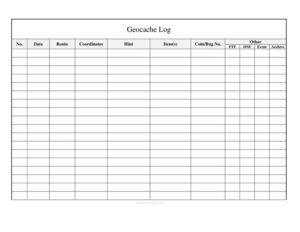
Geocache Log
Track your geocaching finds, coordinates, hints, and trackables with this free Geocache Log template, available as a free download in PDF and DOCX.
PDF
DOC
6 downloads
0
likes
Download Files
- DOC
A Geocache Log is a simple tracking sheet that lets geocachers record every cache they search for, including the date, coordinates, hints, and any trackable items they pick up or drop off. Most people use it as a personal field record to remember where they have been and what they found, and it is free to download in PDF and DOCX.
What Is a Geocache Log?
A Geocache Log is a structured record kept by treasure-hunters who use GPS coordinates to find hidden containers, or “caches,” placed by other members of the geocaching community. While the official online listing service tracks your finds digitally, a paper or printable Geocache Log gives you an offline backup and a place to note details that matter in the field — the route you took, the hint that finally cracked the puzzle, and the trackable coins or travel bugs you handled. It is used by hobbyists, scout groups, families, and event organizers to document outings, plan future hunts, and keep a tidy history of every container they have logged.
When Do You Need a Geocache Log?
This log is handy any time you want a reliable, offline record of your geocaching activity. Common situations include:
- Heading into areas with poor or no cell signal, where the official app cannot sync your finds in real time.
- Tracking trackable items like travel bugs and Geocoins so you can log their movement accurately once you are back online.
- Recording First-to-Find (FTF) achievements that you want to remember and verify.
- Noting Did-Not-Find (DNF) caches so you can return better prepared with the right tools or a fresh approach.
- Documenting attendance at geocaching Events and CITO (Cache In Trash Out) gatherings.
- Building a family or group logbook for a road trip, vacation, or weekend that hits multiple caches in a single day.
What a Geocache Log Should Have
A complete Geocache Log balances enough detail to be useful with enough simplicity to fill out quickly in the field. The core elements are a sequential entry number, the date of the hunt, location details such as route and coordinates, the hint that helped, a place to note items and trackables, and status flags for FTF, DNF, Event, and Archive. Together these columns let you reconstruct any outing at a glance and reconcile your paper notes against your online profile later. A good log is legible, consistent, and laid out so you can scan a single line and know exactly what happened with that cache.
How to Fill Out a Geocache Log
- No.: Assign a running entry number to each cache so your records stay in order and are easy to reference.
- Date: Write the date you searched for or found the cache.
- Route: Note the trail, road, or general path you took to reach the location — useful for revisiting or sharing with others.
- Coordinates: Record the GPS coordinates (latitude and longitude) for the cache or the final waypoint.
- Hint: Jot down the decoded hint or any clue that helped you locate the container.
- Item(s): List any swag or items you took from or left in the cache.
- Coin/Bug No.: Enter the tracking number of any Geocoin or travel bug you discovered, moved, or dropped.
- Other: Use this open column for notes such as cache size, difficulty, terrain, or memorable details.
- FTF: Mark this if you were the First to Find the cache.
- DNF: Mark this if you searched but Did Not Find the container.
- Event: Check this when the entry is a geocaching event rather than a traditional cache.
- Archive: Note whether the cache has been archived or retired so you do not waste a return trip.
Understanding the Status Columns
The short status columns — FTF, DNF, Event, and Archive — pack a lot of meaning into a single tick mark. FTF (First to Find) is a coveted badge among geocachers, and tracking yours builds a record you can be proud of. DNF (Did Not Find) is just as important; an honest DNF helps the cache owner know the container may be missing and reminds you to come back. Event distinguishes social gatherings from physical caches, which matters when you tally your statistics. Archive flags caches that are no longer active so your historical log stays accurate even after a listing is removed online.
Tips for Keeping Trackable Items Organized
If you regularly move travel bugs and Geocoins, the Coin/Bug No. column is your best friend. Always copy the tracking code exactly as it appears on the item, including letters and numbers, because a single wrong character makes it impossible to log the item correctly later. Note in the Item(s) or Other column whether you picked the trackable up, dropped it off, or simply “discovered” it. This habit prevents the common frustration of holding a travel bug for weeks because you never recorded its code, and it keeps the item’s owner happy by reflecting an accurate journey.
Common Mistakes to Avoid
- Leaving the Coordinates field blank or partially filled, which makes it impossible to revisit a cache or verify a find.
- Forgetting to record a trackable’s Coin/Bug number before placing it in your pack, so you cannot log it online.
- Skipping the Date, which throws off the chronology when you reconcile your paper log with your online profile.
- Not marking DNF entries, which hides the fact that a cache may need attention or a return visit.
- Overcrowding the Other column with everything instead of using the dedicated FTF, Event, and Archive flags.
- Letting entries pile up unnumbered, making it hard to cross-reference notes from a busy multi-cache day.
Frequently Asked Questions
What is a Geocache Log used for? It is a personal tracking sheet for recording the caches you search for, including the date, coordinates, hints, items, and trackables. Many geocachers use it as an offline backup so they can log their finds online accurately once they are back in cell range.
How do I fill out the FTF and DNF columns? Mark FTF when you are the First to Find a newly published cache, and mark DNF when you searched but Did Not Find it. These quick flags help you celebrate achievements and remember which caches deserve a return trip.
What goes in the Coin/Bug No. field? Enter the unique tracking code printed on any Geocoin or travel bug you find, move, or discover. Copy it exactly, character for character, so you can log the trackable’s journey correctly on the official site later.
Do I have to record coordinates if I use a GPS app? It is a good idea even if your app stores them, because writing the coordinates in your log gives you a reliable offline backup. This is especially valuable in remote areas with no signal or if your device battery dies mid-hunt.
Is this Geocache Log free to download? Yes. You can download this Geocache Log template for free in both PDF and DOCX formats with no signup required, so you can print it for the field or edit it on your computer.
Can I customize the log for my own hunting style? Absolutely. The DOCX version is fully editable, so you can rename columns, add fields for cache size or difficulty, or remove flags you do not use to match the way you geocache.
This Geocache Log template is provided as a general example for informational purposes only and is not professional advice. Geocaching practices and community guidelines vary, and the official listing service has its own rules — always follow local regulations and the cache owner’s instructions when hunting.
Related Forms
- Event Production Schedule
- Social Media Tracker
- Blog Post Planner
- Edit Log
- Contracts List
- Aquarium Maintenance: Schedule & Free Log
Browse more in Log and Inventory.