
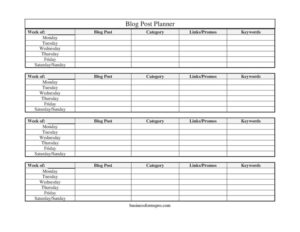
Blog Post Planner
Organize your content calendar with our free Blog Post Planner template — track topics, keywords, and weekly schedules. Free download in PDF and DOCX.
PDF
DOCX
1 downloads
0
likes
Download Files
- DOCX
A Blog Post Planner is a simple weekly worksheet that maps out which blog articles you’ll write, schedule, and promote across each day of the week. Most people reach for one to bring order to a chaotic content calendar so nothing slips through the cracks. It’s free to download here in both PDF and DOCX formats — no signup required.
What Is a Blog Post Planner?
A Blog Post Planner is a content-organization template used by bloggers, marketers, freelance writers, and small business owners to plan their publishing schedule week by week. It records the post title, the category it belongs to, the keywords you’re targeting, and any links or promotions tied to it, then lays out the days of the week so you can assign each task a publishing or working day. Rather than juggling ideas in your head or across scattered notes, the planner gives you one tidy reference sheet. It documents what you intend to publish and when, making it easier to stay consistent, balance topics, and coordinate promotion alongside writing.
When Do You Need a Blog Post Planner?
This planner earns its place any time you’re managing more than a single post at a time. Common scenarios include:
- Running a content calendar: You publish multiple posts a week and need to see them laid out Monday through the weekend at a glance.
- Targeting specific keywords: You’re doing SEO work and want each post tied to a deliberate keyword instead of writing at random.
- Coordinating promotions: A product launch, sale, or affiliate push needs supporting blog content scheduled around it.
- Managing a team or freelancers: Several writers need a shared, clear view of who’s covering which topic and when it’s due.
- Batching content: You write several posts in one sitting and want to spread their publishing dates across the week.
- Avoiding topic overlap: You want variety across categories so you’re not publishing three posts on the same subject back to back.
What a Blog Post Planner Should Have
A useful planner keeps the essentials visible without becoming cluttered. The core elements are the post title or working headline, the category or topic bucket it falls into, the target keywords for search, and any links or promotional notes attached to the piece. Equally important is the time structure — a clearly labeled “Week of” date and a row of days from Monday through Saturday/Sunday so each task lands on a specific day. Together these elements let you balance topics across a week, ensure every post has an SEO purpose, and connect your writing to your wider marketing goals.
How to Fill Out a Blog Post Planner
- Week of: Enter the start date of the week you’re planning. This anchors everything below it and helps you file or archive planners chronologically.
- Blog Post: Write the working title or headline of the post. Even a rough title is fine — it gives the entry an identity you can refine later.
- Category: Note which content bucket the post belongs to, such as “Tutorials,” “News,” or “Product.” This helps you keep variety across the week.
- Keywords: List the primary and secondary search terms you’re targeting so the writer keeps SEO front of mind.
- Links/Promos: Record any internal links, affiliate links, calls to action, or promotions the post should support.
- Monday through Saturday/Sunday: Assign each post or task to its day. Use the day cells to mark drafting, editing, publishing, or social promotion so the week’s workflow is mapped out at a glance.
Tips for Getting the Most From Your Planner
Treat the planner as a living document. At the start of each week, fill it in with your intended posts, then update the day columns as work moves from draft to published. Color-coding categories — if you’re working in the DOCX version — makes it easy to spot whether you’ve leaned too heavily on one topic. Keep your keywords realistic and specific; one well-chosen long-tail phrase per post usually outperforms a long list of vague terms. If you publish less frequently, use the day rows for milestones instead of daily posts: outline on Monday, draft midweek, edit Thursday, publish Friday. Saving each completed week builds an archive you can review to see which categories and keywords drove the most engagement.
How It Differs From a Full Editorial Calendar
A Blog Post Planner is intentionally lightweight and focused on a single week. A full editorial calendar typically spans months, tracks every channel (email, social, video), and may include status workflows, author assignments, and analytics. The planner is the day-to-day companion to that bigger calendar — the place where the week’s plan actually gets executed. Many writers use both: the editorial calendar for the long view and the weekly planner for hands-on scheduling. If you’re just starting out, the planner alone is often enough to keep you consistent without the overhead of a complex system.
Common Mistakes to Avoid
- Overloading the week: Scheduling more posts than you can realistically write leads to a backlog and missed dates.
- Skipping keywords: Leaving the keyword field blank means you write first and worry about SEO later, which rarely works well.
- Vague titles: A headline like “Blog idea” gives you nothing to act on — write something specific enough to start from.
- Ignoring categories: Without tracking category, you may accidentally publish several similar posts and bore your audience.
- Forgetting promotions: Writing a post but not noting where you’ll share or link it leaves traffic on the table.
- Not updating during the week: A plan you never revisit drifts out of date by Wednesday.
Frequently Asked Questions
What is a Blog Post Planner used for? It’s used to plan and schedule your blog content for a single week, capturing each post’s title, category, target keywords, and promotional links alongside the day it should be worked on or published. It keeps your content calendar organized and helps you stay consistent.
How do I fill out the Blog Post Planner? Start by entering the “Week of” date, then list each post’s title under Blog Post, assign a Category, add target Keywords, and note any Links/Promos. Finally, place each task in the Monday through Saturday/Sunday columns so you can see your whole week at a glance.
Is the Blog Post Planner free to download? Yes. You can download it free from Business Forms Pro in both PDF and DOCX formats, with no signup or payment required. The DOCX version is editable so you can adapt the fields to your workflow.
Can I use this planner for a whole month? The template is designed for one week, but you can print or copy multiple sheets — one per week — to cover a month or more. Many users keep a stack of weekly planners as a running archive of their content history.
Should each post target only one keyword? Not necessarily, but focusing on one primary keyword per post tends to produce clearer, better-ranking content. You can list a primary keyword plus a couple of related secondary terms in the Keywords field to guide your writing.
Can a team share this planner? Absolutely. Because it lays out the week clearly with categories and tasks per day, it works well as a shared reference for writers, editors, and marketers. The editable DOCX version makes it easy to assign posts and update status collaboratively.
This Blog Post Planner template is provided as a general example for informational purposes only and does not constitute marketing, business, or professional advice. Content strategies and best practices vary by industry and audience — consult a qualified professional where appropriate.
Related Forms
- Advertisement Tracker
- Home Food Storage Inventory Card
- Depreciable Assets Log
- Inventory Control
- Bird Strike Form
- IT Inventory
Browse more in Log and Inventory.