
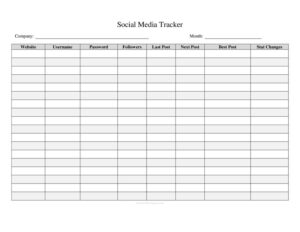
Social Media Tracker
Track posts, engagement, and growth across platforms with a free Social Media Tracker template—organize your content and metrics with a free download.
PDF
DOC
7 downloads
0
likes
Download Files
- DOC
A Social Media Tracker is a simple log used to record your social media posts, schedules, and performance metrics in one organized place. People most often use it to keep tabs on what they’ve posted, when, and how well each piece of content performed across platforms. It’s free to download here in both PDF and DOCX formats, with no signup required.
What Is a Social Media Tracker?
A Social Media Tracker is a logging and inventory document that helps individuals, small businesses, and marketing teams organize their social media activity. Rather than scattering notes across calendars, apps, and spreadsheets, the tracker gathers everything—post dates, platforms, content types, captions, links, and engagement numbers—into a single, repeatable format. It’s used by content creators, freelancers, social media managers, and business owners who want a clear record of what they publish and how it lands. The document doubles as both a planning tool and a results log, making it easier to spot patterns, repeat what works, and report progress to clients or stakeholders over weeks and months.
When Do You Need a Social Media Tracker?
This tracker is useful any time you want structure and accountability around your online presence. Common scenarios include:
- Managing multiple platforms — keeping Instagram, Facebook, LinkedIn, X, TikTok, and YouTube posts straight without losing track.
- Planning a content calendar — mapping out posts in advance so you publish consistently rather than reactively.
- Reporting to clients — freelancers and agencies summarizing reach, likes, comments, and shares for monthly updates.
- Running a campaign — tracking the performance of a product launch, sale, or seasonal promotion across channels.
- Measuring growth — logging follower counts and engagement over time to see whether your strategy is working.
- Coordinating a team — giving everyone one shared reference for who is posting what and when.
What a Social Media Tracker Should Have
A complete tracker captures both the plan and the results of each post. At minimum it should include the publishing date, the platform, the content type or format, a short description or caption, and any links or media references. Beyond the basics, strong trackers add space for engagement metrics—likes, comments, shares, saves, and clicks—plus a status field to mark whether a post is drafted, scheduled, or published. A notes column for ideas, hashtags, or follow-up actions rounds it out. The goal is a layout you’ll actually keep updated, so balance detail with simplicity.
How to Fill Out a Social Media Tracker
Because this is a flexible log, fill it out row by row as you plan and publish:
- Enter the date the post will go live, so you can sort entries chronologically and spot gaps in your schedule.
- List the platform for each post (for example, Instagram or LinkedIn) so cross-channel activity stays separated.
- Note the content type—image, video, reel, carousel, story, poll, or text—to track which formats perform best.
- Add the caption or description, including the headline or first line and any hashtags or tags you plan to use.
- Record links and media, such as the destination URL or the file name of the image or video being posted.
- Set the status—idea, draft, scheduled, or published—so you always know what’s outstanding.
- Fill in engagement metrics after publishing: likes, comments, shares, saves, and click-throughs.
- Use the notes field for results commentary, reposting ideas, or reminders to reply to comments.
Tips for Getting the Most From Your Tracker
A tracker only helps if you update it regularly. Build a habit of logging each post the moment you schedule it, then circle back a few days later to record engagement once the numbers settle. Review the tracker weekly to identify your top-performing content and the times or formats that drive the most interaction. Keep your descriptions consistent so you can scan the log quickly. If you manage several brands or clients, consider one tracker per account to avoid confusion. Over a few months, the patterns that emerge—best posting days, strongest content types, most engaged platforms—become the foundation of a smarter, data-informed strategy.
Tracker vs. Native Platform Analytics
Social platforms offer built-in analytics, so why keep a separate tracker? Native dashboards are powerful but siloed: each platform shows only its own data, numbers reset or roll off over time, and there’s no single view across channels. Your own Social Media Tracker preserves a permanent, cross-platform history that you control. It lets you compare an Instagram reel against a LinkedIn article side by side, annotate why a post over- or under-performed, and keep records even after a campaign ends. Think of the tracker as your master archive and the platform analytics as the live source you copy key numbers from.
Common Mistakes to Avoid
- Logging posts but never the results — without engagement data, the tracker can’t guide decisions.
- Inconsistent labeling — mixing terms like “vid,” “video,” and “reel” makes filtering and analysis difficult.
- Letting it go stale — a tracker updated once and forgotten gives a misleading picture.
- Tracking everything at once — start with a few core metrics rather than dozens of fields you won’t maintain.
- Forgetting to note context — a spike in engagement is more useful when you record what caused it.
- Not backing it up — keep a saved copy so months of records aren’t lost.
Frequently Asked Questions
What is a Social Media Tracker used for? It’s used to record and organize your social media posts and their performance in one place. People rely on it to plan content, monitor engagement across platforms, and review what’s working over time. It serves as both a scheduling tool and a results archive.
How do I fill out a Social Media Tracker? Add one row per post, starting with the date, platform, and content type, then include the caption, links, and a status. After publishing, return to fill in engagement metrics like likes, comments, and shares. Use the notes field for ideas, hashtags, or follow-up reminders.
Is this Social Media Tracker free to download? Yes. You can download this template completely free in PDF or DOCX format, with no signup or account required. The DOCX version is fully editable so you can add or remove columns to fit your needs.
Which platforms can I track with it? You can use it for any platform—Instagram, Facebook, LinkedIn, X, TikTok, YouTube, Pinterest, or others. Simply note the platform name in its column. Many users keep one tracker covering all channels, or separate trackers per account or client.
How often should I update my tracker? Log each post when you schedule it, then update engagement metrics a few days after it goes live so the numbers have time to settle. A quick weekly review helps you spot trends. Consistency matters more than frequency—pick a rhythm you can maintain.
Can I customize the columns in the template? Absolutely. The DOCX version is editable, so you can add fields like budget, paid versus organic, target audience, or campaign name. Remove any columns you don’t use to keep the log clean and quick to fill in.
This Social Media Tracker template is provided as a general example for informational purposes only and is not legal, financial, or professional marketing advice. Platform features, metrics, and best practices change over time and may vary by region—consult a qualified professional for guidance specific to your situation.
Related Forms
- Social Security Options Planner
- Warranty Tracker
- Geocache Log
- Publication Submission Tracker
- Advertisement Tracker
- Website Traffic Tracker
Browse more in Log and Inventory.