
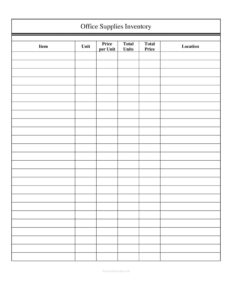
Office Supplies Inventory
Track stock, costs, and reorder needs with our free Office Supplies Inventory template, available as a free download in PDF and DOCX formats.
PDF
DOC
0
likes
Download Files
- DOC
An Office Supplies Inventory is a simple tracking sheet used to record every consumable and supply item your workplace keeps on hand, along with quantities, costs, and storage locations. Most people use it to know exactly what’s in the supply closet, what needs reordering, and how much money is tied up in stock. It’s free to download here in both PDF and DOCX formats, with no signup required.
What Is an Office Supplies Inventory?
An Office Supplies Inventory is a structured log that catalogs the consumable goods an office uses day to day — paper, pens, toner, sticky notes, folders, cleaning items, and similar materials. It is typically maintained by an office manager, administrative assistant, or facilities coordinator and is used to document what is in stock, how it is packaged, what it costs, and where it is kept. The form serves both an operational purpose (preventing shortages and overbuying) and a financial one (showing the value of supplies on hand). By capturing item, unit, price, quantity, total value, and location in one place, it turns a cluttered storeroom into an organized, countable, and budget-friendly system.
When Do You Need an Office Supplies Inventory?
This form is useful any time you need a clear picture of supply levels and spending. Common scenarios include:
- Routine stock counts — performing weekly or monthly counts so the supply closet never runs dry mid-project.
- Reordering decisions — knowing which items are low and need to be purchased before they run out.
- Budget tracking — calculating how much money is invested in supplies and reporting it to finance or management.
- Multi-location offices — tracking which floor, room, or branch holds each item using the Location field.
- Year-end or audit preparation — providing a documented valuation of supplies on hand for accounting purposes.
- Onboarding a new office manager — handing over a complete record so nothing is lost in transition.
What an Office Supplies Inventory Should Have
A complete inventory sheet should let anyone read it and immediately understand what is stocked and what it is worth. The essentials are a clear Item description, a defined Unit of measure (box, ream, pack, each), the Price per Unit, the Total Units on hand, the resulting Total Price, and the Location where the item is stored. Together these fields support both counting and costing. A good inventory also benefits from consistent naming, a count date, and the initials of whoever performed the count, so the record stays trustworthy and easy to compare against past counts.
How to Fill Out an Office Supplies Inventory
- Item: Write a specific, consistent name for each supply — for example, “Copy paper, 8.5×11, white” rather than just “paper.” Precise names prevent duplicate or confusing entries.
- Unit: Record how the item is measured or packaged, such as ream, box, case, pack, or each. The unit defines what a single count represents.
- Price per Unit: Enter the cost of one unit, based on your most recent purchase or supplier price list. Keep currency consistent across the sheet.
- Total Units: Count the physical quantity on hand and enter the number of units currently in stock at the time of the count.
- Total Price: Multiply Price per Unit by Total Units to show the value of that item’s stock. This column gives you a running total when summed.
- Location: Note where the item lives — “Supply closet, Shelf B,” “Reception cabinet,” or “Floor 3 storeroom” — so anyone can find it quickly.
Work through one row per item, then total the Total Price column to see the full value of your supplies.
Tips for an Accurate, Useful Inventory
The value of an inventory comes from keeping it current and consistent. Always count on the same schedule — a fixed weekly or monthly date prevents drift and surprises. Use the same unit definitions every time; if one count lists “box” and the next lists “each,” your totals will be meaningless. Consider adding a reorder threshold note beside fast-moving items, so when Total Units drops below a set number, it’s an automatic signal to buy more. Store the completed sheet where the next person can find it, and keep prior versions so you can spot consumption trends and seasonal spikes. If you maintain the DOCX version, the price columns are easy to update each time a supplier quote changes.
Inventory Sheet vs. Purchase Order
It’s worth distinguishing this form from related documents. An Office Supplies Inventory describes what you currently have — a snapshot of stock and its value. A purchase order or supply request, by contrast, describes what you intend to buy. Many offices use the inventory to drive the purchase order: when the count reveals low or zero Total Units for an item, that becomes the line you add to your next order. Keeping the two documents separate but linked gives you a clean trail from “what we have” to “what we bought,” which is helpful for both budgeting and accountability.
Common Mistakes to Avoid
- Inconsistent units — mixing “box” and “each” for the same item makes counts and costs unreliable.
- Skipping the count date — without a date, you can’t tell whether the figures are current or months old.
- Forgetting to update prices — stale Price per Unit values produce inaccurate Total Price and budget figures.
- Vague item names — generic labels like “pens” hide whether you mean blue, black, or gel, leading to wrong reorders.
- Leaving Location blank — items get lost or double-ordered when no one knows where they’re stored.
- Not totaling the value — failing to sum the Total Price column means you miss the financial picture the form is built to provide.
Frequently Asked Questions
What is an Office Supplies Inventory used for? It is used to track the supplies an office keeps in stock, including how many units are on hand, what they cost, and where they are stored. This helps prevent shortages, control spending, and document the value of supplies for budgeting or accounting.
How do I calculate the Total Price column? Multiply the Price per Unit by the Total Units for each row. When you add up the Total Price for every item, you get the overall value of supplies currently on hand.
How often should I update the inventory? Most offices count weekly or monthly, depending on how fast supplies are consumed. Fast-moving items like paper and toner may warrant more frequent checks, while slow-moving items can be counted less often.
Is this template free to download? Yes. The Office Supplies Inventory template is completely free to download in both PDF and DOCX formats, with no signup or account required. You can print it or edit the DOCX version to fit your office.
Can I use it for multiple storage locations? Absolutely. The Location field lets you note exactly where each item lives — a shelf, cabinet, room, floor, or branch — so a single sheet can cover several storage areas at once.
What’s the difference between this and a purchase order? An inventory records what you already have in stock, while a purchase order records what you plan to buy. The inventory typically drives the order: low Total Units signal which items to reorder next.
This template is a general example provided for informational purposes only and does not constitute legal, financial, or accounting advice. Inventory valuation and recordkeeping requirements vary by organization and jurisdiction — consult a qualified professional for guidance specific to your situation.
Related Forms
- Project Timeline
- Household Inventory Card
- Software Inventory
- Computer Update Tracker
- Telephone Time Tracker
- Inventory Report
Browse more in Log and Inventory.