
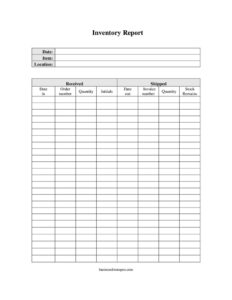
Inventory Report
Track stock movements, received and shipped goods with this free Inventory Report template—download in PDF or DOCX, no signup required.
PDF
DOCX
7 downloads
0
likes
Download Files
- DOCX
An Inventory Report is a record that tracks the quantity, location, and movement of stock items over a set period. People most commonly use it to know exactly how much of each item they have on hand after goods are received and shipped. You can download this Inventory Report free in both PDF and DOCX formats, with no signup required.
What Is an Inventory Report?
An Inventory Report is a structured document that captures every item in your stock along with how much arrived, how much left, and what remains. It is typically used by warehouse staff, store managers, small business owners, and operations teams to maintain an accurate count of physical goods. Rather than relying on memory or scattered notes, the report ties each item to a location, an order or invoice number, and the dates it moved in or out. The result is a clear paper trail you can reconcile against purchase orders, sales records, and shelf counts. Whether you manage a single storeroom or several locations, the report turns raw stock activity into a verifiable summary.
When Do You Need an Inventory Report?
This form is useful any time you need to document what you have and how it is changing. Common scenarios include:
- Monthly or quarterly stock counts — to reconcile physical shelves against your records and spot discrepancies.
- Receiving a shipment — to log incoming quantities against the order number and confirm what arrived matches what was ordered.
- Fulfilling customer orders — to record shipped items, the invoice number, and the date out so dispatch is traceable.
- Year-end accounting — to provide accurate stock-on-hand figures for financial statements and tax preparation.
- Transferring goods between locations — to track where each item physically sits across multiple stores or warehouses.
- Auditing or loss prevention — to investigate shrinkage by comparing received, shipped, and remaining quantities.
What an Inventory Report Should Have
A complete Inventory Report leaves no gaps between what came in and what went out. The essential elements are an item description so each line is identifiable, a location to pinpoint where stock is stored, and clearly separated columns for quantities received and shipped. It should record movement dates—both date in and date out—plus the order number for incoming goods and the invoice number for outgoing goods. A quantity column and a running stock remains figure tie everything together, while an initials field assigns accountability to the person who logged each entry. A report date at the top frames the period being covered.
How to Fill Out an Inventory Report
- Date: Enter the date you are completing or updating the report at the top of the sheet.
- Item: Write the name, SKU, or description of the product being tracked on each row.
- Location: Note where the item is stored—aisle, bin, shelf, or warehouse name.
- Received: Record the quantity of units that came into stock.
- Date in: Enter the date the received goods physically arrived.
- Order number: List the purchase order or supplier order number tied to the received goods.
- Shipped: Record the quantity of units that left stock for a customer or transfer.
- Date out: Enter the date the shipped goods were dispatched.
- Invoice number: Add the invoice or sales document number linked to the shipment.
- Quantity: Note the total count being handled in that line item if it differs from received or shipped.
- Stock remains: Calculate the running balance after additions and subtractions.
- Initials: Have the person logging the entry sign off to confirm accuracy.
Keeping Counts Accurate Over Time
The value of an Inventory Report depends on consistent updating. Whenever stock moves, the corresponding row should be filled in promptly rather than reconstructed from memory days later. The simple formula behind the stock remains column is straightforward: previous balance plus received minus shipped equals current balance. When this running total stops matching a physical count, the report becomes a diagnostic tool—you can scan the dates, order numbers, and initials to trace where a number went wrong. Many teams photocopy or save a fresh DOCX version at the start of each period so they keep a clean historical archive while continuing to log new activity.
How It Differs From a Packing Slip or Purchase Order
It is easy to confuse an Inventory Report with related documents, but each serves a distinct purpose. A purchase order is a request to a supplier for goods and exists before anything arrives; the order number from that document feeds into your report. A packing slip or invoice accompanies a specific shipment and confirms one transaction. The Inventory Report sits above all of these—it aggregates the inflows and outflows across many transactions into a single ongoing balance. Think of the order and invoice numbers as references that point back to source documents, while the report itself is the master ledger of what you actually hold.
Common Mistakes to Avoid
- Leaving the stock remains column blank — without a running balance, the report cannot tell you what you actually have.
- Skipping order or invoice numbers — these references are how you trace and verify each movement later.
- Not initialing entries — accountability disappears when no one signs off on a logged change.
- Confusing date in and date out — swapping these distorts your timeline and any audit trail.
- Forgetting to note location — counts are meaningless if you cannot find the stock they describe.
- Batching updates at period end — logging movements long after they happen invites errors and forgotten entries.
Frequently Asked Questions
What is an Inventory Report used for? It is used to track how much of each item you have, where it is stored, and how quantities change as goods are received and shipped. The report gives you an accurate, verifiable stock-on-hand figure for operations, accounting, and audits.
How do I fill out the stock remains column? Start with your previous balance, add the received quantity, then subtract the shipped quantity to get the current figure. Update this number every time stock moves so the running total always reflects what is physically on the shelf.
Do I need both an order number and an invoice number? The order number applies to goods coming in and references the purchase made from a supplier, while the invoice number applies to goods going out for a customer. Fill in whichever applies to that row—incoming rows use the order number, outgoing rows use the invoice number.
Is this Inventory Report template free? Yes, it is completely free to download in both PDF and DOCX formats with no signup required. You can print the PDF for manual logging or edit the DOCX version to match your own items and columns.
How often should I update an Inventory Report? Update it whenever stock physically moves—ideally at the moment of each receipt or shipment. Many businesses also perform a full reconciliation against a physical count monthly or quarterly to catch any discrepancies.
Can I customize the template for my business? Absolutely. The DOCX version lets you rename columns, add fields like unit cost or reorder point, or remove sections you do not use, so the report fits your specific products and workflow.
This Inventory Report template is provided as a general example for informational purposes only and does not constitute legal, financial, or accounting advice. Inventory and recordkeeping requirements vary by industry and jurisdiction—consult a qualified professional to ensure your records meet applicable standards.
Related Forms
- Household Inventory Card
- Warranty Log
- Telephone Time Tracker
- Pledge Log
- Housekeeping Inspection Checklist
- Inventory Tag
Browse more in Log and Inventory.