
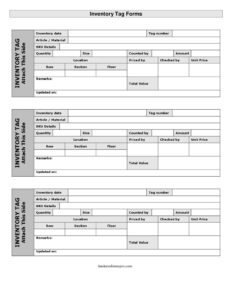
Inventory Tag
Download a free Inventory Tag template to count, label, and value stock during physical inventory counts — accurate, audit-ready, free download in PDF and DOCX.
PDF
DOC
7 downloads
0
likes
Download Files
- DOC
An Inventory Tag is a small, structured form attached to or recorded against a group of items during a physical stock count, used to capture the article, quantity, location, and value of inventory at a single point in time. Most people reach for it during periodic or year-end stocktakes when every shelf, bin, and pallet must be counted and reconciled against the books. You can download this Inventory Tag template free in both PDF and DOCX formats, with no signup required.
What Is an Inventory Tag?
An Inventory Tag is a counting and valuation document issued by warehouse staff, store managers, or auditors to record the details of a specific lot of stock during a physical inventory. Each tag carries a unique tag number and documents what was counted, how much, where it sits, and what it is worth. Tags are typically pre-numbered and distributed across the counting area so that no items are missed or double-counted. After counting, the tags are collected, reviewed, priced, and totaled to produce a complete inventory valuation. Because each tag is independently signed off by the people who counted, priced, and checked it, the form creates an accountable paper trail that supports financial reporting, loss prevention, and audit verification.
When Do You Need an Inventory Tag?
Inventory Tags are essential whenever stock must be physically verified rather than simply trusted to a software count. Common situations include:
- Year-end physical counts when accountants require a verified closing inventory value for financial statements.
- Periodic cycle counts where sections of a warehouse are rotated through verification on a schedule.
- Audit support, where external or internal auditors observe and validate the counting process.
- Retail stocktakes covering shelves, backrooms, and display floors before reordering.
- Investigating shrinkage or discrepancies between recorded and actual quantities.
- Setting up a new location or transferring stock between floors, sections, or facilities.
Types of Inventory Counts That Use Tags
The same tag template adapts to several counting methods. A full wall-to-wall count tags every item in one event, ideal for smaller operations or annual closings. A cycle count tags only a defined section or row at a time, spreading the work across the year. A spot count targets high-value or fast-moving SKUs flagged by remarks. In each case the tag number keeps records organized and traceable back to a precise location.
What an Inventory Tag Should Have
A complete Inventory Tag combines identification, quantity, location, and valuation in one compact record. The key elements are a unique tag number and inventory date for traceability; a clear description of the article/material with SKU details and size; the counted quantity; precise location coordinates such as floor, section, and row; pricing fields for unit price, amount, and total value; and sign-off lines naming who counted by, priced by, and checked by. A remarks field and an updated on date round out the form so corrections and notes are documented.
How to Fill Out an Inventory Tag
- Enter the inventory date the count is being performed and assign the pre-printed or handwritten tag number so the record stays unique.
- Describe the article/material being counted in plain language, then add the SKU details and the item size to remove ambiguity.
- Physically count and write the quantity on hand, recording exactly what is present rather than what the system expects.
- Record the storage location, then break it down by floor, section, and row so the lot can be found again.
- Have the counter sign the counted by line to take ownership of the figure.
- The pricing clerk enters the unit price, calculates the amount, and confirms the total value (unit price multiplied by quantity); they sign priced by.
- A supervisor verifies the entries and signs checked by.
- Note anything unusual under remarks — damage, expiry, or a recount — and set the updated on date for any later revision.
Pricing and Valuation Tips
The valuation half of the tag is where errors quietly inflate or deflate your financial statements, so handle it carefully. Decide in advance which costing method you use — typically cost price rather than retail — and apply it consistently across every tag. Keep the unit price tied to a documented source such as the latest purchase invoice or standard cost, and recompute the total value as a simple check: quantity times unit price should equal the amount written. For items flagged as damaged or obsolete in the remarks, apply any write-down before recording the total so the count reflects realistic value. When tags are aggregated, the sum of all total values becomes your physical inventory valuation.
Tag Control and Reconciliation
Tags only protect accuracy if they are controlled. Issue them in a numbered sequence, log which numbers go to each counter, and account for every tag at the end — used, voided, or blank. This prevents items from being skipped or counted twice. After collection, enter each tag into your inventory system and compare the counted quantity against the book quantity; investigate any variance noted on the tag before adjusting records. Retain the completed tags with your count documentation so an auditor can trace any figure back to the original signed slip.
Common Mistakes to Avoid
- Reusing or skipping tag numbers, which breaks the chain of control and makes reconciliation unreliable.
- Writing what the system says instead of counting — the whole point of a physical tag is to capture reality.
- Leaving the location fields vague, so the same lot cannot be re-found during a recount.
- Mixing retail and cost prices across tags, producing an inconsistent total valuation.
- Skipping the checked-by sign-off, removing the second set of eyes that catches arithmetic errors.
- Forgetting to update the updated on field after a correction, so the latest figure is unclear.
Frequently Asked Questions
What is an Inventory Tag used for? It is used to record the description, quantity, location, and value of a specific lot of stock during a physical inventory count. Each tag creates a signed, traceable record that supports reconciliation and audit verification. Together, the collected tags form your complete physical inventory valuation.
How do I fill out an Inventory Tag? Start with the inventory date and tag number, then describe the article, SKU, and size, and record the counted quantity. Add the location details (floor, section, row), enter the unit price and calculated total value, and have the counter, pricer, and checker sign their respective lines. Use the remarks field for any notes such as damage or recounts.
Why does each tag need a unique number? Unique, sequential tag numbers let you account for every tag issued and ensure no items are skipped or double-counted. They also let auditors trace any number in your valuation back to the original physical slip. Reusing numbers undermines this control entirely.
What is the difference between quantity and total value? Quantity is the physical count of how many units are present, while total value is the financial worth of that lot. You calculate total value by multiplying the unit price by the quantity. Both figures are needed: one for stock accuracy and one for financial reporting.
Is an Inventory Tag a legally binding document? An Inventory Tag is primarily an internal accounting and control record rather than a contract, though signed tags can serve as evidence in audits and disputes. Its credibility comes from accurate counting and proper sign-off. Always retain completed tags as part of your count documentation.
How much does this Inventory Tag template cost? Nothing — you can download it free from Business Forms Pro in both PDF and DOCX formats with no signup required. The DOCX version is editable so you can add your company name, location coding, or extra columns. Print as many copies as you need for your stocktake.
This Inventory Tag template is a general example provided for informational purposes only and does not constitute legal, financial, accounting, or tax advice. Inventory valuation and record-keeping requirements vary by jurisdiction and by accounting standard, so consult a qualified accountant or professional before relying on it for financial reporting.
Related Forms
- Weekly Bathroom Cleaning Checklist
- Change Log
- Yearly Project Timetable
- Side Hustle Expenses Log
- Side Income Log
- Trip Itinerary
Browse more in Log and Inventory.