
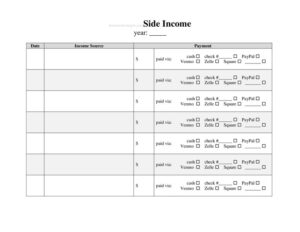
Side Income Log
Track your freelance and gig earnings with this free Side Income Log template, available as a free download in PDF and DOCX for easy record keeping.
PDF
DOCX
2 downloads
0
likes
Download Files
- DOCX
A Side Income Log is a simple record-keeping sheet for tracking money earned from freelance work, gig jobs, hobbies, and other income outside your main paycheck. People most often use it to keep tax-time records accurate and to see how much their side hustle actually brings in. It’s free to download here in both PDF and DOCX formats, with no signup required.
What Is a Side Income Log?
A Side Income Log is a running record of every payment you receive from secondary income sources — anything that isn’t your primary employment salary. It’s typically maintained by freelancers, rideshare and delivery drivers, online sellers, tutors, crafters, consultants, and anyone with a side hustle. The log documents the date money was earned, where it came from, how much it was, how it was paid, and any related notes or expenses. Its purpose is twofold: to give you a clear, ongoing picture of your supplemental earnings, and to create a paper trail that supports accurate tax reporting. Unlike a formal accounting ledger, it’s lightweight and easy to maintain week to week, making it ideal for people managing income on the side of a busy schedule.
When Do You Need a Side Income Log?
Almost anyone earning money outside a regular job benefits from keeping one. Common situations include:
- Freelancing and consulting — tracking client payments for design, writing, coding, or advisory work that arrive on irregular schedules.
- Gig and platform work — logging earnings from rideshare, food delivery, task apps, or short-term contract gigs.
- Selling products — recording revenue from an online shop, craft fairs, resale, or marketplace listings.
- Renting and sharing — capturing income from renting a room, equipment, parking space, or other assets.
- Teaching and creative work — tutoring, music lessons, photography sessions, or content monetization.
- Tax preparation — assembling a complete year-end summary so you can report self-employment or miscellaneous income correctly.
Types of Income You Might Track
The log is flexible enough to handle several income patterns at once. You might record one-off payments like a single freelance invoice, recurring income such as a monthly retainer or subscription, and variable earnings like daily gig payouts that change every shift. Some users keep a separate log for each income stream, while others combine everything into one master sheet and use the source or category column to distinguish them. Both approaches work — the key is consistency so that nothing slips through the cracks at tax time.
What a Side Income Log Should Have
A useful log captures enough detail to identify and verify each payment without being so complicated that you stop using it. At minimum, each entry should record the date, the source or payer, a short description of what the income was for, the gross amount received, and the payment method. Many people also add a category to group similar earnings, a column for related expenses or fees, and a running total. Including a notes field is valuable for capturing context — an invoice number, a client name, or whether the amount was net of platform fees — that you’ll appreciate months later when memory has faded.
How to Fill Out a Side Income Log
- Enter the date. Record the date you actually received the money (or the date it was earned, if you track on an accrual basis). Be consistent about which you choose.
- Identify the source. Write the client, platform, customer, or payer name so you can trace the payment back later.
- Describe the income. Add a brief note about what the payment was for — “logo design,” “5 delivery shifts,” or “Etsy sale,” for example.
- Assign a category. Group the entry by income type (freelance, gig, resale, rental) to make totals and reporting easier.
- Record the amount. Enter the gross amount received before any deductions. Note fees separately if your version has an expense column.
- Note the payment method. Indicate cash, bank transfer, a payment app, or check so you can reconcile against statements.
- Add any notes. Capture an invoice number, tax withheld, or anything unusual about the transaction.
- Update your running total. Sum the column periodically so you always know your year-to-date side income.
Tips for Accurate Record Keeping
Logging income consistently is more valuable than logging it perfectly. Set a regular rhythm — many people update their sheet weekly or every time a payment clears — so entries don’t pile up and become guesswork. Keep supporting documents like invoices, payout screenshots, and bank statements in a matching folder so each log line can be verified. If you also pay business expenses for your side work, consider tracking those alongside income (or in a companion expense log) because your taxable profit is income minus deductible costs. Finally, back up your file. A spreadsheet version makes it easy to sort, filter, and total, while a printed PDF works well if you prefer logging by hand.
Side Income Log vs. a Full Accounting System
This log is intentionally simple and is not a substitute for accounting software or a formal bookkeeping ledger if your side activity grows into a real business. A log is excellent for capturing what came in and when, but it doesn’t automatically calculate tax owed, manage invoices, or reconcile bank accounts. Think of it as the foundation: a clean, reliable record you can hand to a tax preparer or transfer into more robust software as your needs expand.
Common Mistakes to Avoid
- Logging only large payments — small gig payouts and cash sales add up and are still reportable income.
- Recording net instead of gross — log the full amount and track platform fees separately so your numbers stay clear.
- Letting entries lapse — waiting months to update the log leads to forgotten payments and inaccurate totals.
- Mixing personal and side income — keep this log focused on supplemental earnings, not your main paycheck.
- Skipping the source or notes — vague entries make it hard to verify income or answer questions later.
- No backups — relying on a single unsaved file risks losing a year’s worth of records.
Frequently Asked Questions
What is a Side Income Log used for? It’s used to track money earned outside your main job — freelance, gig, resale, and similar income. Keeping a log helps you understand your true earnings and prepares you for accurate tax reporting at year-end.
How do I fill out a Side Income Log? For each payment, record the date received, the source or payer, a short description, the category, the gross amount, and the payment method. Add notes for invoice numbers or fees and update your running total regularly so the sheet stays current.
Do I need to report side income on my taxes? In most places, income from side work is taxable and must be reported, even if it’s small or paid in cash. Rules and thresholds vary by jurisdiction, so check your local tax authority’s guidance or ask a tax professional.
Should I track expenses too? Yes, if your side work has costs like supplies, fees, or mileage. Tracking deductible expenses alongside income gives you your actual profit and can reduce the amount of income subject to tax.
Can I use this log instead of accounting software? For a small or occasional side hustle, a simple log is often enough. If your activity grows, you may want dedicated accounting software, but the log remains a useful source record you can transfer or hand to a preparer.
Is this Side Income Log free to download? Yes. You can download it for free in both PDF and DOCX formats with no signup required, then print it or edit it on your computer to fit your income streams.
This Side Income Log template is provided as a general example for informational purposes only and does not constitute legal, financial, or tax advice. Tax and record-keeping requirements vary by jurisdiction and individual circumstances — consult a qualified accountant or tax professional before relying on it.
Related Forms
- Vehicle Maintenance Log
- Store Opening Procedure Checklist
- Loaned Items Tracker
- Inventory Count Sheet
- Hazardous Chemical Inventory
- Used Truck Inventory Card
Browse more in Log and Inventory.