
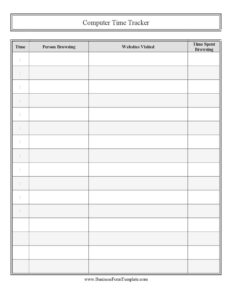
Computer Time Tracker
Use this free Computer Time Tracker template to log who used a device, what sites they visited, and how long—free PDF and DOCX download.
PDF
0
likes
Download Files
A Computer Time Tracker is a simple log used to record who used a computer, what websites they visited, and how much time they spent online. People most often use it to monitor shared or supervised device usage—whether at home, in a classroom, or in a small office—and it’s free to download in both PDF and DOCX formats with no signup required.
What Is a Computer Time Tracker?
A Computer Time Tracker is a manual record-keeping sheet that documents computer and internet activity over a period of time. Rather than relying on software alone, it captures a human-readable summary of each session: the time it occurred, the person using the device, the websites visited, and the total time spent browsing. Parents use it to keep tabs on screen time, teachers use it to manage lab or library workstations, and employers use it to encourage accountability on shared machines. Because it is a paper-and-pen (or fillable digital) log, it works anywhere, requires no installation, and gives everyone a transparent, agreed-upon view of how a device is being used.
When Do You Need a Computer Time Tracker?
This log is useful any time more than one person shares a device, or when you want a clear record of online activity. Common scenarios include:
- Parents managing screen time for children, tracking daily browsing and total minutes to enforce healthy limits.
- Teachers and librarians overseeing shared computer stations, recording which student used a workstation and when.
- Small business owners who want a lightweight record of how a front-desk or shared office computer is being used during work hours.
- Households with shared family computers, where multiple people log time so usage can be divided fairly.
- Tutors or coaching centers documenting that supervised browsing stayed on task during a session.
- IT or facilities staff spot-checking activity on a public-access or kiosk computer.
What a Computer Time Tracker Should Have
A complete tracker stays simple but captures enough detail to be meaningful. At minimum it should include the time of the session so entries can be placed in order, the name of the person browsing so usage is tied to an individual, the websites visited during that session, and the total time spent browsing. Beyond the core fields, it helps to leave space for a date column, a notes or purpose field, and a running total at the bottom of the page. Consistency matters more than complexity: a tracker that everyone fills in the same way produces a record you can actually read and act on later.
How to Fill Out a Computer Time Tracker
- Time: Record when the session began. Use a consistent format—either clock time (for example, 3:15 PM) or a start-and-end range. Adding the date alongside the time keeps multi-day logs in order.
- Person browsing: Write the full name or a recognizable identifier of whoever used the computer. If several people share one machine, each new user should start a fresh row so activity is never blended together.
- Websites visited: List the main sites or categories accessed during the session—for instance, a homework portal, a streaming service, or a research database. You don’t need every URL; capture the significant destinations that reflect how the time was spent.
- Time spent browsing: Note the total duration of the session, such as 45 minutes or 1.5 hours. At the end of the day or week, add these figures together to see total usage per person.
Fill in one row per session and avoid leaving gaps; an incomplete log loses its value as a record. If you use the DOCX version, you can widen the websites column to fit more detail.
Tips for Keeping an Accurate Log
The usefulness of a Computer Time Tracker depends entirely on the discipline behind it. Make entries in real time or immediately after each session—relying on memory at the end of the day leads to guesswork and missing rows. Keep the sheet near the computer, whether printed and clipped to a clipboard or open as a digital file. If the tracker is meant to support a household or classroom rule, agree in advance on what counts as “browsing” so everyone logs consistently. Periodically tally the time-spent column to spot patterns, and review the websites visited together rather than as a surprise. Transparency turns the log from a surveillance tool into a shared agreement.
Digital vs. Paper Tracking
Automated software can capture browsing history without manual entry, but a manual Computer Time Tracker has real advantages. It is device-independent, costs nothing, and creates a record that the user actively acknowledges by signing or writing it—which is often the point in a parenting or teaching context. A paper or fillable log also sidesteps privacy software, browser limitations, and the technical know-how needed to configure monitoring tools. Many people use both: software for raw history and this tracker as a human-readable, agreed-upon summary. Choose the approach that fits your goal, and remember that any monitoring should be done openly and with the knowledge of the people involved.
Common Mistakes to Avoid
- Skipping rows when the computer is busy—gaps make the log unreliable and easy to dispute.
- Blending multiple users into one entry, so you can’t tell who did what; always start a new row per person.
- Vague time entries like “afternoon” instead of an actual clock time or duration.
- Listing only one website when a session covered several, which understates real usage.
- Forgetting to total the time-spent column, which is usually the whole reason for keeping the log.
- Using the tracker secretly when the people being recorded should reasonably know about it.
Frequently Asked Questions
What is a Computer Time Tracker used for? It is a log for recording who used a computer, what websites they visited, and how long they browsed. Parents, teachers, and small businesses use it to monitor screen time, manage shared devices, and keep a transparent record of online activity.
How do I fill out a Computer Time Tracker? Use one row per session: enter the time the session occurred, the name of the person browsing, the main websites they visited, and the total time spent. Make entries as they happen and tally the totals at the end of the day or week.
Is this Computer Time Tracker free to download? Yes. You can download this template completely free in both PDF and DOCX formats, with no signup or account required. Print it as-is or edit the editable version to match your needs.
Can I customize the columns in this template? Absolutely. The DOCX version is fully editable, so you can add a date column, a notes or purpose field, widen the websites column, or insert a signature line. Tailor it to a household, classroom, or office setting.
Is it legal to track someone’s computer use? Monitoring rules vary by relationship and jurisdiction—parents tracking minors is treated differently from employers tracking staff. As a best practice, always be transparent with the people involved and check the rules that apply to your situation before logging activity.
Should I use software instead of a paper tracker? Both have a place. Software automatically captures browsing history, while this manual tracker creates a simple, agreed-upon, device-independent record that users acknowledge. Many people use the manual log alongside any automated tools for a clear, human-readable summary.
This Computer Time Tracker template is a general example provided for informational purposes only and is not legal, employment, or privacy advice. Monitoring laws and acceptable-use rules vary by jurisdiction and by relationship; consult a qualified professional before relying on this form in any official capacity.
Related Forms
- Hairdresser Customer Profile
- General Journal
- Store Opening Procedure Checklist
- Gas Mileage Log
- Restaurant Ban Form
- Inventory Cards Spreadsheet
Browse more in Log and Inventory.