
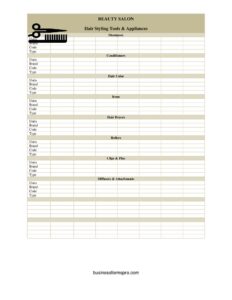
Beauty Salon Supplies Inventory Card
Track salon stock with our free Beauty Salon Supplies Inventory Card template, organizing shampoos, color, tools and appliances by brand, code and units — free download.
PDF
DOCX
0
likes
Download Files
- DOCX
A Beauty Salon Supplies Inventory Card is a simple stock-tracking sheet that records every product and tool in your salon — from shampoos and hair color to irons, dryers and clips — along with quantities, brands and product codes. Salon owners and managers most often use it to know exactly what’s on the shelf, what’s running low, and when to reorder. You can download it free here in PDF and DOCX, with no signup required.
What Is a Beauty Salon Supplies Inventory Card?
A Beauty Salon Supplies Inventory Card is a structured form used to catalog the consumable products and reusable equipment a salon relies on day to day. It is typically maintained by the salon owner, manager, or a designated stockroom lead, and it documents the type, brand, code and unit count for each item across categories like styling tools, shampoos, conditioners, hair color and appliances. The card serves as a single reference point so anyone on the team can check current stock at a glance. Rather than relying on memory or scattered notes, the inventory card creates an accurate, repeatable snapshot of what the salon owns, which supports ordering, budgeting, and loss prevention.
When Do You Need a Beauty Salon Supplies Inventory Card?
This card is useful any time you need a clear picture of salon stock. Common situations include:
- Weekly or monthly stock counts — recording units of shampoos, conditioners and color before placing supplier orders.
- Reordering decisions — spotting when developer, foils, or a popular color shade is running low.
- Opening a new salon or station — building a baseline list of every appliance and product on hand.
- Onboarding staff — showing new stylists which brands and codes the salon stocks and where they live.
- Tracking expensive appliances — keeping count of irons, hair dryers and diffusers to deter loss or misplacement.
- End-of-year or accountant reviews — providing a documented value of supplies and equipment on hand.
What a Beauty Salon Supplies Inventory Card Should Have
A complete inventory card groups items into logical categories and captures consistent details for each one. The categories on this template cover Hair Styling Tools & Appliances, Shampoos, Conditioners, Hair Color, Irons, Hair Dryers, Rollers, Clips & Pins, and Diffusers & Attachments. For every line, the card records four core data points: the number of Units in stock, the Brand, the product Code (SKU or supplier reference), and the Type (such as volumizing shampoo, 20-volume developer, or 1-inch flat iron). Keeping these four fields consistent across every category is what makes the card scannable and useful for fast reordering.
How to Fill Out a Beauty Salon Supplies Inventory Card
- Choose a count date and counter. Note who is taking the inventory and when, so you can compare cards over time.
- Start with Hair Styling Tools & Appliances. List each item, then fill in Units, Brand, Code and Type for that line.
- Record Shampoos. Enter the number of Units on the shelf, the Brand, the product Code, and the Type (clarifying, color-safe, sulfate-free, etc.).
- Record Conditioners. Repeat with Units, Brand, Code and Type for each conditioner you stock.
- Log Hair Color. Capture Units, Brand, Code and Type — note shade numbers or developer volumes under Type for clarity.
- Count Irons. Add Units, Brand, Code and Type (flat, curling, crimping, and barrel size).
- Count Hair Dryers. Record Units, Brand, Code and Type (professional, ionic, travel).
- Log Rollers. Enter Units, Brand, Code and Type, including roller size or material.
- Tally Clips & Pins. Record Units (or packs), Brand, Code and Type such as sectioning clips or bobby pins.
- Finish with Diffusers & Attachments. Fill in Units, Brand, Code and Type, matching attachments to compatible dryers where possible.
Tips for Keeping Your Inventory Accurate
Inventory only helps when it’s reliable. Always count consumables — shampoos, conditioners and color — by full units, and decide in advance how to handle partially used bottles (many salons round down or note them separately). Keep the Code field consistent with your supplier’s catalog so reordering is fast and error-free. Store the completed card near the stockroom or save the DOCX version so you can update unit counts digitally. Consider setting a reorder threshold for each high-use product and flagging anything at or below it during every count.
Consumables vs. Equipment: Why Both Belong on the Card
This template deliberately mixes consumables (shampoos, conditioners, color) with durable equipment (irons, dryers, diffusers). Consumables are used up and reordered frequently, so their Unit counts change every week. Equipment is counted less for reordering and more for asset tracking — knowing you own six dryers and four flat irons helps you spot breakage, theft, or items that walked off with a stylist. Recording both on one card gives you a complete operational view: what to buy and what to protect. If your salon grows, you can split these into separate cards, but starting with one keeps things simple.
Common Mistakes to Avoid
- Skipping the Type field. “Shampoo” alone isn’t enough — note clarifying vs. color-safe so you reorder the right product.
- Inconsistent codes. Mixing internal labels with supplier SKUs makes reordering confusing and slow.
- Counting opened and sealed units the same way. Decide a rule and apply it every time.
- Forgetting to date the count. Without a date, you can’t track usage trends or compare to the last card.
- Leaving expensive appliances off the card. Irons and dryers are easy to lose if no one is counting them.
- Updating only some categories. A half-finished card gives a false sense of what’s in stock.
Frequently Asked Questions
What is a Beauty Salon Supplies Inventory Card used for? It is used to track every product and tool in a salon, recording units, brand, code and type for each item. Salons use it to monitor stock levels, plan reorders, and keep an asset record of equipment. It replaces guesswork with a documented count.
How do I fill out the card for products like hair color? List each color product, then enter the number of Units in stock, the Brand, the product Code, and the Type. For Type, include the shade number or developer volume so the entry is specific. Repeat this for every color you carry.
How often should I update the inventory card? Most salons count consumables weekly or before each supplier order, and review equipment monthly. The right frequency depends on your sales volume and how fast you go through products. Frequent counts make low-stock items easier to catch early.
What’s the difference between the Code and Type fields? The Code is the SKU or supplier reference number used to reorder the exact item, while Type is a plain-language description of what it is — such as “volumizing shampoo” or “1-inch flat iron.” Using both lets staff identify products at a glance and order them accurately.
Can I use this card for a single station or a whole salon? Yes. The categories work for one stylist’s station or an entire salon stockroom. For larger operations you may keep one card per station and combine the totals, or maintain a master card for the full inventory.
Is this inventory card free to download? Yes, the Beauty Salon Supplies Inventory Card is completely free to download in both PDF and DOCX formats with no signup required. Use the PDF for quick printing and clipboard counts, or edit the DOCX to add your own product categories and reorder thresholds.
This template is a general example provided for informational purposes only and is not business, financial, or tax advice. Inventory and recordkeeping practices vary by business and jurisdiction — consult a qualified professional for guidance specific to your salon.
Related Forms
- List of Insurance Policies
- Garment Inventory Form
- Store Opening Procedure Checklist
- Pest Sighting
- Inventory Count Sheet
- Yearly Multiple Project Timetable
Browse more in Log and Inventory.