
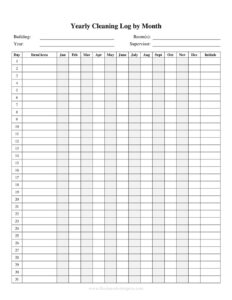
Yearly Cleaning Log
Track every cleaning task across the year with this free Yearly Cleaning Log template, available as a free download in PDF and DOCX formats.
PDF
DOCX
4 downloads
0
likes
Download Files
- DOCX
A Yearly Cleaning Log is a record-keeping sheet used to document cleaning tasks performed throughout an entire year, giving you a single annual reference for who cleaned what, when, and how often. People most commonly use it to prove that recurring sanitation routines were actually completed and to spot gaps in their schedule. It is free to download in both PDF and DOCX formats, with no signup required.
What Is a Yearly Cleaning Log?
A Yearly Cleaning Log is a structured document that captures cleaning activity over a 12-month period. It is typically issued and maintained by facilities managers, business owners, housekeeping supervisors, or homeowners who want a long-term, at-a-glance history of upkeep. Rather than tracking a single day or week, this log consolidates the whole year so you can review patterns, confirm compliance, and demonstrate accountability. It documents the area or item cleaned, the dates of each cleaning, the person responsible, the cleaning method or products used, and a place to verify the work. In short, it transforms scattered cleaning efforts into an organized, auditable annual trail.
When Do You Need a Yearly Cleaning Log?
A Yearly Cleaning Log is useful any time cleaning needs to be tracked, proven, or scheduled across an extended timeframe. Common situations include:
- Health and safety inspections — restaurants, clinics, and food-handling businesses often must show ongoing sanitation records spanning the full year.
- Facility and property management — building managers track recurring tasks like HVAC vent cleaning, carpet shampooing, and window washing across seasons.
- Rental and Airbnb turnover — hosts maintain proof that deep cleans happened between guests throughout the year.
- Office and workplace hygiene — employers document daily, weekly, and quarterly cleaning to reassure staff and meet workplace standards.
- Equipment and machinery upkeep — manufacturing and lab settings log periodic cleaning of tools, surfaces, and instruments.
- Home maintenance routines — households use it to plan and remember seasonal deep cleans like gutters, dryer vents, and appliances.
What a Yearly Cleaning Log Should Have
To be genuinely useful and audit-ready, a complete Yearly Cleaning Log should capture a few core elements. First, it needs the area, room, or item being cleaned so each entry is unambiguous. Second, it should record the date of each cleaning, ideally laid out so you can scan an entire year. Third, it must identify the person or team who performed the task and provide space for their initials or signature. Fourth, it benefits from a column for the cleaning method, frequency, or products used. Finally, a notes or verification field lets a supervisor confirm the work or flag anything that needs follow-up. Including a header for the facility name and the calendar year ties the whole record together.
How to Fill Out a Yearly Cleaning Log
Because this is a flexible blank template, you can adapt the columns to your environment. Follow these steps:
- Add the heading details. Write the facility, property, or department name and the calendar year the log covers at the top.
- List the areas or items. In the first column, enter each room, surface, or piece of equipment to be cleaned — for example “break room,” “restrooms,” or “HVAC filters.”
- Set the frequency. Note how often each task should occur (daily, weekly, monthly, quarterly) so reviewers know the expected cadence.
- Record the date. Each time cleaning is done, log the specific date in the corresponding cell.
- Enter the cleaning method. Briefly describe the products or process used, especially for sanitizing tasks.
- Sign or initial. The person who performed the cleaning adds their initials to confirm responsibility.
- Add verification and notes. A supervisor reviews and signs off, recording any issues, missed dates, or supplies needed.
Organizing the Log Across the Year
The strength of a yearly format is its ability to reveal trends a daily sheet cannot. Consider grouping tasks by frequency: keep daily and weekly items at the top and seasonal or annual deep-cleaning tasks lower down. Many users print one page per month and bind them, or keep a digital DOCX version updated continuously. Color-coding or shading completed cells makes gaps obvious at a glance. For multi-staff teams, assign each person a consistent initial set so accountability stays clear. Reviewing the log at the end of each quarter helps you adjust schedules before small lapses become bigger problems.
Paper vs. Digital Cleaning Logs
The PDF version is ideal for posting on a clipboard near the cleaning area, where staff can mark entries by hand immediately after completing a task. The DOCX version suits teams that prefer typing entries, sharing the file across locations, or customizing columns to match specialized equipment. Whichever format you choose, store completed logs securely for the full year and, if your industry requires it, keep prior years archived. A consistent storage habit ensures the records are available when an inspector, auditor, or new manager asks for them.
Common Mistakes to Avoid
- Backfilling dates from memory — record each cleaning when it happens, not days later when details are forgotten.
- Leaving the verifier column blank — unsigned entries weaken the log’s credibility during an inspection.
- Vague area labels — “kitchen” is less useful than “kitchen prep counter” or “walk-in cooler.”
- Ignoring seasonal tasks — annual deep cleans are easy to overlook on a log built around daily routines.
- Skipping the frequency column — without a target cadence, no one can tell whether a task is overdue.
- Not reviewing the log — a record nobody checks defeats the purpose of tracking the full year.
Frequently Asked Questions
What is a Yearly Cleaning Log used for? It is used to document and verify cleaning tasks performed over an entire calendar year. Businesses use it to demonstrate ongoing sanitation for inspections, while homeowners use it to schedule and track seasonal upkeep. The annual format makes it easy to confirm that recurring tasks were completed on time.
How do I fill out a Yearly Cleaning Log? Start by adding the facility name and year, then list each area or item to be cleaned and its target frequency. Each time a task is completed, record the date, the method used, and the initials of the person who did it. A supervisor can then verify the entry and add notes.
Is a Yearly Cleaning Log legally required? Requirements vary by industry and jurisdiction. Food service, healthcare, and childcare facilities often face regulations that expect documented cleaning, while other settings keep logs voluntarily for accountability. Check your local health authority or regulatory body for the specific rules that apply to you.
Can I customize this template for my business? Yes. The DOCX version is fully editable, so you can rename columns, add areas or equipment specific to your operation, and adjust the frequency labels. The PDF version is ready to print and fill in by hand if you prefer a posted clipboard.
How much does this Yearly Cleaning Log cost? It is completely free to download from Business Forms Pro in both PDF and DOCX formats. There is no signup, subscription, or hidden fee. You can use it for personal or commercial purposes.
How long should I keep a completed cleaning log? Keep the log for at least the full year it covers, and longer if your industry or local regulations require retention of sanitation records. Many businesses archive several years of logs for audits. Storing prior years digitally makes them easy to retrieve when needed.
This template is a general example provided for informational purposes only and does not constitute legal, regulatory, or professional compliance advice. Cleaning and record-keeping requirements vary by industry and jurisdiction. Consult a qualified professional or your local regulatory authority to ensure your practices meet applicable standards.
Related Forms
- Basic Inventory Card
- Fire Drill Log
- Interview Preparation Worksheet
- Salad Bar Items Inventory Spreadsheet
- Auto Maintenance Log
- Store Closing Procedure Checklist
Browse more in Log and Inventory.