
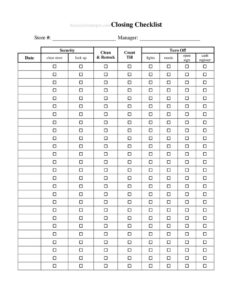
Store Closing Procedure Checklist
Download a free Store Closing Procedure Checklist template in PDF and DOCX to secure your shop, count the till, and lock up consistently every night.
PDF
DOCX
2 downloads
0
likes
Download Files
- DOCX
A Store Closing Procedure Checklist is a step-by-step list that guides employees through everything required to safely and consistently shut down a retail location at the end of the business day. Most stores use it to make sure no critical task — counting the register, locking doors, setting the alarm — gets skipped during the rush to leave. It’s free to download here in both PDF and DOCX, with no signup required.
What Is a Store Closing Procedure Checklist?
A Store Closing Procedure Checklist is an operational document used by retail managers and staff to standardize how a store is closed each night. It is typically posted near the register or kept in a closing binder, and it lists each closing duty in the order it should be performed. The checklist documents who completed the close, what time the store was secured, and whether cash, security, and cleaning tasks were finished. By turning the routine into a repeatable, written process, it reduces shrinkage, prevents security lapses, and creates accountability across shifts and employees.
When Do You Need a Store Closing Procedure Checklist?
Almost any business with a physical storefront and set hours benefits from a written closing routine. Common situations include:
- Training new employees or shift leads who are closing the store for the first time and need a reliable reference.
- Running a store with multiple closing staff where consistency between people and nights is hard to maintain.
- Managing a franchise or multi-location chain that requires identical closing standards at every site.
- Reducing cash discrepancies by documenting the till count and deposit each evening.
- Protecting the premises overnight by confirming doors are locked, alarms are armed, and lights are set.
- Investigating an incident — such as a missed deposit or unlocked door — where a signed checklist shows what was and wasn’t completed.
Types of Closing Checklists
Some stores keep a single master checklist, while others break the close into sections — front-of-house, cash handling, and security — or maintain separate versions for weekday and weekend closes. A small boutique may need a one-page list, while a grocery or big-box store often uses a multi-page document covering departments, refrigeration, and back-stock areas.
What a Store Closing Checklist Should Have
An effective closing checklist covers four core areas. Customer and sales floor tasks ensure shoppers have left and merchandise is tidy. Cash and register tasks document the count, deposit, and reconciliation. Cleaning and stocking tasks prepare the store for the next day. Security and facilities tasks confirm the building is locked and protected. The form should also capture the date, the employee’s name and signature, the time the store was secured, and a space for notes about anything unusual. Each task should be a clear checkbox so it is obvious at a glance what is done and what remains.
How to Fill Out a Store Closing Procedure Checklist
Because closing tasks vary by store, this template is structured so you can adapt it to your location. Follow these steps:
- Enter the store name or location and the date of the close at the top of the form.
- Record the name of the employee performing the close and the shift if applicable.
- Work through the sales floor section: confirm all customers have left, lock the front entrance, and turn off display lighting or signage. Check each box as you go.
- Complete the cash handling section: count the register drawer, reconcile it against the day’s sales, prepare the deposit, and store cash in the safe. Note the totals.
- Finish the cleaning and restocking tasks: empty trash, sweep or mop floors, and restock shelves or fitting rooms for the morning.
- Move to the security section: shut down equipment, set the thermostat, turn off non-essential lights, lock back and storage doors, and arm the alarm.
- Add any notes about incidents, low stock, or maintenance issues.
- Enter the time the store was secured and add your signature to confirm completion.
Tips for Building a Reliable Closing Routine
Order the tasks in the actual sequence staff perform them, so the checklist mirrors how people move through the building. Place cash-handling steps where they make sense — usually after the registers close but before the doors are locked. Laminate a master copy or keep blank forms in a closing binder so a fresh sheet is always available. Review the completed checklists weekly to spot recurring problems, such as repeated cash shortages or skipped cleaning tasks. Finally, pair the checklist with a short opening checklist so the handoff between night and morning shifts is seamless.
How It Differs From an Opening Checklist
An opening checklist focuses on getting the store ready for customers — unlocking, disarming the alarm, counting the starting till, and turning on lights and equipment. A closing checklist reverses that flow and adds security and reconciliation steps. Many stores keep both side by side in the same binder because they share the same staff and physical space, but the priorities differ: opening is about readiness, closing is about security and accuracy.
Common Mistakes to Avoid
- Skipping the cash count when rushing to leave, which makes discrepancies impossible to trace later.
- Locking the front door before confirming all customers and staff have actually left the building.
- Forgetting to arm the alarm or check that back and storage doors are secured.
- Leaving the time-secured and signature fields blank, removing accountability for the close.
- Using a generic checklist that doesn’t match your store’s real equipment, departments, or layout.
- Not noting unusual events — like a power issue or suspicious activity — that the morning crew or manager should know about.
Frequently Asked Questions
What is a store closing procedure checklist? It is a written list of the tasks employees must complete to safely shut down a retail store at the end of the day. It typically covers the sales floor, cash handling, cleaning, and security, and includes spaces for the date, employee name, time secured, and signature.
How do I fill out the closing checklist? Start with the store name, date, and your name, then work through each section in the order tasks are performed — sales floor, cash, cleaning, and security. Check off each item as you complete it, add notes about anything unusual, and sign and time-stamp the form when the store is fully secured.
Can I customize this template for my store? Yes. The DOCX version is fully editable so you can add or remove tasks to match your store’s layout, equipment, departments, and security setup. Most businesses adapt the sections to reflect their exact closing routine.
Is a closing checklist legally required? A closing checklist is generally an internal operational tool rather than a legal requirement. However, it can help demonstrate due diligence and support compliance with cash-handling, safety, or insurance obligations that vary by business and location.
How much does this template cost? It is completely free to download here in both PDF and DOCX formats, with no signup, account, or payment required. You can print it for nightly use or edit the digital version to fit your needs.
Should the checklist be signed? Signing the checklist is strongly recommended because it creates accountability for who closed the store and confirms each task was completed. A signature and time stamp are especially valuable if a discrepancy or security incident needs to be investigated later.
This template is provided as a general example for informational purposes only and does not constitute legal, financial, or operational advice. Closing requirements, cash-handling rules, and security obligations vary by business, jurisdiction, and insurer — consult a qualified professional to ensure your procedures meet your specific needs.
Related Forms
- Janitorial Checklist
- Credit History Record
- Interruptions Log
- Amateur Radio Station Log
- Retirement Income Sources
- Project Status Report
Browse more in Log and Inventory.