
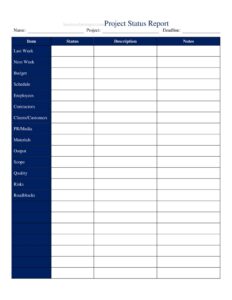
Project Status Report
Use this free Project Status Report template to track progress, risks, and milestones, then download it instantly in PDF or DOCX with no signup.
PDF
DOCX
3 downloads
0
likes
Download Files
- DOCX
A Project Status Report is a concise document that summarizes where a project stands at a given point in time, covering progress, budget, risks, and upcoming work. The most common reason people use one is to keep stakeholders aligned without endless meetings — a single snapshot everyone can read in two minutes. This template is free to download in both PDF and DOCX formats, with no signup required.
What Is a Project Status Report?
A Project Status Report is a recurring summary, usually issued weekly or monthly, that a project manager or team lead prepares for sponsors, clients, and team members. It documents what has been accomplished since the last update, what is planned next, how the schedule and budget are tracking, and which risks or issues need attention. Rather than burying details in email threads, the report consolidates the project’s health into a predictable, scannable format. Because it lives in the log and inventory category of project documentation, it also becomes a historical record — a chronological trail showing how a project evolved, what decisions were made, and when problems first surfaced.
When Do You Need a Project Status Report?
Almost any structured initiative benefits from a regular status report. Common situations include:
- Weekly team check-ins — to align developers, designers, and stakeholders before the next sprint or work cycle begins.
- Client deliverable updates — when an agency or contractor must show a paying client measurable progress against the agreed scope.
- Executive or sponsor reporting — to give leadership a high-level view of budget burn, timeline, and major risks without technical detail.
- Cross-department initiatives — where marketing, IT, and operations all depend on shared milestones and need a common reference point.
- Recovering a troubled project — when timelines slip, frequent status reports document corrective actions and rebuild stakeholder confidence.
- Grant or compliance-funded work — where funders require periodic written evidence that milestones and spending stay on plan.
What a Project Status Report Should Have
A complete report balances brevity with substance. Strong reports typically include a project header (name, manager, reporting period, and report date), an overall health indicator such as on-track, at-risk, or off-track, and a short executive summary. From there, include accomplishments completed during the period, work planned for the next period, milestone and schedule status, budget or resource notes, and an open-issues and risks section with owners and due dates. Many teams add a color or status rating for scope, schedule, and budget so readers can spot trouble instantly. The goal is consistency: using the same headings every period lets readers compare reports over time and notice trends rather than reacting only to the latest update.
How to Fill Out a Project Status Report
Work through the template top to bottom so nothing is missed:
- Project name and ID: Enter the official project title and any internal reference number so the report is easy to file and search later.
- Prepared by and date: Record the author’s name and the date the report was issued; this anchors the report in the timeline.
- Reporting period: Note the start and end dates the report covers (for example, the past week or month).
- Overall status: Mark the project as on-track, at-risk, or off-track, and add a one-line justification.
- Executive summary: Write two or three sentences capturing the headline — what matters most to a busy reader.
- Accomplishments this period: List completed tasks, delivered items, and decisions reached.
- Planned for next period: Outline the upcoming priorities and deadlines.
- Milestones and schedule: Show key dates, their planned versus actual status, and any slippage.
- Budget and resources: Note spending against plan and any staffing constraints.
- Issues and risks: Capture each open item with an owner, impact, and target resolution date.
Reporting Frequency and Audience
Choose a cadence that matches the pace of the work. Fast-moving software or marketing projects often warrant weekly reports, while long construction or research efforts may suit a monthly rhythm. Tailor the depth to your audience: executives want a one-glance health rating and the top three risks, while the core delivery team needs task-level detail. A practical approach is to keep one master report and present a condensed version to senior stakeholders. Whatever frequency you pick, issue reports on the same day each period so recipients learn to expect and read them.
Status Report vs. Project Plan
It is easy to confuse these two documents, but they serve different purposes. A project plan is forward-looking and created at the start — it defines scope, schedule, budget, and resources for the whole effort. A Project Status Report is a recurring snapshot that measures actual performance against that plan. The plan sets expectations; the status report reports reality. Used together, they let everyone see not just where the project intended to go, but how it is actually progressing and where it has drifted off course.
Common Mistakes to Avoid
- Burying bad news — softening or hiding risks erodes trust; flag problems early with a plan to address them.
- Listing activity instead of outcomes — “held three meetings” matters less than “finalized the vendor contract.”
- Inconsistent formatting — changing sections every period makes it impossible to compare reports over time.
- Omitting owners and dates on issues, which leaves risks unassigned and unresolved.
- Writing too much — a report nobody reads helps no one; keep summaries tight and link to detail.
- Skipping the overall status rating, forcing readers to infer health from scattered details.
Frequently Asked Questions
What is a Project Status Report used for? It gives stakeholders a regular, consistent snapshot of a project’s health — progress made, work ahead, budget, and risks. It replaces scattered updates with one reliable document and creates a historical record of how the project evolved over time.
How often should I send a status report? Match the cadence to the project’s pace. Fast-moving work often calls for weekly reports, while longer initiatives may suit a monthly schedule. The key is consistency — issue them on the same day each period so recipients always know when to expect the update.
How do I fill out this template? Start with the header details (project name, author, date, and reporting period), set an overall status, then complete the accomplishments, upcoming work, milestone, budget, and risk sections. Keep entries outcome-focused and assign an owner and date to every open issue.
Is a Project Status Report a legally binding document? No. It is an internal communication and record-keeping tool, not a contract. That said, archived reports can serve as useful evidence of decisions, timelines, and notifications if a dispute over project performance ever arises.
What is the difference between a status report and a status update meeting? A written report is a durable, scannable artifact that anyone can read on their own time and revisit later. A meeting is interactive but leaves no automatic record. Many teams use the report as the agenda for a short meeting, then file it.
How much does this template cost? Nothing. You can download the Project Status Report template for free in PDF or DOCX with no signup, then customize the sections, headings, and status ratings to fit your project and organization.
This template is provided as a general example for informational purposes only and does not constitute legal, financial, or project-management advice. Reporting requirements and best practices vary by organization, industry, and contract — consult a qualified professional or your project office to ensure your reporting meets your specific obligations.
Related Forms
- Volunteer Hours Tracker
- Prospect List
- Event Production Schedule
- Salad Bar Items Inventory Spreadsheet
- Phone Tree
- Publication Submission Tracker
Browse more in Log and Inventory.