
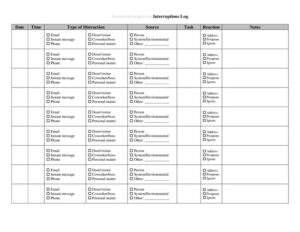
Interruptions Log
Track every distraction at work with our free Interruptions Log template, identify time-wasters, and boost focus with a free download in PDF and DOCX.
PDF
DOCX
2 downloads
0
likes
Download Files
- DOCX
An Interruptions Log is a simple tracking sheet used to record every interruption, distraction, or disruption that pulls you away from focused work during the day. People most often use it to discover exactly where their time goes, who or what keeps breaking their concentration, and how to protect deep-work blocks. It is completely free to download in PDF and DOCX, with no signup required.
What Is an Interruptions Log?
An Interruptions Log is a structured record of the moments your attention is diverted from a task. Each entry typically captures when the interruption happened, who or what caused it, how long it lasted, and whether it was truly urgent. Individuals, remote workers, managers, and productivity coaches all use this log to turn a vague feeling of “I never get anything done” into concrete data. By writing down interruptions as they occur, you build an honest picture of your working day. Over a week or two, patterns emerge that you can act on u2014 recurring meetings, chatty coworkers, notification floods, or self-inflicted detours like checking email out of habit.
When Do You Need an Interruptions Log?
This log is useful any time concentration feels scarce and you want evidence rather than guesswork. Common situations include:
- Diagnosing low productivity: You finish the day feeling busy but unproductive and want to know where the hours actually went.
- Protecting deep work: You need to defend focused blocks for coding, writing, design, or analysis and want data to justify “do not disturb” time.
- Managing a team: A supervisor wants to understand why a department keeps missing deadlines despite long hours.
- Working from home: Household members, deliveries, and pets compete with work, and you want to quantify the cost.
- Reducing meeting and message overload: You suspect Slack pings, emails, and “quick questions” are fragmenting your day.
- Time-management coaching: A coach or accountability partner asks you to track interruptions before recommending changes.
Types of Interruptions to Track
Not all interruptions are equal, and labeling them helps you respond appropriately. Most fall into a few buckets: external human interruptions (a colleague stopping by, a phone call, a manager’s request), digital interruptions (notifications, emails, instant messages, social media), environmental interruptions (noise, deliveries, equipment failures), and self-initiated interruptions (task-switching, checking the news, snack runs). Distinguishing an urgent, unavoidable interruption from an optional one is the key insight the log delivers, because the two require completely different fixes.
What an Interruptions Log Should Have
A complete Interruptions Log captures enough detail to be analyzed later without becoming so detailed that logging itself becomes a distraction. The essentials include the date and time of each interruption, the source or person responsible, a short description of what it was about, the task you were working on when it happened, the duration, an urgency or priority rating, and a notes column for follow-up. A header area for the person’s name, role, and the date range being tracked makes the sheet easy to file and compare across weeks. A summary section at the bottom u2014 total interruptions, total minutes lost, and top recurring sources u2014 turns raw entries into action.
How to Fill Out an Interruptions Log
- Fill in the header: Add your name, role or department, and the date or week you are tracking so the log can be filed and compared later.
- Log the time: When an interruption occurs, immediately note the time it started u2014 doing it in the moment keeps the record honest.
- Record the source: Write who or what caused it, such as a coworker’s name, “email,” “phone call,” or “self u2014 checked phone.”
- Describe the interruption: In a few words, capture what it was about, like “approval question” or “status update request.”
- Note the current task: List the task you were pulled away from so you can see which work is most vulnerable.
- Estimate duration: Record how many minutes the interruption lasted, including the time it took to refocus afterward.
- Rate urgency: Mark whether it was urgent, could wait, or was avoidable.
- Add notes and follow-up: Capture any action needed, then total your entries in the summary at the end of the day or week.
Turning the Log Into Action
Collecting data is only half the value; the payoff comes from reviewing it. At the end of each day or week, tally the total number of interruptions and the total minutes lost. Sort by source to find your biggest offenders. If “email” or “messaging” tops the list, batch those into set times instead of reacting all day. If a single colleague accounts for many entries, consider posting office hours or a status signal. If self-interruptions dominate, the fix is usually environmental u2014 silencing notifications, closing tabs, or using a timer. The goal is not zero interruptions, which is unrealistic, but fewer avoidable ones and faster recovery from the necessary ones.
Tips for Accurate Tracking
Keep the log within arm’s reach u2014 a printed sheet on the desk or an open DOCX file u2014 so entries take seconds. Log interruptions the moment they happen rather than reconstructing them from memory, which always undercounts. Track for at least a full week, including a Monday and a Friday, since interruption patterns shift across the workweek. Be honest about self-interruptions; they are often the easiest to fix once you see them written down.
Common Mistakes to Avoid
- Logging only big interruptions: The two-minute “quick questions” add up fastest, so record the small ones too.
- Skipping the duration: Without minutes, you cannot quantify lost time or justify changes.
- Forgetting refocus time: Returning to a task often takes several minutes; include that recovery cost.
- Tracking for only a day: A single day is too small a sample u2014 track at least a week for reliable patterns.
- Not reviewing the data: A log nobody analyzes is wasted effort; always tally and act on it.
- Making the log too complex: If logging itself becomes a chore, you will stop, so keep columns simple.
Frequently Asked Questions
What is an Interruptions Log used for? It is used to record every distraction during your workday so you can see where your time and focus actually go. Over a week, it reveals the people, tools, and habits that fragment your concentration most, giving you concrete data to make changes.
How do I fill out an Interruptions Log? Each time you are interrupted, jot down the time, the source, a brief description, the task you were doing, how long it lasted, and how urgent it was. At the end of the day or week, total your entries to spot the biggest time-drains.
How long should I track interruptions? Aim for at least one full working week so you capture patterns across different days. Tracking two weeks gives an even clearer picture, since some interruptions are weekly events like recurring meetings or reports.
Is this Interruptions Log free to download? Yes. You can download it free in both PDF and DOCX formats with no signup required. Use the PDF for quick printing or the DOCX if you want to add columns or customize the layout.
Should I track self-interruptions too? Absolutely. Self-initiated distractions like checking your phone, switching tasks, or browsing the web are often the largest and most fixable category, and logging them honestly is one of the most valuable things this sheet does.
Can a manager use this log for a whole team? Yes. Each team member can keep their own log, and the combined results help identify systemic issues u2014 too many meetings, unclear priorities, or notification overload u2014 that affect the whole group’s productivity.
This Interruptions Log template is provided as a general example for informational and productivity purposes only and does not constitute professional, managerial, or legal advice. Workplace policies and tracking practices vary by organization; adapt the form to your own needs and consult a qualified professional where appropriate.
Related Forms
- Outgoing Mail Detailed Log
- Employee Password Tracker
- Inventory Cards Spreadsheet — Black And White
- Hazardous Chemical Inventory
- Inventory Report
- Cash Register Log
Browse more in Log and Inventory.