
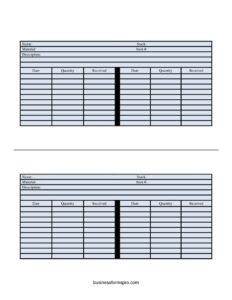
Basic Inventory Card
Track stock levels and item movement with a free Basic Inventory Card template, available as a free download in PDF and DOCX formats.
PDF
DOCX
3 downloads
0
likes
Download Files
- DOCX
A Basic Inventory Card is a simple record used to track a single item’s stock levels, identifying details, and the dates and quantities received over time. People most often use it to keep a clear, per-item paper or digital record of what is on hand and when new stock arrives. It’s free to download here in both PDF and DOCX formats, with no signup required.
What Is a Basic Inventory Card?
A Basic Inventory Card is a one-item tracking sheet that documents the essential details of a stocked product and a running history of receipts. Each card represents a single item or material, capturing its name, stock identifier, material type, item number, and a short description, along with a dated log of quantities received. Warehouse staff, store owners, office managers, and small business operators issue and maintain these cards to monitor what they hold and to spot when reordering is needed. Rather than relying on memory or scattered notes, the card keeps everything about one item in a single, consistent place that anyone on the team can read and update.
When Do You Need a Basic Inventory Card?
This card suits situations where you need a lightweight, reliable way to follow individual items without a full software system. Common scenarios include:
- Running a small retail shop and keeping a card for each product to watch stock and reorder before shelves run empty.
- Managing a stockroom or warehouse bin where each card is filed with or near the physical item for quick reference.
- Tracking office or facility supplies such as paper, toner, cleaning materials, or safety equipment.
- Monitoring raw materials in a workshop or manufacturing setting where the Material field identifies what each item is made of.
- Documenting deliveries by logging the date and quantity received each time a shipment arrives.
- Conducting periodic stock counts and comparing physical counts against the recorded card history.
What a Basic Inventory Card Should Have
A complete and useful inventory card combines item identification with a movement log. The identification block should clearly state the item Name, its Stock reference, the Material it consists of, a unique Item #, and a brief Description so the right card is never confused with another. The tracking block should include repeating columns for Date, Quantity, and Received so you can record each addition as it happens. Together these elements let you answer the two most important inventory questions at a glance: what is this item, and how much of it has come in and when.
How to Fill Out a Basic Inventory Card
Follow these steps to complete the card using its actual fields:
- Enter the Name of the item exactly as your team refers to it, so the card is easy to find and identify.
- Record the Stock reference, such as a shelf, bin, or stock code that ties the card to a physical location or category.
- Write the Material the item is made of or its material classification, which is useful for raw goods and components.
- Assign or copy the Item #, a unique number or SKU that distinguishes this item from all others.
- Add a short Description covering size, color, model, or any detail that prevents mix-ups.
- For the first receipt, fill in the Date the stock arrived, the Quantity received, and confirm in the Received field who logged it or that it was checked in.
- Each time new stock arrives, use the next Date, Quantity, and Received row to continue the running history.
Tips for Keeping Accurate Inventory Cards
An inventory card is only as good as the discipline behind it. Update the card at the moment stock is received rather than at the end of the day, when details are easy to forget. Keep one card per item and never combine two products on a single sheet, even if they look similar. If you are using the DOCX version on a computer, save a copy of each card and back up the file regularly so your history is not lost. For printed cards, store them in a labeled binder or attach them near the item so anyone can update them on the spot. Initialing the Received column also creates simple accountability, showing who verified each delivery.
Inventory Card vs. Full Inventory List
A Basic Inventory Card focuses on one item across time, while a master inventory list shows many items at a single point in time. The card excels at telling the story of a single product — every shipment, the dates, and the quantities — which is ideal when you want a deep history. A list is better for a quick overview of everything you hold. Many businesses use both: cards for detailed per-item tracking and a periodic list compiled from the cards. If you outgrow paper cards, the same fields translate neatly into a spreadsheet, so starting with this template costs you nothing later.
Common Mistakes to Avoid
- Skipping the Item #, which makes it hard to match cards to products when names are similar.
- Forgetting to log a date with each receipt, leaving you unable to track how quickly stock moves.
- Combining multiple items on one card, which defeats the purpose of per-item tracking.
- Leaving the Received field blank, so no one knows whether a delivery was actually verified.
- Letting the card fall out of date by updating it days after stock arrives.
- Not keeping a backup of the card, whether a photocopy or a saved digital file.
Frequently Asked Questions
What is a Basic Inventory Card used for? It is used to track a single item’s details and its history of stock received over time. Businesses keep one card per product to know what they hold and when new stock arrived. It works for retail, warehouses, offices, and workshops alike.
How do I fill out a Basic Inventory Card? Start by entering the item Name, Stock, Material, Item #, and Description in the identification fields. Then log each delivery in the Date, Quantity, and Received columns as stock comes in. Continue adding rows for every new receipt to build a running history.
Is the Basic Inventory Card free to download? Yes, this template is completely free to download in both PDF and DOCX formats. There is no signup or payment required. You can print it for paper use or edit the DOCX version on your computer.
Can I use this card for more than one item? No — each card is designed to track a single item so its history stays clear and accurate. If you have many items, simply print or save one card per item. This keeps every product’s record separate and easy to read.
What does the Received field mean? The Received field confirms that a delivery was checked in, and it can hold the name or initials of the person who verified it. Using it creates accountability and shows who logged each shipment. Pair it with the Date and Quantity columns for a complete record.
Do I need special software to use it? No special software is required. The PDF can be printed and filled out by hand, while the DOCX opens in common word processors for typing and editing. Choose whichever format fits how your team works.
This template is provided as a general example for informational purposes only and does not constitute legal, financial, or accounting advice. Inventory and record-keeping requirements vary by industry and jurisdiction, so consult a qualified professional to ensure your practices meet your specific needs.
Related Forms
- Computer Fault List
- Pledge Log
- Inspection Tags
- Website Traffic Tracker
- Library Loan List
- Wagering Tracker
Browse more in Log and Inventory.