
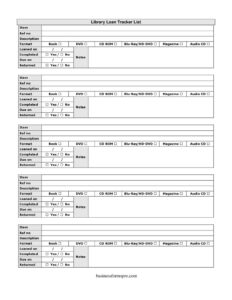
Library Loan List
Track borrowed books, DVDs, and media with this free Library Loan List template — record due dates and returns easily, free download in PDF and DOCX.
PDF
DOCX
6 downloads
0
likes
Download Files
- DOCX
A Library Loan List is a simple tracking sheet used to record which items have been borrowed, by whom they are managed, and when they are due back. Whether you run a small community lending library, a classroom collection, or a corporate resource shelf, this is the most common tool for keeping every loaned item accounted for. You can download it free in both PDF and DOCX formats — no signup required.
What Is a Library Loan List?
A Library Loan List is a log that documents the circulation of physical items from a collection — books, DVDs, CDs, magazines, and other media. It is typically maintained by whoever oversees the collection: a librarian, teacher, office administrator, or volunteer. The list captures each item’s reference number, format, the date it was loaned out, when it is due, and whether it has been returned. Rather than relying on memory or scattered notes, the form gives a single, organized record of what is in circulation at any moment. It helps prevent lost items, supports follow-up on overdue loans, and creates an audit trail showing the movement of materials in and out of the collection.
When Do You Need a Library Loan List?
This form is useful any time materials leave a shelf and need to come back. Common situations include:
- Running a small community, church, or neighborhood lending library where members borrow books and media.
- Managing a classroom or school library and tracking which students have checked out which titles.
- Overseeing a company resource library of manuals, training DVDs, and reference materials shared across departments.
- Lending items from a personal collection — books, Blu-rays, or audio CDs — to friends and family and wanting a record of who has what.
- Operating a club, hobby group, or studio that circulates equipment, magazines, or media among members.
- Performing a periodic inventory check to reconcile which items are out on loan versus sitting on the shelf.
Types of Items You Can Track
This particular list is built to handle a mixed media collection. The format columns let you tick the medium for each entry, so a single sheet can cover many material types: physical books, DVDs, CD-ROMs, Blu-ray discs, HD-DVDs, printed magazines, and audio CDs. Marking the format makes it easy to scan the log and see at a glance what kind of item is out, which matters when a Blu-ray and a paperback might share similar titles. It also helps when sorting or counting your collection by media type during an inventory.
What a Library Loan List Should Have
A complete loan list combines item identification with loan-cycle dates. The essential elements are a unique reference number for each item, a clear description so the title can be identified, a format indicator, and the key dates: when it went out, when it is due, and when it came back. A notes column rounds out the record by capturing condition issues, borrower details, or special arrangements. Together these elements let anyone read the sheet and immediately know what is loaned, what is overdue, and what has been safely returned.
How to Fill Out a Library Loan List
- Item: Enter the item number or sequential line number for the entry so each row is uniquely identified on the sheet.
- Ref no: Write the catalog or reference number assigned to the item — barcode, accession number, or your own shelf code.
- Description: Record the title and any identifying detail, such as author, edition, or volume, so the item is unmistakable.
- Format: Tick the matching format column — book, DVD, CD-ROM, Blu-ray, HD-DVD, magazine, or audio CD — to show what medium the item is.
- Loaned on: Fill in the date the item was checked out and left the collection.
- Due on: Enter the expected return date based on your lending period.
- Completed: Mark this when the loan transaction is finished or the borrower has finished using the item, if you track usage status.
- Returned: Note the date the item physically came back, or tick to confirm its return.
- Notes: Add the borrower’s name, condition observations, renewals, or any follow-up reminders.
Tips for Keeping an Accurate Loan Log
Update the sheet at the moment of every transaction rather than later, when details are easily forgotten. Use the notes column consistently for borrower names if the form does not have a dedicated borrower field, so you always know who to contact about an overdue item. Review the due dates regularly and highlight or flag any rows where the due date has passed but no return date is recorded. If you manage a larger collection, keep one master list and consider archiving completed rows periodically so the active sheet stays readable.
Common Mistakes to Avoid
- Leaving the ref no blank, which makes it impossible to match the entry to a specific physical item later.
- Forgetting to record the returned date, so an item that is safely back still appears overdue.
- Writing vague descriptions like “DVD” without the title, causing confusion when several items share a format.
- Skipping the due on date, leaving no basis for following up on late returns.
- Not noting the borrower in the notes field, so there is no way to contact the right person.
- Reusing reference numbers across different items, which corrupts your inventory and double-counts entries.
Frequently Asked Questions
What is a Library Loan List used for? It is used to track items borrowed from a collection — recording the reference number, description, format, loan and due dates, and return status. It helps libraries, classrooms, offices, and individuals keep accurate records of what is currently out on loan and follow up on overdue items.
How do I fill out a Library Loan List? Add a row for each item, entering its reference number and description, ticking the correct format, and recording the date it was loaned and when it is due. When the item comes back, fill in the returned date and use the notes column for borrower names or condition details.
Is this Library Loan List free to download? Yes. The template is completely free to download in both PDF and DOCX formats, with no signup or payment required. You can print the PDF for a clipboard at a checkout desk or edit the DOCX version to customize the columns for your collection.
Can I add a borrower’s name to the list? Yes. While the form centers on item and date fields, you can record the borrower’s name in the notes column, or edit the DOCX version to add a dedicated borrower column if you track many loans.
What do the format checkboxes mean? They let you indicate the medium of each item — book, DVD, CD-ROM, Blu-ray, HD-DVD, magazine, or audio CD. Ticking the right format makes the log easier to scan and helps when sorting or counting your collection by media type.
Can I use this for a personal book or media collection? Absolutely. The list works just as well for keeping track of items you lend to friends and family as it does for an organized library. It gives you a simple record of what is out, who has it, and when it is due back.
This template is provided as a general example for informational purposes only and does not constitute legal, financial, or professional advice. Record-keeping practices and any applicable requirements vary by organization and jurisdiction — consult a qualified professional for guidance specific to your situation.
Related Forms
- Baby Care Daily Log
- Large-Print Packing List
- Trucker Log
- List of Non-Negotiables
- Comic Book Inventory
- Lost And Found Log
Browse more in Log and Inventory.