
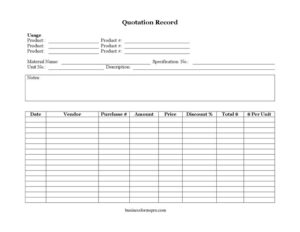
Quotation Record
Track vendor quotes, unit prices, and discounts with our free Quotation Record template—organize pricing data and compare suppliers, free download in PDF and DOCX.
PDF
DOCX
0
likes
Download Files
- DOCX
A Quotation Record is a simple log used to capture and compare price quotes from vendors so you can track what each supplier charges for specific products and materials over time. Most people use it to organize incoming quotations in one place before making a purchasing decision. It’s free to download here in both PDF and DOCX formats, with no signup required.
What Is a Quotation Record?
A Quotation Record is a structured document that logs the pricing details a vendor provides when you request a quote. It captures the product or material being quoted, the vendor offering it, the unit price, any discount, and the resulting total. Purchasing staff, small business owners, procurement coordinators, and warehouse managers typically use it to keep a clear, dated history of supplier pricing. Rather than letting emails and paper quotes pile up, the record consolidates the essentials into rows you can scan and compare. Over time, it becomes a reference tool that documents what you were offered, when, and by whom—useful for budgeting, reordering, and holding vendors to their previously quoted prices.
When Do You Need a Quotation Record?
This log is valuable any time pricing information needs to be tracked and compared rather than acted on immediately. Common scenarios include:
- Comparing multiple vendors for the same material before placing a bulk order, so you can line up unit prices side by side.
- Recording a verbal or emailed quote from a supplier so the figures aren’t lost or forgotten before approval.
- Tracking price changes over time for a recurring product you reorder, helping you spot when a vendor raises rates.
- Documenting negotiated discounts so you can confirm the agreed percentage applies when the invoice arrives.
- Preparing a purchase request or budget by gathering current quoted prices for everything on the procurement list.
- Auditing past purchasing decisions to show why a particular vendor was chosen for a given specification.
What a Quotation Record Should Have
A complete Quotation Record ties each quote to a specific item, supplier, and date so it can be verified later. The essentials include a clear identifier for the product or material, the vendor name, the per-unit price, the quantity or usage, any discount applied, and the calculated total. Reference numbers—such as a product number, purchase number, and specification number—connect the quote to your wider inventory and ordering system. A date stamp establishes how current the pricing is, since quotes often expire. A specification field ensures everyone is comparing the exact same grade or version of an item, and a notes column captures terms, lead times, or conditions that affect the offer.
How to Fill Out a Quotation Record
- Enter the Date the quotation was received so you know how current the pricing is.
- Record the Vendor name—the supplier providing this particular quote.
- Fill in the Product and Material Name, then add a short Description to clarify exactly what is being quoted.
- Add the Product #, Specification No., and Unit No. so the item matches your catalog and the correct grade or size.
- Note the Usage—where or how the item will be used—and the Purchase # if it ties to an existing request.
- Enter the $ Per Unit price and the quantity, then record the Price and Amount as quoted.
- Apply any Discount % the vendor offered, and calculate the Total $ after the discount.
- Use the Notes field for terms like quote expiry, lead time, minimum order, or shipping conditions.
Tips for Comparing Quotes Effectively
The real power of a Quotation Record comes from consistency. When you fill out the same fields the same way for every vendor, comparison becomes a matter of scanning columns. Always normalize pricing to the $ Per Unit figure—one vendor may quote per case and another per piece, and only a per-unit number lets you compare fairly. Pay attention to the Specification No. so you’re not comparing a premium grade against a budget one. Note expiry dates in the Notes column, because a great price is meaningless if the quote lapses before approval. Finally, keep older records rather than overwriting them; a price history reveals trends and gives you leverage in future negotiations.
How It Differs From a Purchase Order
It’s easy to confuse a Quotation Record with a purchase order, but they serve different stages. A Quotation Record is a tracking log for offered prices—it documents what a vendor is willing to charge and helps you decide. A purchase order is a binding commitment to buy at agreed terms. You typically gather quotes in your record first, choose the best option, and then issue a purchase order referencing the relevant Purchase #. Keeping the two separate prevents premature commitments and creates a clean paper trail from inquiry to order.
Common Mistakes to Avoid
- Leaving the date blank, which makes it impossible to tell whether a quote has expired.
- Mixing units—logging one price per case and another per unit—so the comparison becomes misleading.
- Forgetting to apply the discount when calculating the Total $, overstating what you’ll actually pay.
- Omitting the specification number, leading you to compare different grades or versions of an item.
- Skipping the notes field and losing track of lead times, minimums, or shipping terms.
- Overwriting old quotes instead of keeping a history that shows pricing trends and supports negotiation.
Frequently Asked Questions
What is a Quotation Record used for? It is used to log and organize price quotes from vendors in one place. By capturing the product, vendor, unit price, discount, and total for each quote, it lets you compare suppliers and document pricing decisions before placing an order.
How do I fill out a Quotation Record? Start with the date and vendor, then identify the product using the description and reference numbers. Enter the per-unit price, quantity, and any discount, calculate the total, and add notes about terms or expiry. Repeat one row per quote so each offer is recorded consistently.
Is a Quotation Record legally binding? No. It is an internal tracking document that records prices a vendor has offered, not a contract. A binding commitment usually comes later through a purchase order or signed agreement that references the quoted terms.
What’s the difference between a quote and a purchase order? A quote is a vendor’s offered price, and the Quotation Record helps you collect and compare those offers. A purchase order is your formal commitment to buy at agreed terms. You typically log quotes first and then issue a purchase order once you’ve chosen a supplier.
How long is a quoted price valid? Validity varies by vendor—some quotes expire in days, others last weeks. Always record the date and note any stated expiry in the notes field, and confirm pricing with the supplier before placing an order if the quote is more than a few weeks old.
How much does this Quotation Record template cost? It is completely free to download from Business Forms Pro in both PDF and DOCX formats, with no signup required. You can use it as is or edit the DOCX version to add columns, your logo, or fields that fit your purchasing process.
This Quotation Record template is provided as a general example for informational purposes only and does not constitute legal, financial, or procurement advice. Pricing terms, contractual obligations, and recordkeeping requirements vary by business and jurisdiction—consult a qualified professional for guidance specific to your situation.
Related Forms
- Company Growth Chart
- Purse Inventory
- Inventory Card Template
- Monthly Editorial Calendar
- Outgoing Mail Log
- Vendor Price Analysis
Browse more in Log and Inventory.