
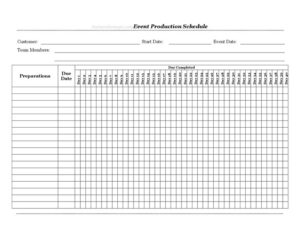
Event Production Schedule
Plan every task with a free Event Production Schedule template that maps preparations across a 40-day timeline — free download in PDF and DOCX.
PDF
DOCX
2 downloads
0
likes
Download Files
- DOCX
An Event Production Schedule is a planning document that maps every preparation task against a countdown of dates leading up to an event, so nothing falls through the cracks. People most often use it to coordinate teams and track which jobs are due — and done — across the days before showtime. You can download it free in PDF and DOCX, with no signup required.
What Is an Event Production Schedule?
An Event Production Schedule is a structured timeline used by event planners, production crews, and venue coordinators to organize the work that goes into staging an event. It documents the customer or client, the project start date, the actual event date, the assigned team members, and a list of preparations — each with a due date and a record of the day it was completed. The day-by-day columns (Day 1 through Day 40) let you plot tasks across roughly six weeks of lead time. Rather than living in someone’s head or scattered across emails, the whole production plan sits on one page so everyone knows what happens when, who owns it, and how close the event is.
When Do You Need an Event Production Schedule?
This form earns its place any time an event has moving parts and a fixed deadline. Common situations include:
- Corporate conferences and trade shows — coordinating booth builds, AV setup, signage, and registration over several weeks.
- Weddings and private celebrations — tracking vendor confirmations, rentals, décor, and rehearsal logistics against the wedding date.
- Concerts and live performances — sequencing load-in, sound checks, rigging, and crew calls in the days before the show.
- Product launches and brand activations — aligning marketing deliverables, sample shipments, and venue dressing.
- Festivals and fundraisers — managing permits, volunteer scheduling, and equipment hire across a long runway.
- Film, photo, and broadcast shoots — booking gear, locations, and talent so each prep task is finished before the call sheet goes live.
Types of Tasks This Schedule Tracks
Although every production is different, the preparations you log usually fall into a few buckets: logistics (transport, load-in, parking, deliveries), technical (lighting, sound, staging, power), vendor and supplier (catering, rentals, florists, printers), creative (signage, décor, run-of-show, scripts), and administrative (permits, insurance, headcounts, payments). Grouping your preparations this way before you plot them helps you spot dependencies — for example, a stage must be built before lighting can be rigged — so the schedule reflects the real order of work rather than a random to-do list.
What an Event Production Schedule Should Have
A complete schedule connects three things: a task, an owner, and a date. To be genuinely useful it should include the customer or client the event is for, a clear start date that marks the beginning of production, and the firm event date that everything counts down toward. It should name the team members responsible so accountability is obvious. Each preparation needs its own row, a due date, and space to mark the day it was completed. Finally, the day columns provide a visual timeline so you can see at a glance how the workload spreads across the available days and where the crunch points are.
How to Fill Out an Event Production Schedule
- Customer: Enter the client, company, or internal department the event is being produced for.
- Start Date: Record the date production work officially begins — this anchors Day 1 of your timeline.
- Event Date: Enter the day the event takes place. The gap between start and event dates tells you how many of the Day 1–Day 40 columns are in play.
- Team Members: List everyone assigned to the production, ideally with their role or area so each task has a clear owner.
- Preparations: Write each task on its own line — be specific (for example, “confirm catering headcount” rather than “food”).
- Due Date: Assign a deadline to each preparation, working backward from the event date.
- Day Completed: When a task is finished, note the date so you have a record of actual progress versus plan.
- Day 1–Day 40: Use these columns to plot or mark activity for each task across the countdown, mapping the busy stretches and confirming nothing is left unscheduled near the event.
Tips for a Schedule That Actually Works
The best production schedules are built in reverse. Start from the event date and work backward, placing must-finish tasks first so their due dates fall well before the day itself — never on it. Build in buffer days before critical milestones to absorb late deliveries or sick crew. Review the schedule at a fixed time each day or week and update the Day Completed column honestly, because a plan that isn’t maintained quickly becomes fiction. Share the document with the whole team so everyone references the same version, and keep one master copy rather than several conflicting ones. Highlight dependencies clearly so people know which tasks block others.
How It Differs From a Run-of-Show
It’s worth separating this document from a run-of-show or call sheet. The Event Production Schedule covers the build-up — the days and weeks of preparation leading to the event. A run-of-show, by contrast, covers the event day itself, minute by minute. Many teams use both: the production schedule gets everything ready, and the run-of-show governs what happens once doors open. Keeping them distinct prevents confusion and ensures each phase has the right level of detail.
Common Mistakes to Avoid
- Scheduling tasks on the event date. Preparations should be done before the day, not during it.
- Leaving owners blank. A task with no named team member rarely gets finished on time.
- Ignoring dependencies. Plotting tasks without regard to what must come first leads to bottlenecks.
- Setting all due dates at the end. Stacking work into the final days creates avoidable stress and errors.
- Never updating the Day Completed column. Without it you can’t tell whether you’re ahead or behind.
- Working from multiple copies. Conflicting versions cause missed tasks and duplicated effort.
Frequently Asked Questions
What is an Event Production Schedule used for? It is used to plan and track all the preparation tasks required to stage an event, mapping each job, its owner, and its deadline against a countdown to the event date. It keeps the whole team aligned and reduces the risk of forgotten tasks.
How do I fill out the day columns? Count from your Start Date as Day 1 up to the event, then mark or plot each preparation in the column for the day it should be worked on or completed. The Day 1–Day 40 columns give you a visual timeline across roughly six weeks of lead time.
Is this template legally binding? No. An Event Production Schedule is an internal planning and tracking tool, not a contract. Any binding commitments — such as vendor bookings or venue hire — should be covered by separate signed agreements.
Can I use it for events shorter than 40 days out? Yes. The 40 day columns are simply the maximum runway; if your event is two weeks away, use only the columns you need and leave the rest blank. The template scales to short or long timelines.
How much does this template cost? Nothing. You can download the Event Production Schedule for free in both PDF and DOCX formats, with no signup or account required. Use the editable DOCX if you want to add rows or rename columns.
Who should maintain the schedule? Usually a single production lead or event coordinator owns the master document and updates it, while team members report progress on their assigned preparations. Centralizing ownership keeps the schedule accurate and prevents conflicting versions.
This template is a general example provided for informational purposes only and does not constitute legal, financial, or professional event-planning advice. Requirements, permits, and best practices vary by jurisdiction and event type — consult a qualified professional for guidance specific to your situation.
Related Forms
- Beer Cider Tasting Log
- Social Media Tracker
- Home Inventory List of Possessions
- Submission Tracker Sent
- Project Timeline
- Hotel Maintenance Request
Browse more in Log and Inventory.