
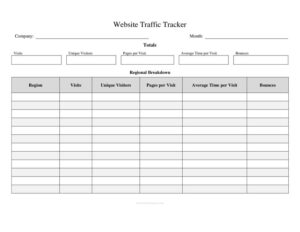
Website Traffic Tracker
Track visitors, sources, and conversions with a free Website Traffic Tracker template, available as a free download in PDF and DOCX formats.
PDF
DOC
0
likes
Download Files
- DOC
A Website Traffic Tracker is a simple log used to record how many people visit your website, where they come from, and what they do once they arrive. The most common reason people use one is to spot trends in their traffic over time so they can make better marketing decisions. It is free to download here in both PDF and DOCX formats, with no signup required.
What Is a Website Traffic Tracker?
A Website Traffic Tracker is a structured log that captures key visitor metrics for a website on a recurring basis. It is typically maintained by website owners, marketers, bloggers, and small business operators who want a clear, at-a-glance record of performance. Rather than logging into multiple dashboards each time, you transfer the numbers that matter most into one consistent sheet. The tracker documents data such as daily or weekly visitor counts, traffic sources, page views, bounce rate, and conversions. Its purpose is to turn scattered analytics into an organized history you can review, compare, and share. Over weeks and months, this log reveals which efforts grow your audience and which ones fall flat.
When Do You Need a Website Traffic Tracker?
This log is useful any time you want a reliable, ongoing snapshot of website performance. Common situations include:
- Launching a new website or landing page and wanting to monitor early traffic patterns from day one.
- Running a marketing or ad campaign and needing to track whether visits and conversions rise during the promotion period.
- Publishing content regularly as a blogger or content creator who wants to see which posts attract the most readers.
- Reporting to clients or managers who expect a clean weekly or monthly summary of traffic instead of raw dashboard screenshots.
- Comparing traffic sources such as organic search, social media, referrals, and direct visits to decide where to focus effort.
- Diagnosing a sudden drop or spike in visitors by reviewing the dates and notes around when the change occurred.
What a Website Traffic Tracker Should Have
A useful tracker keeps the same columns from one entry to the next so comparisons stay honest. Core elements usually include the date or reporting period, the number of total visitors or sessions, unique visitors, page views, and the average time on site. Most trackers also break traffic down by source — organic, paid, social, referral, and direct — so you can see which channels deliver. A bounce rate column shows how many visitors leave without engaging, while a conversions or goal-completion column ties traffic to results that matter, such as sign-ups or sales. Finally, a notes field captures context like a campaign launch, a viral post, or a site outage that explains the numbers.
How to Fill Out a Website Traffic Tracker
Because this is a flexible log, set up your columns first and then enter data consistently. Follow these steps:
- Enter the date or period. Record the specific day, week, or month the figures cover so every row represents the same time span.
- Log total visits and unique visitors. Pull these from your analytics platform and record sessions and the count of distinct people.
- Record page views. Note how many pages were viewed in total during the period to gauge depth of engagement.
- Break down traffic sources. Fill in visits from organic search, paid ads, social media, referrals, and direct traffic in their own columns.
- Add engagement metrics. Enter the bounce rate and average time on site to show how well visitors interact with your content.
- Track conversions. Log goal completions such as form submissions, purchases, or downloads for the period.
- Write notes. Use the notes column to explain anything unusual — a new campaign, a holiday lull, or a technical issue.
Choosing What Metrics to Track
You do not need to track everything; you need to track what informs a decision. If your goal is growth, focus on total and unique visitors plus traffic sources so you can double down on the channels that work. If your goal is engagement, watch page views, time on site, and bounce rate. If your goal is revenue, conversions and conversion rate by source matter most. The strength of a manual tracker is that you choose the handful of numbers that map directly to your objectives, then keep them in front of you week after week. Resist the urge to add columns you will never review — a focused log is far easier to maintain than an overloaded spreadsheet.
Turning Your Log Into Action
The value of a Website Traffic Tracker comes from reviewing it on a regular schedule. Once a week or once a month, scan the most recent rows against earlier ones and ask what changed and why. A rising social column after a series of posts tells you that channel is paying off. A high bounce rate on a high-traffic week suggests your landing page may not match what visitors expected. Use the notes column to connect cause and effect over time, and bring the completed log to planning meetings so decisions rest on real history rather than gut feeling.
Common Mistakes to Avoid
- Changing your columns midway, which breaks comparisons and makes earlier rows hard to interpret.
- Mixing time periods, such as logging daily numbers one week and weekly totals the next.
- Confusing sessions with users, since one person can generate several visits in a day.
- Leaving the notes field blank, so a strange spike or drop has no explanation when you review it later.
- Recording numbers inconsistently, for example pulling data from different tools that count visits differently.
- Tracking too many metrics and abandoning the log because it becomes a chore to update.
Frequently Asked Questions
What is a Website Traffic Tracker used for? It is used to keep an organized, ongoing record of how many people visit your website, where they come from, and what they do once there. By logging these numbers consistently, you can spot trends, measure campaigns, and make informed decisions about your marketing.
How do I fill out a Website Traffic Tracker? Start by entering the date or reporting period, then record visits, unique visitors, and page views from your analytics tool. Add traffic sources, engagement metrics like bounce rate, and any conversions, and finish with notes that explain unusual results.
Where do I get the traffic numbers to enter? Most people pull figures from a web analytics platform connected to their site. Always use the same source and the same definitions each period so your log stays consistent and comparable.
How often should I update the tracker? That depends on your goals, but weekly or monthly updates work well for most websites. Pick a schedule you can stick to, because the tracker is only useful when entries are consistent and complete.
Is this Website Traffic Tracker free to download? Yes. You can download it here for free in both PDF and DOCX formats with no signup required, and you are welcome to add or remove columns to fit your needs.
Can I use this tracker for more than one website? Yes, though it is cleanest to keep a separate log or a clearly labeled section for each site. Mixing two sites in one set of columns makes it harder to read the performance of either one.
This template is a general example provided for informational purposes only and does not constitute marketing, business, or financial advice. Analytics definitions and best practices vary by platform and goal — consult a qualified professional for guidance specific to your situation.
Related Forms
- Long Distance Phone Call Log
- Work Search Log
- Ongoing Contracts List
- Evidence Log
- Project To Do List
- Wagering Tracker
Browse more in Log and Inventory.