
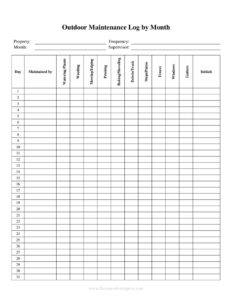
Monthly Outdoor Maintenance Log
Track lawn, landscaping, and exterior upkeep with a free Monthly Outdoor Maintenance Log template — organize tasks, dates, and notes. Free download in PDF and DOCX.
PDF
DOCX
0
likes
Download Files
- DOCX
A Monthly Outdoor Maintenance Log is a simple record sheet used to track recurring exterior and grounds upkeep tasks over the course of a month. People most often use it to make sure routine jobs like mowing, trimming, inspections, and seasonal cleanup actually get done and stay documented. It’s free to download here in both PDF and DOCX, with no signup required.
What Is a Monthly Outdoor Maintenance Log?
A Monthly Outdoor Maintenance Log is a structured form that documents the outdoor maintenance activities performed at a property during a single month. It’s typically used by homeowners, property managers, facilities teams, landscaping crews, HOA volunteers, and groundskeepers to record what task was done, who did it, when, and any observations made along the way. Rather than relying on memory, the log creates a written history of upkeep that can be reviewed, shared, or carried forward. It usually captures the property or area, the date of each task, the type of work completed, the person responsible, and notes about condition or issues found — turning scattered chores into an organized, repeatable routine.
When Do You Need a Monthly Outdoor Maintenance Log?
This log is helpful any time outdoor upkeep needs to be tracked consistently across days or sites. Common situations include:
- Residential property care: A homeowner tracking lawn mowing, hedge trimming, gutter cleaning, and irrigation checks throughout the growing season.
- Property management: A manager documenting grounds maintenance across multiple rental units or buildings to demonstrate diligence to owners.
- Landscaping businesses: A crew leader logging completed services per client and noting follow-up work for the next visit.
- HOA and community grounds: Volunteers recording shared-space upkeep like sidewalks, common lawns, and parking-lot landscaping.
- Commercial facilities: Facilities staff scheduling and verifying exterior tasks such as snow removal, parking-lot sweeping, and signage inspection.
- Seasonal transitions: Tracking fall leaf cleanup, winterizing equipment, spring fertilization, and summer watering on a clear monthly cadence.
What a Monthly Outdoor Maintenance Log Should Have
To be genuinely useful, the log should make it easy to see at a glance what was done and what still needs attention. Strong logs include a header identifying the property or site and the month being covered, plus a row for each maintenance entry. Each entry should capture the date the task was performed, a clear description of the task, the area or zone it applies to, the name or initials of the person who completed it, and a notes column for problems found or follow-ups needed. A completion checkmark or status field helps separate finished work from outstanding items, while a signature or sign-off line adds accountability.
How to Fill Out a Monthly Outdoor Maintenance Log
- Identify the property and month: At the top, write the property name or address and the month and year the log covers so the record is unambiguous later.
- List the task: In each row, record the maintenance task performed — for example, mowing, edging, weeding, mulching, pruning, or gutter cleaning.
- Enter the date: Note the exact date the task was completed so you can track frequency and spacing between visits.
- Specify the area: Indicate the zone or section the task applies to, such as front lawn, back garden, north parking strip, or building perimeter.
- Record who performed it: Add the name or initials of the person or crew responsible for accountability.
- Add notes: Use the notes column for observations — irrigation leaks, dead plants, equipment issues, or work that needs follow-up.
- Mark status: Check off completed items or flag anything still pending.
- Sign off: At month-end, review the sheet and sign or initial to confirm the record is accurate.
Tips for Building a Reliable Maintenance Routine
A log is most valuable when it drives consistent action, not just record-keeping. Consider organizing recurring tasks by frequency — weekly jobs like mowing, monthly jobs like fertilizing or inspection, and seasonal jobs like leaf removal or winterization. Pre-filling the task column at the start of each month creates a built-in checklist your team can simply date and initial as work happens. Keep the notes column active: a one-line observation about a sprinkler head or a thinning patch of grass today can prevent a much larger repair later. If you manage several properties, use a separate log per site so histories stay clean and comparisons stay meaningful.
How It Differs From a Work Order or Inspection Report
It’s easy to confuse a maintenance log with related documents, but each serves a distinct purpose. A work order authorizes and assigns a specific job before it’s done, while the Monthly Outdoor Maintenance Log records what was actually completed afterward. An inspection report evaluates the condition of a property at a single point in time, whereas the log builds an ongoing month-by-month timeline of routine activity. Used together, they complement one another: inspections flag issues, work orders assign the fix, and the log confirms the work happened and tracks recurring upkeep over time.
Common Mistakes to Avoid
- Leaving the date blank: Without dates, you can’t track how often a task is performed or spot gaps in coverage.
- Vague task descriptions: “Yard work” tells you little later — be specific about what was actually done.
- Skipping the notes column: Small observations about damage, pests, or equipment are often the most valuable part of the record.
- Forgetting to identify the area: On larger properties, an entry without a zone makes it impossible to know what was covered.
- Filling it out from memory: Logging tasks days later leads to errors — record entries as the work is completed.
- Not reviewing at month-end: The log’s value comes from spotting patterns and carrying unfinished tasks into next month.
Frequently Asked Questions
What is a Monthly Outdoor Maintenance Log used for? It is used to document the outdoor upkeep tasks performed at a property over a single month, including the date, area, person responsible, and notes. It helps ensure routine jobs get done consistently and creates a written history you can review or share. Homeowners, property managers, and landscaping crews all rely on it to stay organized.
How do I fill out the log? Start by entering the property name and month at the top, then add one row per task with its date, the area it applies to, who performed it, and any notes. Mark each item complete as the work is finished, and sign off at the end of the month to confirm accuracy. Filling it out in real time keeps the record reliable.
Is this log legally binding? A maintenance log is generally an internal record rather than a binding legal contract, but it can serve as useful documentation of work performed. It may help demonstrate diligence to property owners, clients, or insurers if questions arise later. For any formal agreement, a separate signed contract is the appropriate document.
How often should I record entries? Record each task as soon as it is completed rather than batching them at the end of the month. Daily or per-visit logging keeps dates and details accurate and ensures nothing is forgotten. Review the full sheet at month-end to catch outstanding items.
Can I use this for multiple properties? Yes, but it’s best to use a separate log for each property or site so the histories stay clean and easy to compare. If you manage many locations, you can download several copies and label each one by address. This keeps records organized for reporting and audits.
How much does the template cost? The Monthly Outdoor Maintenance Log is completely free to download here in both PDF and DOCX formats, with no signup or account required. The DOCX version is fully editable, so you can add your own task rows, zones, or branding. Print it for clipboard use or fill it out digitally.
This template is provided as a general example for informational purposes only and does not constitute legal, financial, or professional advice. Maintenance requirements, safety standards, and recordkeeping obligations vary by jurisdiction and property type — consult a qualified professional for guidance specific to your situation.
Related Forms
- Store Opening Procedure Checklist
- Ongoing Contracts List
- Salad Bar Items Inventory Spreadsheet
- Evidence Inventory
- Household Inventory Card
- Inventory Control
Browse more in Log and Inventory.