
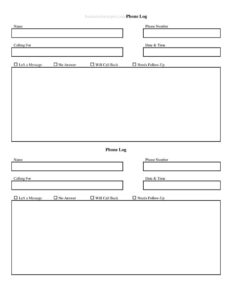
Phone Log
Track every call accurately with our free Phone Log template — record callers, times, and messages in PDF or DOCX for free download.
PDF
DOCX
4 downloads
0
likes
Download Files
- DOCX
A Phone Log is a simple record-keeping sheet used to document incoming and outgoing telephone calls, capturing who called, when, the reason for the call, and any follow-up needed. The most common reason people use one is to make sure messages and important details are never lost between busy phone conversations. It’s free to download here in both PDF and DOCX formats — no signup required.
What Is a Phone Log?
A phone log is a structured document used to track telephone communication over the course of a day, week, or project. Receptionists, office managers, sales teams, customer service reps, contractors, and even individuals use it to note the date and time of each call, the name of the caller, the phone number, the purpose of the conversation, and what action is required afterward. Rather than relying on scattered sticky notes or memory, a phone log keeps every call in one consistent place. It serves as both a working tool for managing follow-ups and a reference record that can be revisited when questions arise about what was discussed, who promised what, and when.
When Do You Need a Phone Log?
A phone log is useful any time accurate records of phone conversations matter. Common situations include:
- Front-desk and reception work — capturing messages for staff who are away from their desks and ensuring callbacks happen.
- Sales and lead tracking — recording prospect calls, quotes discussed, and the next step in the pipeline.
- Customer support — documenting complaints, requests, and resolutions so the next agent has full context.
- Contractors and service businesses — logging client calls about scheduling, estimates, and job changes that may later be billed or disputed.
- Medical, legal, and professional offices — keeping a time-stamped trail of communications for accountability and recordkeeping.
- Personal use — tracking calls with insurers, utilities, or government agencies where confirmation numbers and representative names are important.
What a Phone Log Should Have
A complete phone log makes each entry easy to read at a glance and leaves no ambiguity about what happened. The essential elements are the date and time of the call, so entries can be placed in chronological order; the caller’s name and organization; their phone number for callbacks; the direction of the call (incoming or outgoing); a clear summary of what was discussed; the name of the person who took or made the call; and a column for follow-up actions or status. A well-built log also leaves room for notes, such as confirmation numbers, deadlines, or commitments made during the conversation. Consistency across every row is what turns a stack of entries into a genuinely useful record.
How to Fill Out a Phone Log
Filling out the phone log takes only a few seconds per call when done in real time. Follow these steps for each entry:
- Enter the date. Write the calendar date of the call so entries stay in order across days and weeks.
- Record the time. Note the start time of the call, and the end time or duration if your work requires it.
- Mark the direction. Indicate whether the call was incoming or outgoing — this matters for billing and follow-up tracking.
- Write the caller’s name. Include the person’s full name and their company or department where relevant.
- Add the phone number. Record the best number for a return call, plus an extension if given.
- Summarize the purpose. Capture the reason for the call in a short, clear phrase — a quote request, a complaint, a scheduling change.
- Note who handled it. Write the name or initials of the staff member who took or made the call.
- List follow-up actions. Record what needs to happen next, who is responsible, and any deadline.
- Update the status. Mark the entry as open, pending, or resolved once the follow-up is complete.
Tips for Keeping an Accurate Phone Log
The value of a phone log comes from discipline and consistency. Fill it in during or immediately after the call while details are fresh — waiting even a few hours leads to forgotten numbers and vague summaries. Keep the log in a fixed location, whether that’s a clipboard by the phone or a shared printed sheet, so every team member knows where to find it. Use clear, legible handwriting or type entries if you use the DOCX version. For teams, agree on shorthand for common call types and follow-up codes so the log reads the same no matter who fills it in. Review open items at the end of each day so nothing slips through, and archive completed sheets by date for easy retrieval later.
Paper Log vs. Digital Tracking
A printed phone log is fast, reliable, and works even when computers are down — it’s ideal for front desks, workshops, and small offices where simplicity matters. The DOCX version lets you customize column widths, add your business name, or adjust headings before printing. Some teams use the printed log as a daily capture sheet and then transfer key entries into a CRM or spreadsheet for long-term reporting. Whichever approach you choose, the goal is the same: a single, trusted place where every call is recorded so nothing important is lost and accountability is clear.
Common Mistakes to Avoid
- Logging calls late — relying on memory hours later produces incomplete or inaccurate entries.
- Skipping the phone number — a message without a callback number is often useless.
- Vague purpose notes — “called about account” tells the next person nothing; be specific.
- Leaving follow-ups unassigned — without a responsible name and status, action items get dropped.
- Illegible handwriting — if no one can read the entry, the log fails its purpose.
- Never reviewing the log — open items pile up when no one checks the sheet at day’s end.
Frequently Asked Questions
What is a phone log used for? A phone log is used to document telephone calls so that messages, details, and follow-up actions are captured in one reliable place. Businesses use it to manage callbacks, while individuals use it to track conversations with companies and agencies. It prevents important information from being lost between busy calls.
How do I fill out a phone log? For each call, record the date and time, mark whether it was incoming or outgoing, write the caller’s name and number, summarize the purpose, note who handled it, and list any follow-up action and its status. Fill it in during or right after the call for accuracy. Update the status once the follow-up is complete.
Is a phone log a legal document? A phone log is primarily a recordkeeping and organizational tool, not a formal legal instrument. That said, accurate, time-stamped logs can serve as useful supporting documentation if a dispute arises about what was discussed and when. Keeping consistent, dated entries strengthens their reliability.
Do I need to log every single call? That depends on your needs — many offices log all business calls for completeness, while others record only calls that require a message or follow-up. Decide on a clear policy so your log is consistent and trustworthy. Logging more rather than less is generally safer for accountability.
Can I customize this phone log template? Yes. The DOCX version can be edited to add your company name, change column headings, or adjust spacing before you print it. The PDF version is ready to print and use immediately as-is.
How much does this phone log template cost? It is completely free to download from Business Forms Pro in both PDF and DOCX formats, with no signup or payment required. You can print as many copies as you need for personal or business use.
This phone log template is provided as a general example for informational purposes only and does not constitute legal, business, or professional advice. Recordkeeping and privacy requirements may vary by jurisdiction and industry — consult a qualified professional to ensure your practices meet applicable rules.
Related Forms
- Beauty Salon Manicure And Pedicure Inventory Card
- Volunteer Hours Tracker
- Daily Music Practice Log
- Moving Inventory Organizer
- Birthday Calendar One Page
- Collectibles Inventory
Browse more in Log and Inventory.