
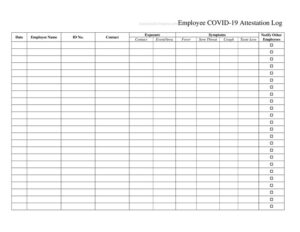
Employee Covid Attestation Log
Track daily employee health attestations with this free Employee Covid Attestation Log template, available as a PDF and DOCX free download.
PDF
DOCX
0
likes
Download Files
- DOCX
An Employee Covid Attestation Log is a record employers use to document that workers have confirmed they are symptom-free and safe to enter the workplace, most often as part of a daily or shift-based health screening process. It is the single most common tool businesses reach for when they need a written trail showing they took reasonable precautions to protect staff and customers. You can download this Employee Covid Attestation Log for free in both PDF and DOCX formats — no signup required.
What Is an Employee Covid Attestation Log?
An Employee Covid Attestation Log is a tracking document that gathers each employee’s self-reported confirmation that they have no Covid-19 symptoms, have not been exposed to a confirmed case, and meet any other entry criteria the employer requires. It is typically issued and maintained by an employer, HR department, or shift supervisor, and completed by employees as they arrive for work. The log documents who attested, on what date, and the result of any screening questions or temperature checks. Rather than collecting loose individual forms, the log consolidates many entries into one running record, making it easier to review patterns, demonstrate compliance, and respond quickly if a potential exposure occurs.
When Do You Need an Employee Covid Attestation Log?
This log is useful any time an organization wants a consistent, dated record of workplace health screening. Common situations include:
- Daily entry screening — recording each employee’s symptom-free attestation before they begin a shift on-site.
- Return-to-work tracking — documenting that an employee who was out sick or quarantined has met the criteria to return.
- Customer-facing operations — restaurants, retail stores, salons, and clinics that need to show diligence in protecting the public.
- Event or facility access — screening staff, vendors, or contractors entering a controlled site for a meeting, production, or job site.
- Policy compliance — meeting internal company rules, client contract requirements, or local public-health guidance that calls for documented screening.
- Exposure follow-up — providing a clear timeline of who was present and attested on specific dates if contact tracing becomes necessary.
What an Employee Covid Attestation Log Should Have
A complete attestation log balances enough detail to be useful with enough simplicity to be filled out quickly each day. The strongest versions include a clear date column, the employee’s name and/or department, the specific attestation statements being confirmed, a place to record temperature or screening results if used, and the employee’s signature or initials. A header should identify the company, the location or department, and the period the sheet covers. It also helps to include a short legend defining what “pass” or “fail” means and the action required when an employee does not pass screening, so every supervisor applies the same standard.
How to Fill Out an Employee Covid Attestation Log
Because this is a running log, you will typically complete one row per employee per day. Follow these steps:
- Complete the header. Enter the company or organization name, the worksite location or department, and the date range the log sheet covers.
- Enter the date. Record the calendar date of each screening so entries are unambiguous and chronological.
- Add the employee name. Write the full name (and employee ID or department if your version includes those columns) of the person attesting.
- Confirm the attestation statements. Have the employee answer the screening questions — for example, no symptoms, no recent positive test, no close-contact exposure — and mark each accordingly.
- Record screening results. If you take temperatures or use other checks, note the reading or a simple pass/fail result.
- Capture the signature or initials. The employee signs or initials to certify the attestation is true.
- Note the screener. Where space allows, the supervisor or screener records their name and any follow-up action taken.
Keeping the Log Accurate and Private
Health-related records deserve careful handling. Store completed logs securely and limit access to those with a legitimate need, such as HR or a designated safety coordinator. Avoid recording more medical detail than your screening process actually requires — a simple pass/fail or symptom-free confirmation is usually sufficient and reduces privacy risk. Decide in advance how long you will retain the logs and dispose of them consistently when that period ends. If you collect temperatures or other data, apply the same standard to everyone to keep the process fair and defensible.
Tips for Using the Log Day to Day
Make completion fast and routine. Keep the sheet at the entry point with a pen, and consider posting the attestation questions nearby so employees know exactly what they are confirming. Train a few backup screeners so the process never stalls when the primary person is out. At the end of each period, file the sheet promptly and start a fresh one so dates and columns stay clean. Review entries periodically to catch missing signatures or blank days before they become gaps in your record.
Common Mistakes to Avoid
- Leaving signatures blank. An attestation without an employee signature or initials loses much of its value as a record.
- Inconsistent dates. Skipping the date or using unclear formats makes it impossible to reconstruct who attested when.
- Collecting excessive medical detail. Recording diagnoses or specific health information beyond your screening needs creates unnecessary privacy exposure.
- Letting anyone fill it in later. Backfilling entries days afterward undermines accuracy; complete each row at the time of screening.
- Storing logs openly. Leaving completed sheets where coworkers can read them risks confidentiality and trust.
- Using outdated questions. Failing to update the attestation statements when guidance changes can leave you screening for the wrong criteria.
Frequently Asked Questions
What is an Employee Covid Attestation Log used for? It is used to document that employees have confirmed they are symptom-free and meet entry criteria before working on-site. The log creates a dated, consolidated record that helps employers demonstrate diligence and respond quickly if an exposure is reported.
How do I fill out the attestation log? Complete the header with your company and location, then add one row per employee per day with the date, name, attestation answers, any screening result, and the employee’s signature or initials. Have a designated screener oversee the process and note any follow-up actions.
Does the log need to be signed or witnessed? A signature or initials from the attesting employee is strongly recommended because it confirms the person personally certified their answers. A formal witness or notary is not typically required for this type of internal workplace record.
Is an attestation log legally binding? The log is primarily an internal record rather than a contract, but a signed attestation can carry weight as evidence that an employee made a representation about their health. Specific legal effect and any required disclosures vary by jurisdiction and employer policy.
How long should we keep completed logs? Retention depends on your internal policies and any applicable local or industry requirements. Choose a consistent retention period, store the records securely, and dispose of them in the same way each time once that period passes.
How much does this template cost? Nothing — this Employee Covid Attestation Log is completely free to download in both PDF and DOCX formats, with no signup required. You can edit the DOCX version to add columns, adjust the attestation questions, or include your company branding.
This template is a general example provided for informational purposes only and is not legal, medical, or human-resources advice. Health-screening obligations, privacy rules, and recordkeeping requirements vary by jurisdiction and change over time — consult a qualified professional and current public-health guidance before relying on this form.
Related Forms
- Cash Envelope Tracker
- Project Status Report
- Telemarketer Call Log
- Warranty Log
- Salad Bar Items Inventory Spreadsheet
- Pledge Log
Browse more in Log and Inventory.