
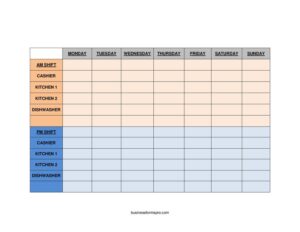
Restaurant Shift Schedule
Organize your team with a free Restaurant Shift Schedule template covering AM and PM shifts, kitchen, cashier, and dishwasher roles — free download in PDF and DOCX.
PDF
DOCX
3 downloads
0
likes
Download Files
- DOCX
A Restaurant Shift Schedule is a simple weekly planning sheet that assigns staff to specific roles and shifts across each day of the week. Restaurant managers use it most often to make sure every station — from the kitchen to the cash register to the dish pit — is covered during opening and closing hours. You can download this template free in both PDF and DOCX formats, with no signup required.
What Is a Restaurant Shift Schedule?
A Restaurant Shift Schedule is a coverage chart that maps your team’s working hours against the days of the week and the roles your operation needs filled. It is typically created by an owner, general manager, or shift lead and posted where staff can see it. The schedule documents who works the AM and PM shifts, and which person is responsible for each station — cashier, kitchen line, or dishwashing — on any given day. Its purpose is straightforward: prevent gaps in coverage, balance hours fairly among staff, and give employees clear advance notice of when and where they are expected to work.
When Do You Need a Restaurant Shift Schedule?
Almost any food-service operation that runs more than one shift benefits from a written schedule. Common situations include:
- Weekly planning: You need to publish next week’s hours so staff can plan their personal lives and request changes early.
- Covering two shifts: Your restaurant runs both an AM (breakfast/lunch) and PM (dinner) shift and you must staff each separately.
- Filling specific stations: You want a named person on the register, two cooks on the line, and a dishwasher every service.
- Onboarding new hires: A clear chart shows trainees exactly which days and roles they are assigned.
- Managing time-off and swaps: A written schedule makes it easy to spot uncovered shifts when someone calls out.
- Weekend rush prep: Saturday and Sunday often need different staffing than weekdays, and the grid makes that obvious at a glance.
What a Restaurant Shift Schedule Should Have
A complete schedule leaves no ambiguity about who is doing what and when. The essentials are a clear week layout with all seven days (Monday through Sunday), a split between AM and PM shifts, and a defined row or column for each role your restaurant staffs. In this template those roles are cashier, kitchen 1, kitchen 2, and dishwasher. Beyond the grid itself, a useful schedule includes the date range it covers, the names of assigned employees, and ideally start and end times for each shift. Posting it in a consistent spot and keeping a copy on file rounds out a schedule staff can actually rely on.
How to Fill Out a Restaurant Shift Schedule
- Set the week: Write the date range so everyone knows which Monday through Sunday the schedule applies to.
- Choose a day column: Work one day at a time, starting with Monday and moving through Sunday.
- Assign the AM shift: Under each day’s AM shift, write the employee covering the cashier role, then kitchen 1, kitchen 2, and the dishwasher.
- Assign the PM shift: Repeat for the PM shift, filling in the cashier, both kitchen positions, and the dishwasher for the dinner service.
- Repeat across the week: Continue through Tuesday, Wednesday, Thursday, Friday, Saturday, and Sunday, adjusting for busier weekend days.
- Balance the hours: Review totals so no employee is overloaded and everyone gets fair coverage.
- Check for gaps: Confirm every role on every shift has a name — no blank cashier, kitchen, or dishwasher slots.
- Post and distribute: Share the finished schedule with the team and keep a copy for your records.
Tips for Building a Schedule That Works
The grid is only as good as the planning behind it. Build the schedule around your actual traffic: weekends and holidays usually demand your strongest line cooks on kitchen 1 and kitchen 2, while slow weekday mornings may run lighter. Stagger experienced and newer staff so each shift has someone who can troubleshoot. When you assign the dishwasher, remember that during peak dinner rushes a single dishwasher can fall behind quickly — plan accordingly. Try to publish the schedule the same day each week so employees know when to check it, and leave a clear way for staff to flag conflicts before the week begins rather than after.
Handling Swaps and Last-Minute Changes
Even the best schedule needs flexibility. Decide in advance how shift swaps are approved — usually a manager signs off so coverage and skill levels stay intact. When someone calls out, the grid makes it easy to see which role is exposed and who is available to step in. Keep the original posted schedule visible and mark any approved changes clearly so there’s never confusion about whether the cashier or a kitchen position is actually covered. A short note about your swap policy at the bottom of the sheet can save a lot of confusion mid-week.
Common Mistakes to Avoid
- Leaving roles blank: An unassigned cashier or dishwasher slot on a busy night means scrambling at the last minute.
- Double-booking staff: Assigning the same person to two roles or both shifts in a way they can’t physically cover.
- Ignoring weekend demand: Staffing Saturday and Sunday the same as a quiet Tuesday.
- Publishing too late: Posting the schedule the night before gives staff no time to plan or raise conflicts.
- Forgetting shift times: Listing only AM or PM without start and end hours leaves room for misunderstandings.
- Not keeping a record: Discarding old schedules makes it hard to track hours, fairness, or attendance patterns.
Frequently Asked Questions
What is a Restaurant Shift Schedule used for? It is used to assign staff to specific roles and shifts across a week so every station is covered during service. Managers rely on it to balance hours, avoid coverage gaps, and give employees clear notice of when they work.
How do I fill out the AM and PM shift sections? Work one day at a time and, under each day’s AM shift, list who covers cashier, kitchen 1, kitchen 2, and dishwasher, then do the same for the PM shift. Adding start and end times next to each entry makes expectations crystal clear.
Can I add more roles or shifts to the template? Yes. Download the DOCX version and add rows or columns for additional positions like servers, hosts, or a third kitchen station, or split shifts into more time blocks if your hours require it.
Is this Restaurant Shift Schedule legally binding? The schedule itself is an operational planning tool, not a contract. However, labor laws on advance notice, breaks, overtime, and minimum hours vary by location, so check the rules that apply to your area.
How much does this template cost? It is completely free to download here in both PDF and DOCX formats, with no signup or payment required. You can use it as-is or customize it to fit your restaurant.
How far in advance should I post the schedule? Best practice is to publish at least a week ahead and on the same day each week so staff can plan and request changes early. Some jurisdictions have predictive-scheduling laws requiring specific notice periods, so confirm the requirements where you operate.
This template is a general example provided for informational purposes only and does not constitute legal, financial, or employment advice. Labor and scheduling requirements vary by jurisdiction — consult a qualified professional to ensure your practices comply with applicable laws.
Related Forms
- Raffle Ticket White
- Customizable Now Hiring Sign
- Raffle Ticket
- Home Moving Checklist
- VIP Pass
- Accident Claim Worksheet
Browse more in Miscellaneous.