
Payment Record
Track payments easily with our free Payment Record template — log amounts due, due dates, and check numbers in seconds. Free PDF and DOCX download.
PDF
DOC
5 downloads
0
likes
Download Files
- DOC
A Payment Record is a simple tracking document used to log money owed and money received against a specific bill, invoice, or account. People most often use it to keep an organized history of payments so nothing slips through the cracks at billing time. You can download this Payment Record template for free in both PDF and DOCX formats, with no signup required.
What Is a Payment Record?
A Payment Record is a running log that documents what was owed, when it was due, and what was actually paid. It is typically maintained by a business owner, bookkeeper, landlord, freelancer, or anyone collecting recurring or one-time payments. The form ties each payment back to a named account or customer and notes the method used — most often a check number — so transactions can be verified later. Unlike a formal receipt issued to a payer, a Payment Record is an internal reference that helps you reconcile accounts, follow up on missing amounts, and prepare clean records for tax season or audits. Its strength is simplicity: a clear, at-a-glance summary of who paid, how much, and when.
When Do You Need a Payment Record?
This form is useful any time money is exchanged in installments or on a schedule and you need a dependable paper trail. Common situations include:
- Tracking customer invoices — log each payment a client makes against an outstanding bill so you know exactly what’s left to collect.
- Rent collection — landlords can record monthly rent received from each tenant, the due date, and the check number.
- Recurring vendor or service payments — keep a tidy history of what you’ve paid a supplier over time.
- Payment plans and installments — when a balance is paid off in pieces, a record shows how much remains.
- Freelance and contractor billing — track which clients have settled their invoices and which are still due.
- Club dues, tuition, or membership fees — organizations can confirm who has paid and follow up with those who haven’t.
What a Payment Record Should Have
A complete Payment Record connects each entry to a specific obligation and a specific transaction. At minimum it should identify what the payment is for, the amount that was owed, the date it was due, the amount actually received, the company or party involved, and the method of payment such as a check number. Together these fields let you reconcile a balance: compare the amount due against the amount received to instantly see whether an account is paid in full, partially paid, or overdue. Keeping these elements consistent across every entry is what makes the record reliable when you need to look something up months later.
How to Fill Out a Payment Record
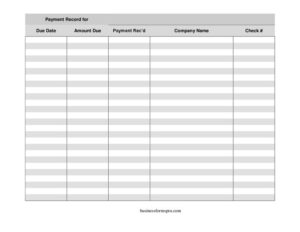
- Payment record for: Enter what the payment relates to — an invoice number, account name, customer, tenant, or service period. This is the anchor for the whole entry, so be specific (e.g., “Invoice #1042 — Smith Consulting”).
- Due date: Write the date the payment was originally expected. This helps you spot late or upcoming payments at a glance.
- Amount due: Record the full amount owed for this item. Include the currency and exact figure so there’s no ambiguity.
- Payment rec’d: Enter the amount actually received. If it matches the amount due, the item is settled; if it’s less, you’ve logged a partial payment and know a balance remains.
- Company name: Note the company or party associated with the payment — your customer, vendor, or the entity making or receiving the funds.
- Check #: Record the check number used for payment. If paid by another method, jot the reference here instead (e.g., “cash,” “ACH,” or a transaction ID) so every payment is traceable.
Tips for Keeping an Accurate Payment Log
Consistency makes a Payment Record far more valuable. Fill out an entry the moment a payment arrives rather than weeks later, while the details are fresh. Use the same date format throughout — for example, MM/DD/YYYY — to avoid confusion. Store the completed record alongside the related invoices or deposit slips so you can cross-check figures quickly. If you handle many accounts, consider keeping one record sheet per customer or per month, which makes totals easier to tally. Finally, retain your records for as long as your business or tax situation requires; many people keep financial documentation for several years for reference and reporting purposes.
Payment Record vs. Receipt
It’s easy to confuse a Payment Record with a receipt, but they serve different audiences. A receipt is given to the person who paid as proof their money was received. A Payment Record is your internal ledger — it tracks the full lifecycle of an obligation, including what was due, the due date, and any remaining balance. You might issue a receipt for a single transaction while continuing to update your Payment Record over multiple payments. Many small businesses use both: the receipt satisfies the customer, and the record keeps your books in order.
Common Mistakes to Avoid
- Leaving the “payment record for” field blank — without an identifier, you can’t tell which bill an entry relates to.
- Recording the amount due but not the amount received — you lose the ability to spot partial payments and outstanding balances.
- Skipping the check number or payment method — this is your audit trail; without it, disputes are hard to resolve.
- Inconsistent date formats — mixing styles makes it easy to misread due dates and miss follow-ups.
- Delaying entries — logging payments late leads to forgotten transactions and reconciliation headaches.
- Not backing up the record — keep a copy, digital or physical, in case the original is lost or damaged.
Frequently Asked Questions
What is a Payment Record used for? It is used to track money owed and money received against a specific bill, invoice, account, or customer. The form helps you see at a glance whether a payment is complete, partial, or overdue, and it serves as an organized reference for bookkeeping and tax preparation.
How do I fill out a Payment Record? Identify what the payment is for, enter the due date and amount due, then record the amount received, the company or party involved, and the check number or payment method. Update the record each time a payment is made so the balance always reflects reality.
Is a Payment Record a legal document? It is generally an internal business or personal tracking tool rather than a binding contract. However, accurate payment records can become important supporting evidence for accounting, tax filings, or disputes, so keeping them complete and consistent is worthwhile.
Does a Payment Record need to be signed or notarized? No, a Payment Record typically does not require a signature or notarization because it is a tracking log, not a formal agreement. Some businesses choose to initial entries for internal accountability, but that is optional and depends on your own procedures.
Can I use this for personal payments, not just business? Absolutely. While businesses use it most, individuals find it handy for tracking shared expenses, loan repayments between friends or family, rent, or installment purchases. The same fields work for any situation where you want a clear record of who paid what and when.
How much does this Payment Record template cost? It is completely free to download from Business Forms Pro in both PDF and DOCX formats, with no signup or account required. You can edit the DOCX version to add your logo, extra columns, or additional fields to suit your needs.
This Payment Record template is provided as a general example for informational purposes only and does not constitute legal, financial, or tax advice. Recordkeeping and retention requirements vary by jurisdiction and situation — consult a qualified accountant or other professional for guidance specific to your circumstances.
Official resource: for the rules that apply to your situation, see the Consumer Financial Protection Bureau.
Related Forms
- Petty Cash Out
- Date Night Cash Envelope
- Request Credit Card Chargeback
- Insurance Coverage Record
- Tip Jar Labels
- Payment Calculator per $1000
Browse more in Money.