
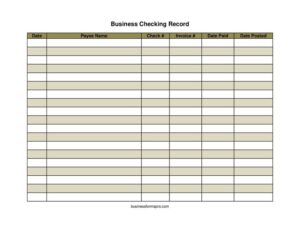
Business Checking Record
Track every check your business writes with this free Business Checking Record template, available as a free download in PDF and DOCX.
PDF
DOCX
0
likes
Download Files
- DOCX
A Business Checking Record is a simple log used to track every check your company writes from its checking account, capturing the date, payee, check number, invoice paid, and when the payment posted. The most common reason people use it is to keep an accurate, up-to-date picture of outgoing payments so the account never gets out of balance. This template is free to download in PDF and DOCX, with no signup required.
What Is a Business Checking Record?
A Business Checking Record is a running register that documents each check issued from a business checking account. It is typically maintained by a bookkeeper, office manager, or small business owner who needs a reliable trail of disbursements. The record captures who was paid, the check number used, the invoice that the payment satisfied, and the dates the payment was made and posted. Unlike a bank statement, which only shows transactions after they clear, this record is updated in real time as you write each check. That makes it an essential tool for reconciling your account, avoiding overdrafts, and proving that bills were paid.
When Do You Need a Business Checking Record?
Almost any business that pays vendors or expenses by check benefits from keeping one. Common situations include:
- Paying suppliers and vendors — log each check so you can match it to the invoice it covers.
- Reconciling your bank statement — compare your record against cleared checks each month to spot errors or missing items.
- Tracking outstanding checks — see which checks have been written but have not yet posted to the account.
- Preparing for tax season — provide your accountant with a clean list of payments tied to invoices.
- Managing cash flow — know exactly how much you have committed in checks that have not yet cleared.
- Responding to a vendor dispute — quickly confirm the check number and date a particular invoice was paid.
What a Business Checking Record Should Have
A complete record makes each payment easy to trace from the moment a check is written until it clears the bank. At minimum it should include the date the check was written, the name of the payee, the check number, the invoice number being paid, the date the payment was actually made, and the date the payment posted to the account. Together these fields create a full audit trail. The invoice number links each disbursement back to a specific bill, while the posting date lets you identify checks that are still outstanding. Consistent, complete entries are what make the record genuinely useful at reconciliation time.
How to Fill Out a Business Checking Record
Work through one row per check, filling each field as the payment moves through your books:
- Date — enter the date you wrote the check. This is your starting reference point for the entry.
- Payee name — write the exact name of the person or company you are paying, matching the name printed on the check.
- Check # — record the pre-printed check number so you can trace this specific payment later.
- Invoice # — note the invoice this check pays. If the check covers more than one invoice, list each number so the payment can be fully reconciled.
- Date paid — enter the date the payment was actually made, which may differ from the date you wrote the check if it was held or mailed later.
- Date posted — fill this in once the check clears and shows on your bank statement. Leaving it blank flags the check as still outstanding.
Update the posting date as checks clear so your outstanding list stays accurate throughout the month.
Using the Record to Reconcile Your Account
The real power of this record shows up at month-end. When your bank statement arrives, go line by line and match each cleared check to a row in your record, then fill in the date posted. Any entry that still has a blank posting date is an outstanding check that has not yet cleared. Add the totals of those outstanding checks back to your bank balance and you should arrive at your true book balance. If the numbers do not match, the record helps you pinpoint the discrepancy quickly — a transposed check number, a missing entry, or a duplicate payment. Keeping the record current makes this monthly task fast instead of frustrating.
Tips for Keeping an Accurate Record
Enter each check the moment you write it rather than relying on memory at the end of the week. Use sequential check numbers and never skip an entry, even for voided checks — note “VOID” so the gap is explained. Keep a digital copy alongside a printed one if you handle a high volume of payments. Finally, store the record with your supporting invoices and bank statements so everything an auditor or accountant might request lives in one place.
Common Mistakes to Avoid
- Skipping the invoice number — without it, you lose the link between the payment and the bill it covered.
- Forgetting to fill in the posting date — this leaves you unable to tell outstanding checks from cleared ones.
- Recording the payee inconsistently — varying spellings make it hard to total payments to the same vendor.
- Not logging voided checks — a missing check number raises red flags during reconciliation.
- Updating only sporadically — letting entries pile up invites errors and overdrafts.
- Confusing date written with date paid — keep these separate so your cash-flow timing stays accurate.
Frequently Asked Questions
What is a Business Checking Record used for? It is used to log every check your business writes, including the payee, check number, invoice, and payment dates. This creates a clear audit trail that supports bank reconciliation, expense tracking, and tax preparation. It is one of the simplest ways to keep your checking account organized.
How do I fill out the Business Checking Record? Enter one row per check, starting with the date and payee name, then the check number and the invoice it pays. Add the date paid when the check leaves your hands, and fill in the date posted once it clears the bank. Updating each row promptly keeps the record reliable.
What is the difference between date paid and date posted? Date paid is when you actually issued or mailed the payment, while date posted is when the check cleared and appeared on your bank statement. There is often a gap of several days between the two. Checks with a date paid but no date posted are considered outstanding.
Is a Business Checking Record a legal document? It is an internal financial record rather than a legally binding contract. However, it can serve as supporting documentation for taxes, audits, and disputes, so accuracy matters. Keep it alongside your invoices and bank statements.
Do I need accounting software to use this? No. This template works well on its own for small businesses or as a backup to software. Many owners use it to cross-check what their software reports.
How much does this template cost? It is completely free to download from Business Forms Pro in both PDF and DOCX formats, with no signup required. You can print it as-is or customize the editable version to fit your workflow.
This template is provided as a general example for informational purposes only and does not constitute legal, financial, or tax advice. Recordkeeping and reconciliation requirements vary by jurisdiction and business type — consult a qualified accountant or financial professional for guidance specific to your situation.
Official resource: for the rules that apply to your situation, see the Consumer Financial Protection Bureau.
Related Forms
- Check Register Colorful
- Accounts Receivable Ledger
- Employee Sales Commission Tracker
- Zero-Based Budget
- Restaurants Cash Envelope
- Fixed Expenses Worksheet
Browse more in Money.