
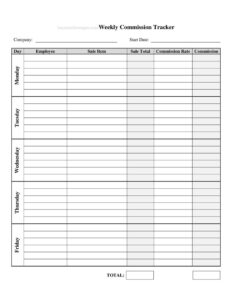
Weekly Sales Commission Tracker
Track weekly sales, rates, and earnings with our free Weekly Sales Commission Tracker template — easy field-by-field guidance and free download in PDF or DOCX.
PDF
DOCX
2 downloads
0
likes
Download Files
- DOCX
A Weekly Sales Commission Tracker is a simple worksheet that records each salesperson’s deals, sales amounts, commission rates, and earned payouts for a single week. People reach for it most often to make sure commission pay is calculated correctly and on time, with a clear record both the rep and the employer can trust. It’s free to download here in PDF and DOCX formats, with no signup required.
What Is a Weekly Sales Commission Tracker?
A Weekly Sales Commission Tracker is a record-keeping document used by sales reps, team leads, and small-business owners to log the sales made during a one-week period and the commission owed on each. It typically lists the salesperson’s name, the dates and details of each sale, the gross sale amount, the applicable commission rate, and the resulting commission figure. The tracker rolls those line items into a weekly total. It serves two purposes at once: it gives the rep visibility into their pipeline and earnings, and it gives whoever runs payroll a verifiable summary to pay from. Unlike a full payroll system, it’s lightweight, portable, and easy to fill out by hand or on a computer.
When Do You Need a Weekly Sales Commission Tracker?
This tracker fits any situation where pay is tied to sales performance and needs to be calculated consistently each week. Common scenarios include:
- Commission-based sales roles — reps who earn a percentage of every closed deal and want to verify their own numbers before payday.
- Small businesses without payroll software — owners who pay commissions manually and need a clean weekly summary to work from.
- Retail or showroom floors — tracking individual staff sales when several people share the floor and earn on what they personally sell.
- Real estate, auto, or insurance teams — high-ticket sales where each commission is significant and must be documented precisely.
- Tiered or bonus structures — when rates change once a rep crosses a weekly threshold and the math needs to be shown clearly.
- Disputes or reconciliation — when a rep and manager need a side-by-side record to settle a disagreement over what was earned.
What a Weekly Sales Commission Tracker Should Have
A complete tracker captures enough detail to recreate every commission figure from scratch. At minimum it should include the salesperson’s name and the week being covered (start and end dates), a row for each sale, the date of each sale, a short description or product/customer reference, the gross sale amount, the commission rate applied, and the commission earned on that line. It should also total the sales and the commissions for the week, and leave room for notes such as returns, adjustments, or split commissions. A signature or approval line is helpful when the tracker doubles as the basis for payment, creating a shared record both parties agree to.
How to Fill Out a Weekly Sales Commission Tracker
- Enter the salesperson’s name and any employee or rep ID at the top so the sheet is clearly attributed.
- Set the week range — write the start and end dates the tracker covers (for example, Monday through Sunday).
- Log each sale on its own row. Record the sale date, then a brief description such as the product, order number, or customer name.
- Enter the sale amount for that line — use the gross amount that commission is calculated on, not the discounted or after-tax figure unless your plan says otherwise.
- Add the commission rate that applies to that sale, written as a percentage (for example, 5%).
- Calculate the commission earned by multiplying the sale amount by the rate, and write the result in the commission column.
- Note adjustments such as refunds, chargebacks, or split deals in the notes field so totals stay accurate.
- Total the columns — sum all sale amounts and all commissions to produce the weekly totals.
- Review and sign if your workflow requires approval before payment.
Understanding Commission Rates and Structures
Commission plans vary widely, and the tracker should reflect whichever one applies to you. A flat-rate plan uses the same percentage on every sale, which makes the math straightforward. A tiered plan raises the rate after a rep reaches a sales threshold, so you may apply different rates to different rows within the same week. Some roles use a draw against commission, where an advance is paid up front and later deducted from earnings — note any draw in the adjustments area so the net is clear. Others combine a base salary with commission; in that case the tracker covers only the commission portion. Whatever your structure, write the rate on each line rather than relying on memory, so anyone reviewing the sheet later can confirm exactly how each figure was produced.
Tips for Accurate Weekly Tracking
Fill in the tracker as sales close rather than reconstructing the week from memory on Friday afternoon — fresh entries are far more accurate. Keep supporting documents, such as order confirmations or signed contracts, with the tracker so any line can be verified. If commissions are only earned once payment clears or after a return window closes, note the status of pending deals instead of counting them early. Save a dated copy each week; a running archive makes monthly and quarterly reconciliation simple and protects you if a payout is ever questioned.
Common Mistakes to Avoid
- Using the wrong sale amount — calculating on the post-discount or after-tax price when your plan pays on gross (or vice versa).
- Forgetting returns and chargebacks — counting a sale that was later refunded inflates earnings and creates a clawback later.
- Applying an outdated rate — using last quarter’s percentage after the plan changed.
- Skipping the week dates — an untitled sheet is easy to confuse with another week during reconciliation.
- Math errors in totals — always double-check the column sums before treating the sheet as final.
- No approval trail — paying from a tracker no one reviewed invites disputes over what was actually owed.
Frequently Asked Questions
What is a Weekly Sales Commission Tracker used for? It’s used to record a salesperson’s sales for one week and calculate the commission owed on each, then total it into a weekly payout figure. It gives both the rep and the employer a clear, verifiable record of earnings.
How do I calculate commission on this tracker? For each sale, multiply the sale amount by the commission rate for that line. Add up the commission column at the end of the week to get the total commission earned.
Is this tracker legally binding? On its own it is a record-keeping tool, not a contract. Your actual commission terms come from your employment agreement or commission plan; the tracker simply documents the figures, and a signature can confirm both parties agree to them.
Can I edit the template to fit my commission structure? Yes. The DOCX version is fully editable, so you can add columns for tiered rates, draws, bonuses, or split commissions to match your plan exactly.
How much does the template cost? Nothing — it’s a free download in both PDF and DOCX, with no signup or account required.
Should commissions be counted before or after a sale is paid? That depends on your commission plan. Many employers only count a commission as earned once payment clears or a return window closes, so note pending deals separately until they’re final.
This template is a general example provided for informational purposes only and is not legal, financial, or tax advice. Commission rules, pay timing, and recordkeeping requirements vary by jurisdiction and by your specific employment agreement — consult a qualified professional for guidance on your situation.
Official resource: for the rules that apply to your situation, see the Consumer Financial Protection Bureau.
Related Forms
- Payment Record
- Balance Sheet
- Utilities Tracker
- Release Of UCC Financing Statement
- Brokerage Accounts Ledger
- Payment Calculator per $100000
Browse more in Money.