
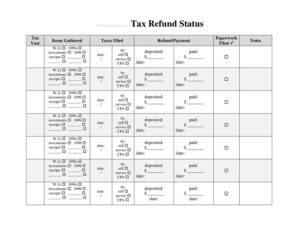
Tax Refund Status Tracker
Use this free Tax Refund Status Tracker template to monitor every refund filing, follow-up, and deposit date in one place — free PDF and DOCX download.
PDF
DOCX
2 downloads
0
likes
Download Files
- DOCX
A Tax Refund Status Tracker is a simple worksheet that helps you record and monitor the progress of a tax refund from the moment you file until the money lands in your account. People most often use it to keep one organized record of filing dates, expected amounts, and status updates instead of repeatedly logging into government portals from memory. It’s free to download here in both PDF and DOCX formats, with no signup required.
What Is a Tax Refund Status Tracker?
A Tax Refund Status Tracker is a personal record-keeping document used by individuals, families, and small business owners to follow the lifecycle of one or more tax refunds. It documents who filed the return, when it was submitted, how it was filed, the expected refund amount, and the changing status reported by the tax authority. Rather than serving as an official government form, it acts as your private dashboard — a place to log confirmation numbers, follow-up calls, and deposit details. The tracker is especially useful when you are waiting on federal and state refunds at the same time, or when a refund is delayed and you need a clear paper trail of every check you’ve made.
When Do You Need a Tax Refund Status Tracker?
This template is handy any time you are owed money back and want to stay on top of it. Common situations include:
- You filed your annual income tax return and want to know exactly when your refund is expected to arrive.
- You are tracking both a federal refund and one or more state refunds, each with its own timeline and status.
- Your refund is delayed or under review, and you need a dated log of every time you checked the status or called for help.
- You file for multiple people — children, a spouse, or family members — and need separate rows for each return.
- You amended a prior-year return and want to monitor the longer processing window that amendments typically require.
- A bookkeeper or small business owner is reconciling expected refunds against bank deposits at year-end.
What a Tax Refund Status Tracker Should Have
A complete tracker captures everything you’d otherwise have to look up repeatedly. The most useful fields include the taxpayer’s name and tax year, the type of return (federal or state) and jurisdiction, the filing date and filing method, a confirmation or reference number, the expected refund amount, the current status, and the date you last checked. Adding a column for the expected or actual deposit date, the payment method (direct deposit or mailed check), and a notes section for any correspondence rounds out the record. Together these elements turn scattered details into a single, scannable overview you can update in minutes.
How to Fill Out a Tax Refund Status Tracker
- Enter the taxpayer details. Write the name on the return and the tax year so each entry is clearly identified.
- Record the return type and jurisdiction. Note whether the entry is a federal return or a specific state, since each is processed separately.
- Log the filing date and method. Indicate whether you e-filed or mailed the return, and the exact date it was submitted.
- Add the confirmation number. Copy any acknowledgment, submission ID, or reference number you received.
- List the expected refund amount. Use the figure shown on your return so you can compare it to what actually arrives.
- Update the status. Record the current stage — received, processing, approved, or sent — along with the date you checked.
- Note the deposit details. Fill in the direct deposit account or mailing address and the expected or actual deposit date.
- Use the notes column. Capture call dates, representative names, or any requested documents for a complete trail.
Tracking Federal and State Refunds Together
Federal and state refunds are processed by different agencies on different schedules, so a refund for one can arrive weeks before the other. Using a separate row for each return prevents confusion when one shows “approved” while another is still “processing.” Most tax authorities offer an online status tool that updates once per day, so checking more than once daily rarely helps. Recording the date and result each time you check creates a timeline that makes patterns obvious — for example, whether a return has been stuck at the same stage for an unusual length of time. If you e-filed, status information typically appears faster than for a mailed paper return, and amended returns generally take longer to show movement.
Tips for Keeping Your Tracker Accurate and Secure
Because this document contains sensitive financial details, store it carefully. If you use the DOCX version, keep it on a password-protected device and avoid emailing it unprotected. Update the status column on a consistent schedule — once a week is plenty for most refunds — and reconcile the expected amount against your bank statement the moment a deposit posts. If the deposited amount differs from what you expected, your notes column gives you a head start in understanding why, since adjustments, offsets, or corrections are often explained in official notices you can log alongside the entry.
Common Mistakes to Avoid
- Leaving out the tax year, which makes multi-year tracking confusing when refunds overlap.
- Forgetting to record the filing method, so you can’t tell why an e-filed return updated faster than a mailed one.
- Skipping the confirmation number, which you’ll need if you ever have to contact the tax authority.
- Not dating each status check, leaving you without a timeline if a refund is delayed.
- Failing to compare the expected amount to the actual deposit and missing an offset or adjustment.
- Storing the tracker insecurely despite the personal financial information it contains.
Frequently Asked Questions
What is a Tax Refund Status Tracker used for? It is a personal worksheet for monitoring the progress of one or more tax refunds in a single place. You use it to log filing dates, confirmation numbers, expected amounts, and status updates so you always know where each refund stands without re-checking from memory.
Is this an official government form? No. This is a private organizing tool, not a document you file with any tax authority. The actual status of your refund is determined by the agency that processes your return; the tracker simply helps you keep a tidy record of what you find when you check.
How often should I update the tracker? Most refund status tools refresh once per day, so checking and updating about once a week is usually sufficient. Update it more often if your refund is delayed or under review and you want a precise timeline of your follow-ups.
Does filling out this tracker speed up my refund? No. The tracker does not influence processing times in any way. Its value is organizational — it helps you spot delays sooner and keeps every detail you might need for a follow-up in one accessible place.
How much does this template cost? It is completely free to download in both PDF and DOCX formats, with no signup or payment required. You can fill out the PDF by hand or edit the DOCX version on your computer.
Can I track refunds for more than one person? Yes. Use a separate row or entry for each taxpayer and tax year, including spouses or dependents whose returns you manage. Keeping them distinct prevents mix-ups when refunds for different people arrive on different schedules.
This template is provided as a general example for informational purposes only and does not constitute legal, financial, or tax advice. Refund processing, timelines, and requirements vary by jurisdiction and individual circumstances — consult a qualified tax professional for guidance specific to your situation.
Official resource: for the rules that apply to your situation, see the Consumer Financial Protection Bureau.
Related Forms
- Cash Receipts
- Debt Collection Report
- Tax Refund Planner
- Fraud Alert Request
- Payment Calculator per $10000
- Credit Freeze Temporary Lift
Browse more in Money.