
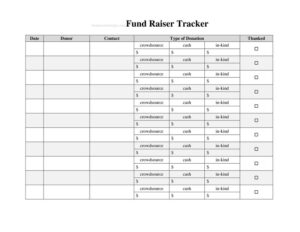
Fund Raiser Source Log
Track every donation, donor, and dollar with a free Fund Raiser Source Log template, easy to download in PDF or DOCX for clean, organized records.
PDF
DOCX
0
likes
Download Files
- DOCX
A Fund Raiser Source Log is a simple record-keeping sheet that lists every source of money raised during a fundraising campaign, including who gave, how much, and when. People most often use it to keep an accurate, running total of donations so nothing slips through the cracks at reconciliation time. You can download it free in both PDF and DOCX formats, with no signup required.
What Is a Fund Raiser Source Log?
A Fund Raiser Source Log is a tracking document used by event organizers, club treasurers, school groups, sports teams, churches, and nonprofit volunteers to record each individual contribution toward a fundraising goal. It captures the donor or source name, the amount given, the date, the payment method, and any notes about the gift. Rather than relying on memory or scattered receipts, the log creates one central, chronological record of every dollar that comes in. This makes it far easier to thank donors, report results to a committee, balance the cash box, and prepare an end-of-campaign summary. It is a working tool — practical, lightweight, and built for everyday volunteers.
When Do You Need a Fund Raiser Source Log?
Any time money is collected from multiple people or sources, a log keeps the effort organized and transparent. Common situations include:
- School and PTA drives — tracking pledges from families, local businesses, and student sales for a class trip or playground project.
- Sports team or booster club fundraisers — logging sponsorship checks, car-wash cash, and concession proceeds across a season.
- Church or community events — recording offerings, raffle ticket sales, and individual gifts toward a building fund or mission.
- Nonprofit campaigns — documenting donations from individuals, corporate sponsors, and grant disbursements during a giving push.
- Charity walks, runs, and bake sales — capturing per-participant pledges and on-the-day cash collections.
- Crowdfunding or peer-to-peer efforts — reconciling online platform payouts against the names of supporters who promised to give.
What a Fund Raiser Source Log Should Have
A complete log balances simplicity with enough detail to stand up to review. The essential elements are a clear campaign or event title, the date range covered, and a column-based table that records each contribution. For every entry you want the source or donor name, the date received, the amount, the payment method (cash, check, card, or online), and a notes field for context such as a check number or pledge status. A running or final total at the bottom lets you reconcile against the actual money on hand. Including who recorded each entry adds accountability, especially when several volunteers handle collections. A goal line at the top helps the team see progress at a glance and stay motivated.
How to Fill Out a Fund Raiser Source Log
Work through the form one line at a time as donations arrive:
- Name the campaign. At the top, write the fundraiser or event title and the organization or group running it.
- Set the dates and goal. Record the start and end dates of the drive and, if you have one, the fundraising target.
- Enter the source. In the first column of each row, write the donor, sponsor, or source name — a person, business, or event activity.
- Add the date received. Note the exact day the money or pledge came in so entries stay in order.
- Record the amount. Enter the dollar figure given. Keep cents consistent for clean totals.
- Mark the method. Indicate whether it was cash, check, card, or an online payment, and add a check number if applicable.
- Use the notes field. Flag anything special: a pledge still owed, an in-kind gift value, or a thank-you sent.
- Initial the entry. The volunteer who recorded it can add their initials for accountability.
- Total it up. Sum the amounts at the bottom and compare against the cash and checks actually collected.
Keeping the Log Accurate and Audit-Ready
Treat the log as the single source of truth for the campaign. Record contributions as they arrive rather than batching them later, when memory fades and slips go missing. Store cash and checks alongside the corresponding log entries, and have a second person verify the running total at the end of each collection session. If your group is a registered nonprofit, donors may need a receipt for tax purposes, so an accurate log makes issuing acknowledgment letters straightforward. Keep the completed log with your other financial records for the period your organization requires — many groups retain such records for several years.
Tips for a Smooth Fundraising Drive
A few habits make the log far more useful. Assign one person as the keeper of the master log so entries do not get duplicated across volunteers. Photograph or scan the completed sheet at the end of each day as a backup. Use the notes column to separate confirmed gifts from outstanding pledges, then follow up on pledges before the campaign closes. Finally, review the totals against your goal mid-campaign so you can rally extra effort if you are falling short.
Common Mistakes to Avoid
- Logging from memory. Waiting until the end of the day to write entries leads to forgotten gifts and mismatched totals.
- Skipping the payment method. Mixing cash and checks without noting which is which makes reconciliation a nightmare.
- Leaving amounts vague. Writing “about $50” instead of the exact figure throws off your totals.
- No one initialing entries. Without accountability, errors are hard to trace back to a source.
- Forgetting pledges versus payments. Counting a promised gift as received inflates your real numbers.
- Failing to back up the sheet. A single paper copy can be lost, soaked, or misplaced before reconciliation.
Frequently Asked Questions
What is a Fund Raiser Source Log used for? It is used to record every donation and source of money collected during a fundraising campaign in one place. This helps treasurers and organizers track totals, thank donors, reconcile cash, and report results accurately. It turns scattered receipts and pledges into a single organized record.
How do I fill out a Fund Raiser Source Log? Start by titling the campaign and noting the dates and goal, then add one row per contribution. For each entry, record the source name, date received, amount, payment method, and any notes, and total the amounts at the bottom. Fill it in as money arrives rather than all at once for the best accuracy.
Is a Fund Raiser Source Log a legal document? It is primarily an internal record-keeping tool rather than a binding legal contract. That said, accurate logs are important for transparency and may support donor tax receipts and nonprofit financial reporting. Keep it with your other records in case anyone reviews the campaign’s finances.
Do I need to track donor names and amounts separately? Yes, keeping the source name and the exact amount in separate columns makes your log far easier to total and review. It also lets you follow up with individual donors, issue thank-you notes, and identify outstanding pledges. Clear columns prevent confusion when several volunteers collect at once.
How much does this template cost? Nothing — this Fund Raiser Source Log template is completely free to download. You can grab it in either PDF or DOCX format with no signup or payment required. Use the editable DOCX if you want to add custom columns or your group’s name.
Can I customize the log for my organization? Absolutely. Download the DOCX version and add columns for things like a campaign code, pledge status, or in-kind gift values to match your needs. You can also brand it with your group’s name and adjust the totals row to fit your reporting format.
This template is a general example provided for informational purposes only and is not legal, financial, or tax advice. Record-keeping and donor-receipt requirements vary by jurisdiction and by organization type — consult a qualified accountant or advisor for guidance specific to your fundraiser.
Official resource: for the rules that apply to your situation, see the Consumer Financial Protection Bureau.
Related Forms
- Debt Worksheet
- Debt Snowball Form
- Large Check Register
- Debt Repayment Plan
- Budget Revision Request
- Daily Sales Commission Tracker
Browse more in Money.