
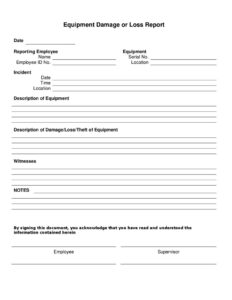
Equipment Damage Report Form
Document broken or damaged equipment accurately with our free Equipment Damage Report Form template, available as a free download in PDF and DOCX.
PDF
DOC
3 downloads
0
likes
Download Files
- DOC
An Equipment Damage Report Form is a document used to record when a piece of equipment is broken, malfunctioning, or otherwise damaged, capturing what happened, when, and the extent of the loss. The most common reason people use it is to create a clear, dated record for insurance claims, repair decisions, or internal accountability. It is free to download here in both PDF and DOCX formats, with no signup required.
What Is an Equipment Damage Report Form?
An Equipment Damage Report Form is a structured record completed by an employee, supervisor, or operator after equipment is found damaged or stops working as intended. It documents the affected item, the circumstances surrounding the damage, the people involved, and any immediate action taken. Organizations issue these forms so that maintenance teams, safety officers, and managers have consistent, written information rather than relying on memory or verbal accounts. The form serves several purposes at once: it supports repair or replacement requests, feeds into insurance and warranty claims, helps identify recurring problems, and establishes a paper trail for liability. Whether the equipment is a forklift, a laptop, a printer, or a piece of factory machinery, the report standardizes how incidents are captured.
When Do You Need an Equipment Damage Report Form?
This form is useful any time company-owned or leased equipment is harmed and someone needs an official record. Common situations include:
- Accidental damage at work — a laptop is dropped, a monitor is knocked off a desk, or a tool is mishandled.
- Operational malfunctions — a machine overheats, jams, or fails during normal use and may need investigation.
- Workplace incidents — equipment is damaged during an accident that may also involve an injury report.
- Vehicle or fleet issues — a company vehicle, lift, or transport cart is dented, scraped, or rendered inoperable.
- Returned or transferred assets — an employee returns a device that is damaged, or an item arrives damaged after a move.
- Insurance and warranty claims — an insurer or manufacturer requires a written description of the damage before processing a claim.
What an Equipment Damage Report Form Should Have
A complete report leaves no important question unanswered. Key elements include the date and time the damage was discovered, identifying details of the equipment (name, model, serial or asset number), the location, and the name of the person reporting. It should describe how the damage occurred and the current condition of the item, note whether anyone was injured, and capture any witnesses. A good form also records immediate actions taken, an estimate of repair or replacement cost where known, and signature lines for the reporter and a supervisor or manager who reviews the report. These elements turn a vague complaint into an actionable, verifiable record.
How to Fill Out an Equipment Damage Report Form
Work through the form section by section while the details are still fresh:
- Date and time: Enter the date the damage occurred or was first noticed, and the time if known.
- Reported by: Write the full name, job title, and department of the person completing the form.
- Equipment details: Identify the item by name or type, and add the model number, serial number, or internal asset tag so it can be matched to inventory records.
- Location: State exactly where the equipment was when damaged — building, floor, room, or site.
- Description of damage: Describe what is broken or not working and how the damage happened, using clear, factual language.
- Cause: Note whether the cause was accidental, misuse, a defect, wear and tear, or unknown.
- Injuries and witnesses: Record whether anyone was hurt and list the names of any witnesses.
- Action taken: Document immediate steps, such as taking the item out of service or notifying maintenance.
- Estimated cost: Add a repair or replacement estimate if available.
- Signatures: Sign and date as the reporter, then route the form to a supervisor or manager for review and signature.
Reporting Versus Investigation: Knowing the Difference
An Equipment Damage Report captures the facts of what happened, but it is not the same as a full root-cause investigation. The report is the starting point — it triggers the next steps. For minor cosmetic damage, the report alone may be enough to authorize a repair. For costly failures or anything involving injury, the report often becomes the foundation for a deeper review involving safety, maintenance, and management. Filing promptly and accurately ensures investigators are working from reliable information rather than fading recollections.
Tips for an Accurate, Useful Report
Photograph the damage from several angles and attach the images to the form, since visual evidence strengthens insurance and warranty claims. Report damage immediately rather than waiting, because delays make causes harder to verify and can complicate coverage. Quarantine or tag damaged equipment so no one uses an unsafe item before it is inspected. Keep a copy of every report on file; patterns across multiple reports — the same model failing repeatedly, or damage clustered in one area — often reveal a training gap, a faulty product line, or an unsafe workspace worth addressing.
Common Mistakes to Avoid
- Vague descriptions — writing “broken” instead of explaining exactly what failed and how.
- Missing identifiers — leaving out the serial or asset number, making the item hard to track or claim.
- Delayed filing — completing the form days later when details are fuzzy and evidence is gone.
- Assigning blame instead of facts — speculation undermines the report’s credibility; stick to what is observed.
- Forgetting signatures — an unsigned, unreviewed report carries little weight.
- No photos or supporting evidence — skipping documentation that insurers and repair vendors often require.
Frequently Asked Questions
What is an Equipment Damage Report Form used for? It is used to create an official, dated record when company equipment is broken, malfunctions, or is damaged. The report supports repair and replacement decisions, insurance and warranty claims, and internal accountability. It also helps organizations spot recurring problems over time.
Who should fill out the form? Usually the person who discovered or caused the damage completes the report, often with input from a supervisor. In many workplaces a manager or maintenance lead then reviews and signs it. The goal is to capture firsthand details from someone close to the incident while it is still fresh.
How soon should I report damaged equipment? Report it as soon as it is safe to do so, ideally the same day. Prompt reporting preserves accurate details, protects insurance and warranty eligibility, and prevents anyone from using equipment that may be unsafe. Delays make causes harder to verify.
Do I need photos to go with the report? Photos are not strictly required, but they are highly recommended. Clear images from multiple angles strengthen the written description and are frequently requested by insurers, manufacturers, and repair vendors. Attaching them to the form keeps all the evidence together.
Is this form legally binding? It is primarily an internal documentation tool rather than a contract, but a signed report can serve as evidence in insurance claims, warranty disputes, or workplace investigations. Accuracy matters because the information may be relied upon by others. Always follow your organization’s own reporting policies.
Is this Equipment Damage Report Form really free? Yes. You can download it here in both PDF and DOCX formats at no cost and with no signup required. The DOCX version is fully editable, so you can add your company logo, adjust fields, or tailor sections to your specific equipment and workflow.
This template is provided as a general example for informational purposes only and does not constitute legal, financial, or insurance advice. Reporting requirements and documentation standards vary by organization, industry, and jurisdiction. Consult a qualified professional or your internal policies to ensure your reporting process meets applicable requirements.
Official resource: for the rules that apply to your situation, see the U.S. Small Business Administration.
Related Forms
- Return To Work Form
- Meeting Agenda Portrait
- Meeting Agenda List
- Lobby Hours
- Appointment Change Form
- Market Map Services
Browse more in Office.