
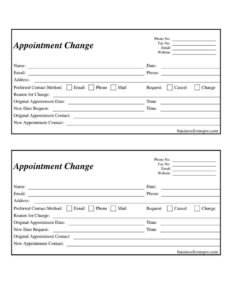
Appointment Change Form
Download a free Appointment Change Form template to reschedule or cancel appointments quickly, available as a free PDF and DOCX download.
PDF
DOCX
0
likes
Download Files
- DOCX
An Appointment Change Form is a simple document that lets a client or staff member request to reschedule, cancel, or modify an existing appointment in writing. People most often use it to formally capture a date or time change so both parties have a clear, dated record of what was requested. You can download this form free in both PDF and DOCX formats — no signup required.
What Is an Appointment Change Form?
An Appointment Change Form is a short administrative document used by offices, clinics, salons, service providers, and any business that books appointments. It is typically issued by the front desk or scheduling team and completed by the person requesting the change. The form documents who is requesting the change, the original appointment details, the requested new details, the reason, and how the person prefers to be contacted with a confirmation. By putting the request in writing, the form reduces miscommunication, prevents disputed no-shows, and creates a paper trail that supports accurate scheduling and follow-up.
When Do You Need an Appointment Change Form?
This form is useful any time a booked appointment cannot proceed as originally scheduled. Common situations include:
- A client needs to reschedule a medical, dental, or therapy visit to a new day or time.
- A customer wants to cancel a service booking such as a consultation, repair visit, or grooming appointment.
- An office needs to change the assigned staff member or contact handling an appointment.
- A scheduling conflict, illness, or travel issue forces a last-minute adjustment.
- A business proactively contacts clients to shift appointments due to closures or staffing changes.
- A client wants to update their preferred contact method so confirmations reach them reliably.
Having a standardized form means every request is captured the same way, whether it arrives by phone, email, or mail.
What an Appointment Change Form Should Have
A complete Appointment Change Form should clearly identify both the requester and the appointment being changed, and leave no ambiguity about what is being asked. Key elements include the requester’s name and contact details, the original appointment date and time, the requested new date and time, a checkbox or indication of whether this is a request to cancel or change, a reason for the change, and the preferred method for receiving confirmation. It should also include the business’s own contact details — phone, fax, email, and website — so the requester knows how to follow up. Fields for the original and new appointment contact help when the staff assignment is changing.
How to Fill Out an Appointment Change Form
- Confirm the business header is complete with Phone No., Fax No., Email, and Website so the form is identifiable and reachable.
- Enter your Name and the Date you are submitting the request.
- Provide your contact details: Email, Phone, and Address so staff can reach you.
- Select your Preferred Contact Method — Email, Phone, or Mail — for receiving confirmation.
- Indicate the type of request by marking Request, Cancel, or Change.
- Write a clear Reason for Change, such as illness, conflict, or travel.
- Record the Original Appointment Date and Time exactly as currently booked.
- Enter the New Date Request and Time you would prefer.
- If the staff member is changing, list the Original Appointment Contact and New Appointment Contact.
- Review every entry for accuracy before submitting to the office.
Choosing the Right Request Type
The form distinguishes between three actions, and selecting the correct one prevents confusion. A Request typically signals a general scheduling inquiry or a tentative ask that still needs confirmation. A Change means you want to keep the appointment but move it to a different date, time, or staff member. A Cancel means you no longer need the appointment at all. When you cancel, you usually leave the New Date and New Time fields blank. When you change, both the original and the new details should be filled in completely so the scheduler can release the old slot and book the new one in a single step.
Tips for a Smooth Rescheduling Process
To make sure your request is processed without delay, submit the form as early as possible — many offices have a notice window for changes, and late requests may still be subject to a fee or count as a missed appointment. Double-check that your original appointment details match the office’s records exactly, since a mismatched date or time can cause the wrong slot to be released. Choosing a realistic preferred contact method helps too: if you select phone, make sure the number you list is one where you can be reached during business hours. Finally, keep your own copy of the completed form so you have a record of when and what you requested.
Common Mistakes to Avoid
- Leaving the Original Appointment Date or Time blank, which makes the request hard to match to a booking.
- Forgetting to mark whether you want to Cancel or Change, leaving staff to guess.
- Providing an outdated phone number or email so the confirmation never reaches you.
- Not specifying a New Date Request when you intend to reschedule rather than cancel.
- Submitting the form too late to meet the office’s cancellation or change notice window.
- Skipping the Reason for Change, which can be helpful for the office’s records and follow-up.
Frequently Asked Questions
What is an Appointment Change Form used for? It is used to formally request rescheduling, cancellation, or modification of an existing appointment. The form documents the original details, the requested change, and how you want to be contacted with a confirmation. This creates a clear written record for both you and the business.
How do I fill out an Appointment Change Form? Enter your name, date, and contact information, then mark whether you want to request, cancel, or change. Fill in the original appointment date and time, add the new date and time if rescheduling, and include a reason. Choose your preferred contact method and submit the completed form to the office.
Does an Appointment Change Form need to be notarized or witnessed? No. This is an administrative scheduling document, not a legal contract, so it does not require notarization or witnesses. It only needs your accurate information and the appointment details to be processed.
What is the difference between a change request and a cancellation? A change keeps the appointment but moves it to a new date, time, or staff member, so you complete both the original and new details. A cancellation removes the appointment entirely, in which case you typically leave the new date and time fields blank. Marking the correct option prevents scheduling errors.
Will I be charged a fee for changing my appointment? That depends entirely on the individual business’s cancellation and rescheduling policy, not on the form itself. Many offices waive fees if you give sufficient notice, while late changes may incur a charge. Check the policy of the specific provider before submitting your request.
Is this Appointment Change Form free to download? Yes. You can download this Appointment Change Form template for free in both PDF and DOCX formats, with no signup required. You may customize it with your own business header and fields to match your scheduling process.
This template is provided as a general example for informational purposes only and does not constitute legal, financial, or professional advice. Office policies and requirements vary by business and jurisdiction — consult the relevant provider or a qualified professional to confirm the appropriate procedure for your situation.
Official resource: for the rules that apply to your situation, see the U.S. Small Business Administration.
Related Forms
- Insertion Order
- Venue Reservation Request
- Recurring Appointment Reminder Card
- Workplace Safety Checklist
- Beauty Salon Appointment
- Client Information Worksheet
Browse more in Office.