
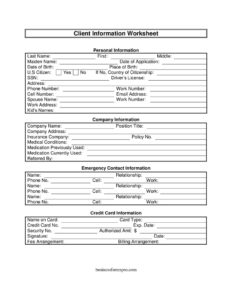
Client Information Worksheet
Download a free Client Information Worksheet template to collect client contact, billing, and emergency details accurately — free PDF and DOCX download.
PDF
DOCX
0
likes
Download Files
- DOCX
A Client Information Worksheet is a single-page intake form businesses use to gather a new client’s contact details, billing arrangements, emergency contacts, and other essentials in one organized place. Most people reach for one when onboarding a new client and they want every detail captured correctly from day one. You can download this Client Information Worksheet free in PDF and DOCX formats — no signup required.
What Is a Client Information Worksheet?
A Client Information Worksheet is a structured intake document that a service business, professional office, or practice gives to a new client to collect identifying, contact, billing, and background information. It is typically issued by the firm and completed by the client (or by staff during an interview). The worksheet documents who the client is, how to reach them, how they prefer to be billed, who to contact in an emergency, and — depending on the field of practice — relevant personal or medical history. It serves as the foundational record in a client file, supporting accurate communication, invoicing, and recordkeeping throughout the relationship.
When Do You Need a Client Information Worksheet?
This worksheet is useful any time you begin a formal relationship with a new client. Common scenarios include:
- Onboarding a new client at a law firm, accounting practice, consultancy, or agency where complete contact and billing details are essential.
- Setting up recurring billing, where you need the client’s credit card information, authorized amount, and fee or billing arrangement up front.
- Opening a medical or wellness file, capturing medical conditions, current and previous medications, and insurance details.
- Registering a household, where spouse name, kids’ names, and emergency contacts matter for the service provided.
- Tracking referrals and marketing by recording how the client was referred by an existing contact or source.
- Verifying identity for regulated services, using driver’s license, SSN, date of birth, and citizenship details.
What a Client Information Worksheet Should Have
A complete worksheet groups related fields into logical sections so nothing is missed. Look for a personal information block (name, date of birth, place of birth, citizenship), full contact details (address, cell, work, email), a company or employer section, a billing or credit card section with an authorized amount, emergency and family contacts, and — where relevant — a health history area. A date and signature line at the bottom confirm the client reviewed and authorized the information. Clear labeling and adequate space for each field make the form easy to complete and easy to file.
How to Fill Out a Client Information Worksheet
- Enter the Date and Date of Application at the top.
- Complete the Personal Information section: First, Middle, and Last Name, plus Maiden Name if applicable, Date of Birth, and Place of Birth.
- Indicate citizenship status by checking U.S. Citizen or filling in Country of Citizenship.
- Provide contact details: Address, Cell Number, Phone No., Work Number, and Email Address.
- Fill in the Company Information block: Company Name, Company Address, Position Title, and Work Address.
- List family and Emergency Contact Information: Spouse Name, Kid’s Names, plus an emergency contact’s Name, Relationship, and Phone Number.
- Record identity numbers where required — SSN, Security No., and Driver’s License.
- Complete the Credit Card Information section: Card Type, Credit Card No., Name on Card, Exp. Date, and the Authorized Amt, along with the chosen Billing Arrangement and Fee Arrangement.
- If health information applies, note Medical Conditions, Medication Currently Used, Medication Previously Used, Insurance Company, and Policy No.
- Note who Referred By, then sign and date the Signature line.
Protecting Sensitive Client Data
Because this worksheet collects highly sensitive details — Social Security numbers, driver’s license data, full credit card numbers, and medical history — handle every completed copy carefully. Store paper forms in a locked cabinet and keep digital files encrypted and access-restricted. Only request the fields you genuinely need for the service you provide; for example, a marketing agency rarely needs medical conditions, while a wellness clinic does. When you no longer need a record, dispose of it securely by shredding paper and permanently deleting digital copies. If you store credit card data, be aware that handling card information may carry compliance obligations, so consider using a secure payment processor instead of retaining full card numbers on paper.
Adapting the Worksheet to Your Practice
The beauty of a DOCX template is that you can tailor it. A law office might emphasize the fee arrangement and referral source; a counseling practice might expand the medical and medication sections; a contractor might trim health fields entirely and add project notes. Reorder sections so the most relevant information appears first, remove fields you do not use, and add a short consent or privacy statement near the signature line so clients understand how their information will be used.
Common Mistakes to Avoid
- Collecting more than you need — gathering SSNs or medical data without a clear business reason creates unnecessary liability.
- Leaving the signature and date blank, which undercuts the form’s value as an authorization record.
- Storing full credit card numbers insecurely instead of using a compliant payment system.
- Skipping the emergency contact and relationship fields, which are easy to overlook but critical when needed.
- Recording incomplete contact info — missing an email or cell number slows every future communication.
- Failing to update the worksheet when a client moves, changes employers, or switches insurance.
Frequently Asked Questions
What is a Client Information Worksheet used for? It is used to collect and organize a new client’s contact, billing, family, emergency, and (where relevant) health information in one document. Businesses use it during onboarding so the client file is complete from the start and future communication and invoicing run smoothly.
How do I fill out a Client Information Worksheet? Work top to bottom through each labeled section: personal details, contact information, company or employer data, emergency and family contacts, identity numbers, billing and credit card details, and any health information. Finish by noting the referral source, then sign and date the form to authorize it.
Does a Client Information Worksheet need to be notarized? No, this is an internal intake document and does not require notarization or witnesses. A signature and date from the client are generally sufficient to confirm the information is accurate and authorized.
Is the information on this worksheet confidential? Yes, it should be treated as confidential because it contains sensitive data like SSNs and credit card numbers. Store completed forms securely, limit who can access them, and dispose of old records by shredding or permanent deletion.
Can I customize the worksheet for my business? Absolutely. Download the DOCX version to add, remove, or reorder fields — for example, expanding the medical section for a clinic or removing it for a non-health service — and add your logo or a privacy statement.
How much does this Client Information Worksheet cost? It is completely free to download here in both PDF and DOCX formats, with no signup or payment required. You can use it as-is or edit it to fit your specific intake process.
This Client Information Worksheet template is a general example provided for informational purposes only. It is not legal, financial, tax, or medical advice, and data-handling and privacy requirements vary by jurisdiction and industry. Consult a qualified professional to ensure your intake and recordkeeping practices comply with applicable laws.
Official resource: for the rules that apply to your situation, see the U.S. Small Business Administration.
Related Forms
- Return To Work Form
- Office Supplies Request Form
- Equipment Damage Report Form
- 2025 Postal Holidays
- Password List
- Workplace Safety Checklist
Browse more in Office.