
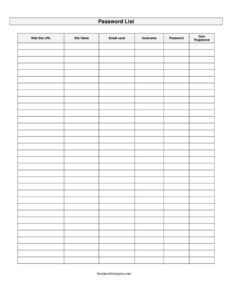
Password List
Track website logins, usernames, and passwords in one place with this free Password List template, available as a free PDF and DOCX download.
PDF
DOCX
4 downloads
0
likes
Download Files
- DOCX
A Password List is a simple worksheet for recording the websites you use along with the email, username, and password tied to each account. People most often reach for one to keep scattered login details organized in a single, easy-to-reference place — and you can download it free in PDF or DOCX with no signup required.
What Is a Password List?
A Password List is a record-keeping document that captures the credentials you rely on across the sites and services you use every day. It typically logs the website URL, the site or service name, the email address you registered with, your username, your password, and the date you created the account. Individuals use it to remember logins; office managers and small teams use it to track shared tool subscriptions; and households use it to centralize accounts in one trusted location. Unlike a password manager app, this is a fillable form you control — print it, fill it by hand, or type into the DOCX version. It documents which account belongs to which service so nothing gets lost.
When Do You Need a Password List?
A Password List comes in handy any time you have more accounts than you can reliably remember. Common situations include:
- Setting up a new device and needing to re-enter logins for email, banking, and subscription services.
- Managing shared office tools like a team email, accounting software, or a social media account several staff members access.
- Onboarding a new employee who needs documented credentials for the systems they will use.
- Household account tracking for streaming services, utilities, and shopping sites used by family members.
- Estate or emergency planning, so a trusted person can access important accounts if you are unavailable.
- Auditing old accounts you want to close, update, or secure with stronger passwords.
What a Password List Should Have
A complete Password List balances usefulness with security. At minimum it should record, for each account, the website URL so you can navigate directly to the login page, a recognizable site name, the email address used to register, the username if it differs from the email, the password itself, and the date you registered. Keeping the registration date helps you spot stale accounts and know which credentials may need rotating. A well-organized list groups related accounts together — for example, all banking sites in one block — and leaves room to add new entries over time. Because the document holds sensitive information, it should also be stored securely rather than left in plain view.
How to Fill Out a Password List
Work through one row per account using the form’s actual fields:
- Website URL: Enter the full address of the login page, such as https://mail.example.com, so you can return to the exact site quickly.
- Site name: Write a short, recognizable label for the service — for example “Online Banking,” “Team Email,” or “Streaming Account” — so you can scan the list at a glance.
- Email used: Record the email address tied to that account. This matters because many sites use the email as the login and as the password-reset destination.
- Username: Add the username if the site requires one separate from the email. Leave it blank if the email serves as the login.
- Password: Enter the current password exactly, including capitalization and symbols. Update this field whenever you change the password.
- Date registered: Note when you created the account. This helps you track account age and decide when to refresh older passwords.
Repeat for each account, and revisit the list whenever you sign up for something new or change a password.
Keeping Your Password List Secure
Because a Password List concentrates sensitive credentials in one place, where and how you store it matters as much as filling it out. If you keep a printed copy, store it in a locked drawer, safe, or another place only trusted people can reach — never taped under a keyboard or pinned to a corkboard. If you use the DOCX version, save it to an encrypted folder or a password-protected file rather than leaving it on a shared desktop. Avoid emailing the completed list as an unprotected attachment. For shared office use, limit access to the people who genuinely need it, and remove an account’s row from circulation once it is closed. Treat the document with the same care you would give a key to your accounts.
Password List vs. a Password Manager
A Password List and a password manager solve the same problem in different ways. The list is a manual, fully portable document you fill out yourself — ideal when you prefer paper, want an offline backup, or need a clear printed reference for handoff or emergency planning. A password manager is software that stores credentials in an encrypted vault and can autofill them. Many people use both: the manager for daily logins and a printed list locked away as a backup. The right choice depends on how many accounts you manage and how comfortable you are with software versus paper.
Common Mistakes to Avoid
- Leaving the list in plain sight — a sticky note on the monitor defeats the purpose of recording passwords privately.
- Forgetting to update entries after you change a password, which leaves you locked out and confused.
- Recording vague site names that you cannot match to the right URL months later.
- Mixing up the email used across accounts, making password resets harder to complete.
- Reusing the same password across many rows, which weakens every account if one is exposed.
- Sharing the file insecurely by emailing or messaging it without protection.
Frequently Asked Questions
What is a Password List used for? It is a worksheet for organizing your account logins — the website, email, username, password, and registration date — in one reliable place. People use it to remember credentials, set up new devices, hand off shared office accounts, and plan for emergencies. It works as a manual alternative or backup to password manager software.
How do I fill out a Password List? Create one row per account and complete each field: the website URL, a recognizable site name, the email used to register, the username if separate, the password, and the date registered. Update the password field whenever you change a login. Add new rows as you create more accounts.
Is it safe to write down my passwords? It can be, as long as you store the completed list securely — for example, in a locked drawer or an encrypted, password-protected file. The risk comes from leaving it in plain view or sharing it carelessly. Treat the document like a physical key to your accounts and limit who can access it.
What is the difference between this and a password manager? A Password List is a manual document you control and can print, while a password manager is software that encrypts and autofills credentials. Many people use both, keeping the printed list as an offline backup. Choose based on your comfort with software and how many accounts you manage.
Can I use this for a shared office account? Yes. The template is well suited to documenting shared tool subscriptions, team email, or software logins that several staff members access. Limit the file to people who need it, and remove rows for accounts that are closed or deactivated.
How much does this Password List template cost? It is completely free to download here in PDF and DOCX formats, with no signup or payment required. You can print the PDF to fill out by hand or type directly into the editable DOCX version. Use it as often as you like.
This Password List template is a general example provided for informational and organizational purposes only. It is not security, legal, or professional advice, and best practices for protecting sensitive information vary by situation — consult a qualified IT or security professional for guidance on safeguarding your credentials.
Official resource: for the rules that apply to your situation, see the U.S. Small Business Administration.
Related Forms
- Meeting Agenda List
- Project Schedule
- 2024 Postal Holidays
- Meeting Agenda Landscape
- Recurring Appointment Reminder Card
- Office Supplies Request Form
Browse more in Office.